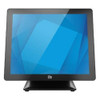
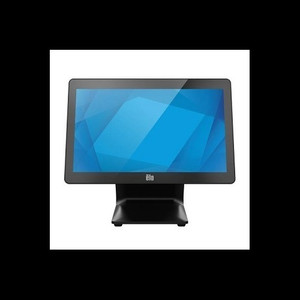
ELO Touch E708953 17-Inch I-Series 3 POS Touchscreen Computer
Overview
The ELO Touch E708953 is a compact POS terminal built around a 17-inch 5:4 aspect ratio touchscreen designed for retail, hospitality, and warehouse point-of-sale workflows. The 5:4 display proportions differ meaningfully from standard 16:9 monitors — you get taller vertical real estate without expanding footprint, which helps when running restaurant ordering systems or inventory terminals that benefit from taller menu layouts. The unit ships as a complete package: display, embedded CPU, integrated stand, and all connectivity.
This is a fixed-installation device, not a mobile platform. The I-Series 3 line targets retail and quick-service operations where a dedicated, high-touch uptime requirement drives the buy decision. The model number E708953 should appear on your purchase order and warranty documentation.
Key Features
- Projected Capacitive 10-Touch Panel: Simultaneous 10-point multi-touch support means multiple staff can interact with a single terminal (e.g., two-handed gestures, concurrent order modifications). Capacitive sensing is faster and more responsive than resistive, but requires conductive input — gloved hands or styluses need to be capacitive-compatible. Skip this if you need bare-fingertip operation in extreme cold or need compatibility with any arbitrary stylus.
- 17-Inch 5:4 Display: The 5:4 ratio delivers 80% more vertical pixels than an equivalently-sized 16:9 widescreen. For menu systems, transaction confirmations, and POS software that stacks vertically, this reduces scroll overhead and improves task efficiency. Antiglare coating reduces reflections in bright environments — meaningful in checkout areas or outdoor kiosks.
- Zero-Bezel Design: Minimal frame around the touchable area means you can mount multiple units side-by-side or position a unit flush against a counter without large black borders interrupting the visual layout. Easier to clean and maintain in high-traffic environments.
- Intel Core i3 Processor with 8GB RAM: Sufficient for single-register or small multi-register POS operations, web browsing, and typical back-office transactions. This is not a workstation-class CPU — if you need video encoding, heavy analytics, or running concurrent virtualized environments on the terminal itself, upgrade to a higher-tier configuration. The Core i3 handles mainstream POS software without stuttering.
- 128GB Solid-State Drive (SSD): SSD boot and application launch are noticeably faster than rotational drives. For a POS terminal, this means quicker startup after power loss and snappier transaction processing. 128GB is ample for a Windows 10 OS and a POS application suite; if you need to store large video archives or raw transaction logs on-device, you may outgrow this quickly.
- Windows 10 Operating System: Runs any Windows-native POS software — Square, Toast, Oracle MICROS, Lightspeed, and thousands of third-party solutions. Simplifies IT support because most integrators already know Windows. End-of-support for Windows 10 is October 2025, so plan a migration strategy if this device will remain deployed beyond that window.
- Wi-Fi and Ethernet Connectivity: Dual network access means you can prioritize a wired connection for transaction reliability and use Wi-Fi as failover or for mobile POS devices nearby. Ethernet guarantees low-latency, deterministic connectivity for payment processing — essential in retail. Wi-Fi adds flexibility for relocating the unit or for temporary deployments.
- Bluetooth 5.2: Pairs with wireless peripherals — barcode scanners, receipt printers, or payment terminals — without USB cable clutter. Bluetooth 5.2 has better range and throughput than older versions, but remains slower than USB 3.0 for bulk data transfer. Use it for lightweight, low-frequency devices like guest-facing buttons or wireless scale readers.
- Integrated Stand Included: Eliminates a separate mount purchase. The stand positions the display at a standard POS viewing angle. If your counter height or layout is non-standard, verify the stand adjustment range before purchase.
Integration & Compatibility
Connectivity options (Ethernet, Wi-Fi, Bluetooth) integrate with most standard POS ecosystems. Windows 10 ensures broad software support. The projected capacitive touchscreen may require software calibration and driver updates if pairing with legacy or heavily customized POS applications. Test integration with your specific POS vendor before full deployment.
When to Choose a Different Model
If your deployment requires a larger display (21 inches or more), consider a higher-end I-Series 3 variant with a bigger screen. If touch input is not required, a standard desktop monitor with a separate PC often costs less and simplifies upgrades. If outdoor installation in harsh conditions is needed, this display is not rated for IP66/IP67 environmental protection — it is designed for indoor retail and warehouse environments.
Frequently Asked Questions
Q: Does the E708953 come with POS software?
A: No. The E708953 is a hardware platform only. You supply your own POS application (Square, Toast, etc.) or engage a system integrator to install and configure software on Windows 10.
Q: What warranty does the E708953 include?
A: Sourced direct from the manufacturer with full US warranty path. Confirm the exact warranty duration with the manufacturer or your sales contact.
Q: Can I mount the E708953 to a wall instead of using the stand?
A: Yes, the display supports VESA mounting. You will need a separate VESA arm or bracket — not included.
Q: Is the E708953 suitable for outdoor kiosks?
A: No. This model is not rated for IP66/IP67 environmental sealing. It is designed for indoor retail, hospitality, and warehouse environments.
Q: How long does Windows 10 receive support?
A: Microsoft's mainstream support for Windows 10 ends October 13, 2025. Plan a migration strategy before that date to ensure ongoing patching and security support.
Q: Can multiple staff use the touchscreen simultaneously?
A: Yes. The 10-point projected capacitive panel supports simultaneous multi-touch input, enabling two or more fingers or hands to interact with the display at the same time.
The ELO Touch E708953 is a solid choice for retail and hospitality operations that have standardized on Windows-based POS infrastructure. The 5:4 display aspect ratio is the headline differentiator here — it gives you genuine vertical real estate without requiring a larger footprint, which matters in tight checkout aisles or when running tall menu layouts. The projected capacitive 10-touch capability is responsive and reliable, but integrate it early with your POS vendor to avoid unexpected driver or calibration issues.
Technical Highlights:
- 5:4 Display Aspect Ratio: Approximately 80% more vertical pixels than a 16:9 equivalent — meaningful for POS systems that stack information vertically (menu items, order details, transaction confirmations). Reduces scroll overhead and improves staff task completion speed.
- Intel Core i3 + 8GB RAM: Handles single or dual-register operations and light multi-user scenarios without slowdown. If your POS software is web-based, bandwidth matters more than CPU; verify with your vendor that the i3 meets their minimum performance spec for your transaction volume.
- 128GB SSD: Fast boot and application launch. Sufficient for Windows 10 and a POS application suite. If you plan to store transaction logs or video on-device, 128GB fills quickly — plan accordingly or enable cloud archiving.
Deployment Considerations:
- The E708953 ships with an integrated stand, but verify the viewing angle and height range match your counter or mounting surface before finalizing installation. VESA mounting is available as an alternative.
- Windows 10 support ends October 2025. If this terminal will remain in service beyond that date, budget for a Windows 11 migration or replacement. POS software vendors may also drop Windows 10 support within 2–3 years.
- Projected capacitive touch requires conductive input — bare fingertips work reliably, but heavily gloved hands or third-party styluses may not register consistently. Test with your staff's expected input method.
Position the E708953 for compact retail counters, fast-casual restaurants, or small warehouse workstations where a 17-inch footprint is acceptable and network connectivity is available. It is not designed for outdoor exposure or extremely high-touch multi-terminal configurations — for those, evaluate larger I-Series or dedicated kiosk platforms.