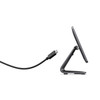
ELO Touch E968117 13.3-inch Projected Capacitive Touch LCD Display
Overview
The ELO Touch E968117 is a 13.3-inch wide-format LCD display designed for point-of-sale, kiosk, and interactive applications where responsive multi-touch input is non-negotiable. This model (E968117) delivers Full HD resolution (1920 x 1080) with 10-point projected capacitive touch, addressing deployments that demand precision input without the latency or wear issues associated with resistive surfaces. The display ships without a stand — you'll need to source or integrate your own mounting solution, which gives you flexibility to fit existing frame geometries or arm systems. Color is gray; connectivity is USB with USB-C input.
Key Features
- Full HD Resolution (1920 x 1080): At 13.3 inches, this pixel density yields sharp text and graphics for menu systems, transaction interfaces, and visual confirmation tasks. In POS and kiosk environments where users stand close to the display, the sharpness supports fast decision-making and reduces misclicks.
- 10-Point Projected Capacitive Touch: Capacitive sensing enables multi-touch gestures and simultaneous finger detection far more reliably than resistive surfaces. You can support pinch-to-zoom, two-finger rotation, and other gesture-driven UX patterns without calibration drift. Gloved hands require a capacitive-compatible glove material (standard latex and nitrile work; some specialized materials may not).
- Anti-Glare Surface: Reduces reflection from overhead lighting and windows, improving readability in mixed indoor lighting. This matters in retail and warehouse pick-and-confirm scenarios where ambient light can wash out an untreated display.
- Zero-Bezel Design: Eliminates the frame gap around the perimeter, enabling edge-to-edge content and seamless multi-display tiling if you're building a larger composite surface or side-by-side kiosk array.
- USB Controller and USB-C Input: The integrated USB controller handles touch events through a single USB connection, simplifying host integration. USB-C input streamlines cable management in compact enclosures and reduces physical stress on the connector compared to older Micro-USB designs.
- No Stand Included: This is a specification, not a drawback. The absence of a factory stand means you're not paying for hardware you'll discard. Pair the E968117 with an appropriate POS display mounting arm or custom enclosure to match your integration footprint.
Integration & Compatibility
The E968117 connects to any host with a USB 2.0 or 3.0 port; no special drivers required for basic functionality on Windows, Linux, or macOS. If your application framework (custom C#/WPF, Qt, web-based) supports TUIO or standard HID touch events, the capacitive input will integrate without middleware. Some POS platforms (Xvision, Ingenico, Square hardware) may require validation — confirm with your software vendor that 10-point capacitive touch over USB is supported.
The display operates worldwide on standard AC power (not specified in evidence, confirm voltage at order). For integration into mobile or temporary setups, verify that your power source can deliver stable voltage; capacitive displays are sensitive to EMI, so avoid running high-current cables adjacent to USB or power lines.
When to Choose a Different Model
If your application requires smaller form factor or lower resolution, explore other options in the ELO Touch 1300-series lineup. If multi-display synchronization or more advanced video processing is needed, consult the ELO Touch catalog for embedded computing variants. If you need a stand included in the box or prefer a pre-assembled mount, factor that into total cost-of-ownership.
Frequently Asked Questions
Q: Does the E968117 include a mounting bracket or stand?
A: No. The model ships without a stand; you'll need to supply or integrate your own mount. This reduces the base cost and avoids waste if your enclosure requires a custom form factor.
Q: Can the E968117 support gloved input?
A: Projected capacitive touch works with latex and nitrile gloves, but not with thick cotton work gloves or insulated thermal gloves. If your environment requires heavy protection, confirm glove compatibility with your application pilot.
Q: What is the warranty on the E968117?
A: The product is factory-new with a full US warranty path. Exact warranty duration is determined by the reseller or direct source; confirm at order.
Q: Does the USB-C connection support video as well as touch?
A: The USB-C input carries touch events and power only. Video is not delivered via USB-C on this model; you must provide a separate video input (HDMI, DisplayPort, or DVI depending on your host hardware).
Q: Is the E968117 suitable for outdoor kiosks?
A: The anti-glare surface helps in bright indoor environments, but no IP rating is specified. For full outdoor sun exposure (direct UV, rain), this display is not rated. Indoor kiosks with window proximity are the primary target.
Q: What resolution does the E968117 support?
A: Native Full HD (1920 x 1080). The host can drive scaled resolutions, but scaling on a fixed-pixel LCD may introduce softness.
The ELO Touch E968117 occupies a specific niche: compact, responsive, glove-compatible touch for POS and light-duty interactive kiosks. The 10-point projected capacitive input is the key differentiator — it eliminates the calibration drift and mechanical wear you see on resistive screens, and it supports genuine multi-touch gestures that improve UX fluidity. Full HD resolution at 13.3 inches keeps text sharp enough for transaction confirmations and menu navigation without requiring users to lean in.
Technical Highlights:
- 10-Point Projected Capacitive Touch: Supports simultaneous multi-finger detection and gesture recognition without drift. Gloved operation is viable with latex/nitrile but not with insulated work gloves — confirm your environment before deployment.
- 1920 x 1080 Full HD on 13.3 inches: Pixel density remains sharp for menu-driven UX and transaction interfaces. At arm's length, legibility is good; scaling issues are minimal.
- Anti-Glare Surface + Zero-Bezel: Reduces reflections in mixed lighting and enables seamless multi-display arrays if you're tiling displays in a larger kiosk footprint.
- USB-C Connectivity: Single USB cable for touch events; power delivery is present but video must come from a separate source (HDMI, DP, or DVI from your host). This simplifies enclosure design — one cable carries interaction, one carries video — and avoids the mechanical stress of older Micro-USB.
Deployment Considerations:
- No stand included — budget for a compatible mounting arm or custom bracket. This is a cost decision, not a limitation; you gain flexibility in integration height and angle.
- Capacitive displays are sensitive to EMI. Route USB and power away from high-current industrial equipment (motors, contactors, RF transmitters) to avoid noise-induced touch errors or jitter.
- Video input is not USB-based — confirm your host hardware has a compatible output (HDMI is most common in modern POS). If you're retrofitting legacy hardware, factor in a converter.
- No IP rating means this is indoor-only. Window-adjacent kiosks are acceptable; full outdoor sun or rain exposure is not.
Position the E968117 in retail POS, quick-service restaurant order terminals, and event-check-in kiosks where responsiveness, multi-touch support, and compact footprint matter more than ruggedness or outdoor durability. It's not the display for warehouse picking or harsh industrial environments — it's purpose-built for clean, climate-controlled indoor countertop deployment.