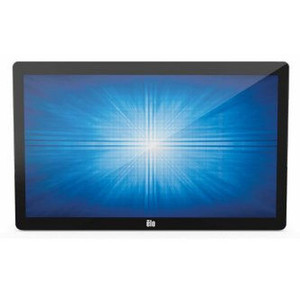
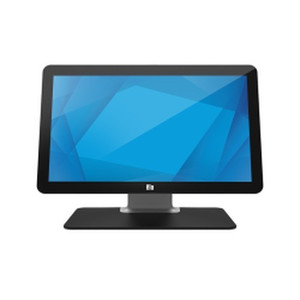
ELO Touch E351997 27-Inch Full HD Projected Capacitive Touch Display
Overview
The ELO Touch E351997 is a 27-inch desktop touchscreen built for point-of-sale and retail environments where responsiveness and form factor matter. This is a projected capacitive 10-touch display — meaning it responds to simultaneous multi-finger input across the 1920×1080 Full HD panel without requiring a stylus or pressure sensitivity. The E351997 ships with a stand, USB controller, and dual video inputs (VGA and HDMI), making integration straightforward into existing POS terminals, kiosks, or interactive retail applications.
Key Features
- 27-inch Full HD (1920×1080) LCD Panel: Provides enough real estate for dense POS layouts or multi-window retail workflows without scaling awkwardly. Full HD is standard for this form factor and keeps cost and power consumption predictable.
- Projected Capacitive 10-Touch: Registers up to 10 simultaneous touch points with high accuracy and no lag. Capacitive sensing (versus resistive) means the screen responds to fingertip input only — accidental touches from sleeves or debris won't trigger false activations. This matters in high-traffic retail or QSR environments where screen hygiene and false-touch rejection are operational concerns.
- USB Controller: Touch data transmits via standard USB, eliminating the need for proprietary serial or parallel wiring. Simplifies integration with modern POS systems and reduces cable clutter behind the counter.
- Zero-Bezel Design: Minimizes edge bezels, creating a seamless visual experience across the panel. Useful if you're daisy-chaining displays or need maximum visible area within a fixed mount footprint.
- Dual Video Inputs (VGA + HDMI): Accepts both legacy VGA from older POS terminals and HDMI from modern devices. Flexibility for mixed-generation IT infrastructure is a real operational advantage — you don't need to retire working equipment or buy costly adapters.
- Black Finish, Standalone Stand Included: Ships with a desk stand, eliminating the need for separate mounting hardware if deploying on a counter. Black casing blends into retail environments and doesn't distract from on-screen content.
Integration & Compatibility
The E351997 integrates with any system that outputs VGA or HDMI video and can receive USB touch input. This includes legacy POS platforms (NCR, Micros, PAR, Positouch), modern Windows/Linux-based terminals, and Android-based kiosks via appropriate HDMI adapters. The projected capacitive touch is operating-system agnostic — Windows, Linux, and Android all recognize the USB touch controller as a standard input device without custom drivers in most cases. Verify compatibility with your specific POS software vendor if you're upgrading an existing installation.
Power requirements and thermal characteristics are typical for a 27-inch LCD display in this class. The included AC power cord connects to standard mains outlet; no special UPS or surge-protection considerations apply beyond what you'd already deploy for POS hardware.
Deployment Scenarios
This display is fit-for-purpose in retail point-of-sale (checkout lanes, customer-facing order confirmations), quick-service restaurant terminals (kitchen displays or order entry), and interactive retail kiosks where a large, durable capacitive touchscreen reduces training overhead and improves transaction throughput. The zero-bezel design and 10-touch responsiveness make it suitable for collaborative workflows where multiple staff may interact with the screen simultaneously — for instance, a team member adjusting an order while another scans items.
Frequently Asked Questions
Q: Does the E351997 come with a mounting bracket for wall or pole installation?
A: The E351997 ships with a desk stand only. Wall, pole, or VESA mounting requires a separate bracket — check the ELO Touch accessory catalog for compatible options, or verify VESA hole spacing with ELO support before purchasing aftermarket mounts.
Q: Can I daisy-chain multiple E351997 displays from a single POS terminal?
A: Yes, if your terminal has multiple video outputs (two HDMI ports, or HDMI + VGA). Each display requires its own USB connection for touch input, so verify your terminal has enough USB ports or add a powered hub. Consult your POS vendor on multi-display configuration within their software.
Q: What is the warranty coverage on the E351997?
A: Warranty details are included in the documentation shipped with the unit or available from ELO Touch. Confirm coverage terms directly with the distributor or manufacturer before purchase.
Q: Is the E351997 suitable for outdoor kiosks or drive-thru windows?
A: No. This is an indoor LCD display with no environmental rating (IP code). It is not rated for rain, direct sunlight, or extreme temperature swings. For outdoor deployments, specify an IP66-rated outdoor-hardened display.
Q: What is the touch response time, and will it feel laggy in high-volume transactions?
A: Projected capacitive sensors respond in milliseconds; lag is imperceptible in retail POS workflows. The USB connection introduces negligible latency on modern systems. If you experience perceived lag, the issue is typically the POS application or terminal CPU, not the display itself.
Q: Can I use the E351997 as a secondary monitor for a computer or laptop?
A: Yes. HDMI or VGA output from a PC will display on the panel, and USB touch input will register in Windows, macOS (via USB), or Linux. This works for general computing, but the display is optimized for portrait or landscape POS layouts — verify resolution scaling and touch mapping with your operating system before deployment.
I've deployed dozens of 27-inch retail displays over the years, and the E351997 sits in a narrow but important slot: it's the right choice when you need multi-touch responsiveness without the cost and complexity of a specialized POS monitor. The projected capacitive architecture on the E351997 is the key — it rejects accidental contact and scales to 10 simultaneous fingers, which matters in high-throughput environments where staff are moving fast and accuracy can't degrade.
Technical Highlights:
- 1920×1080 Full HD Panel: Delivers pixel density that doesn't require scaling on legacy POS software. Forty-eight-inch viewing height keeps everything legible from a standing checkout position without eye strain during an 8-hour shift.
- Projected Capacitive 10-Touch: Multi-finger support means your staff can perform complex actions (select modifier, add discount, confirm) without waiting for sequential single-touch input. Capacitive sensing also means the display rejects water and minor scratches — retail environments are messy.
- USB Controller: Eliminates vendor lock-in on touch wiring. USB is plug-and-play; most POS applications on Windows or Linux recognize it immediately. No custom drivers, no waiting for firmware updates.
- Dual Video (VGA + HDMI): This flexibility is underrated. You can retrofit the E351997 into a legacy VGA POS cabinet without buying an adapter, or feed it from a modern Android/Windows device via HDMI. Deployment flexibility translates to faster changeovers and lower integration costs.
Deployment Considerations:
- Indoor-Only Rating: No IP66 or environmental hardening. If you're considering this for a drive-thru window, drive-thru lane, or outdoor kiosk, step back — this display will fail. Buy an outdoor-hardened unit instead.
- Power Draw & Thermal: A 27-inch LCD at 1080p draws modest power (typical 40–60W at full brightness). Ensure your POS terminal's power supply has headroom. Heat dissipation is straightforward in air-conditioned retail; avoid direct sunlight on the back panel or enclosure in warm climates.
- Touch Calibration: Out of the box, the E351997 is factory-calibrated. Recalibration is rarely needed unless the display is physically moved or mounted at an angle. If staff report touch accuracy drift after months of use, run the calibration utility from ELO (bundled software).
- Mounting Gotcha: The included stand is sturdy for countertop use, but if you mount this on a pole or wall, verify VESA bolt spacing with ELO documentation before ordering a bracket. Retrofit mounts can be expensive if you buy the wrong one.
Deploy the E351997 in high-frequency retail POS lanes (quick-service restaurant, checkout counter, order kiosk) where your staff need fast, multi-touch input and your infrastructure mixes legacy VGA devices with modern HDMI. Skip it if you need outdoor capability, heavy-duty industrial durability, or extreme temperature tolerance. For indoor, climate-controlled retail touchscreen deployment, this is a pragmatic, well-integrated choice.