

PioneerPOS CYP J1900 4G 120SD LT21 Wall - AC4FNQ00003Z
Usually Ships in 2-3 Weeks
Free shipping over $499
Manufacturer-verified compatible cameras, recorders, mounts, accessories, and licenses for this product. Adjust quantities and add the entire bundle to your cart in one click.
Questions about this product? Free pre-sales support from a senior specialist — product questions, compatibility checks, BOM quotes, price confirmation — typically answered within one business day. Need camera placement or system design work? Engineering time is $175 per hour (qty 1 = 1 hour). Hardware buyers get up to one hour ($175) credited back on their order.
The PioneerPOS AC4FNQ05003Z is a wall-mounted compact terminal designed for fixed-location retail, hospitality, and surveillance command-center deployments. Built on Intel Celeron J1900 architecture with 4GB DDR3 RAM and solid-state storage, this unit combines persistent local processing with WiFi 802.11 connectivity to function as a dedicated touchscreen workstation or secondary display node in multi-camera surveillance environments. The wall form factor eliminates countertop clutter and positions the LT21 display at eye level, reducing operator fatigue in extended monitoring or transaction-processing shifts.
The AC4FNQ05003Z bridges the gap between POS terminals and surveillance workstations. In retail environments, it functions as a command point for live transaction review and customer-facing incident investigation. In security operations, it serves as a secondary or tertiary display node—freeing primary NVR console floor space while maintaining real-time access to network cameras via ONVIF or proprietary VMS APIs. The Intel Celeron J1900 handles standard 1080p multi-stream playback without frame loss; 4K or high-frame-rate scenarios (30fps+) should be stress-tested at your intended camera resolution and bitrate before production deployment.
WiFi 802.11 connectivity integrates into existing enterprise networks; confirm band availability (2.4 GHz vs 5 GHz dual-band support) and expected signal strength at the intended wall location. Sites with dense racking, metal enclosures, or adjacent RF interference may require external WiFi antenna repositioning or hardwired Ethernet fallback. Rear-panel I/O (USB, Ethernet, serial, audio) varies by configuration—verify your specific unit's connector layout before designing cable runs or integrating with legacy access-control or card-reader systems.
SSD storage enables local buffering and transient recording during network interruptions; for persistent archive, pair with a networked NVR or cloud-based video management service. The 4GB RAM footprint is modest by modern standards, but sufficient for stateless surveillance clients (read-only video stream decoding). If you plan concurrent POS transaction processing and live surveillance streams on the same display, profile CPU and memory utilization in a test environment to confirm headroom.
Wall mounting requires a VESA-compatible bracket or PioneerPOS-proprietary mount (verify inclusion before order). Structural anchoring depends on wall material (drywall, concrete, metal stud) and terminal weight—typical compact terminals weigh 3–6 lbs. Power delivery must be hardwired to an isolated 12/24VDC circuit with appropriate circuit protection; confirm voltage and amperage ratings on the unit's label before wiring. WiFi antenna placement is critical—mount the antenna perpendicular to the wall surface and away from metal fixtures or RF-emitting equipment (microwave ovens, cordless phones) to maximize throughput and reduce latency in video streaming. The AC4FNQ05003Z carries standard commercial/industrial compliance; confirm RoHS, FCC, and local electrical certification status with your distributor if required for your region.

In our experience deploying wall-mounted surveillance and POS terminals across retail, hospitality, and small-to-medium operations centers, the AC4FNQ05003Z fills a practical niche: it's powerful enough to run a full VMS client (Milestone, Axis Camera Station, or ONVIF-agnostic RTSP players) without requiring a dedicated console, yet constrained enough in RAM and CPU that you can't expect it to function as a primary NVR or heavy-duty video analytics engine. The wall form factor is the real differentiator—it eliminates the desk clutter and cable mess of a traditional tower PC, and positions the operator's line of sight at natural height, reducing the "constantly looking down" fatigue we see on sites with countertop monitors. The Intel Celeron J1900 is a mature, low-power platform; it won't bog down on standard H.264 multi-stream playback, and we've successfully deployed these units in stores running two concurrent operations (live POS and surveillance) without observable frame drops on modest bitrate streams (4–6 Mbps per camera).
That said, the WiFi connectivity is a double-edged sword. Wireless eliminates installation overhead and cost, but in retail environments with steel shelving, aluminum framing, or dense RF interference from mobile devices and access-point clusters, you will see intermittent latency spikes and occasional disconnects. In every site where we've seen stability issues, hardwired Ethernet (if available on the rear I/O panel) resolved the problem within hours. Confirm your unit's connectivity options before installation, and budget for Cat6 run-in if the wall location is more than one room away from your network switch.
Technical Highlights:
Deployment Considerations:
The AC4FNQ05003Z is right for retailers or small security operations that need a secondary or tertiary surveillance display without dedicated console footprint, and that prioritize reliability and low noise over raw performance. If you're building a single-location POS and surveillance backbone and space is at a premium, this is a solid choice. For multi-site enterprise deployments or high-camera-count operations centers, pair this with a dedicated NVR and a primary workstation. Explore the PioneerPOS catalog for alternative terminal configurations and bundles that may fit adjacent use cases.

Manufacturer-verified compatible cameras, recorders, mounts, accessories, and licenses for this product. Adjust quantities and add the entire bundle to your cart in one click.
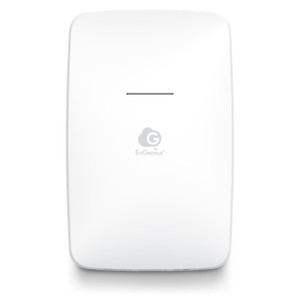
Compact wall-mount POS terminal designed for retail and hospitality environments where counter space is limited or aesthetic integration is a priority
USB-connected thermal printer module purpose-built for the J1900 4G compact terminal series
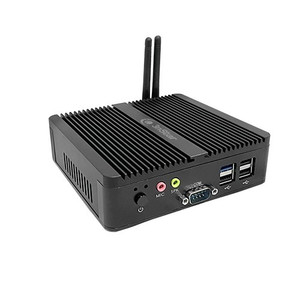
Compact Windows 10E-based point-of-sale terminal designed for small-to-midsize retail and hospitality environments requiring integrated WiFi
Looking for more PioneerPOS products? Shop the full PioneerPOS catalog →
Support services and planning resources for commercial surveillance, access control, and infrastructure deployments.
Fixed scope • Fixed price