StarTech P4AD122M-KVM-SWITCH 4-Port DisplayPort 1.2 KVM Switch
Overview
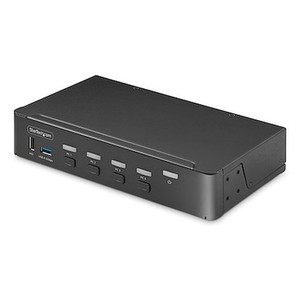
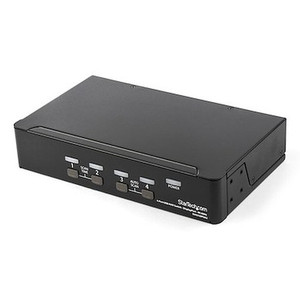
The StarTech P4AD122M-KVM-SWITCH is a 4-port KVM switch built around DisplayPort 1.2 and USB 3.2 Gen 1 — the right tool when you need one keyboard, mouse, and monitor to control four separate PCs without the desk clutter of duplicate peripherals. Housed in an aluminum-and-steel chassis measuring 8.7 x 5.1 x 1.6 inches, it sits cleanly on a workbench or control desk. If you manage multiple workstations in a control room, engineering suite, or security operations center, the P4AD122M-KVM-SWITCH removes the friction of constantly swapping cables or reaching for separate input devices.
For teams evaluating KVM switches across a mix of display technologies, note that this unit is DisplayPort-only on the host side — no HDMI, no VGA adaptation built in. That is a deliberate spec, not an oversight: DisplayPort 1.2 supports the bandwidth needed for high-resolution single-monitor workflows without signal conversion loss.
Key Features
- 4-Port KVM with DisplayPort 1.2: Controls four separate PCs from a single display, keyboard, and mouse. DisplayPort 1.2 carries sufficient bandwidth for high-resolution output — you are not throttled by an older display standard that would limit your monitor's native capabilities.
- USB 3.2 Gen 1 at 5Gbps: Each of the four host connections uses a USB 3.2 Type-B port running at up to 5Gbps. That bandwidth matters when peripherals include external drives, high-speed cameras, or other USB 3.x devices — you are not bottlenecked at USB 2.0 speeds while switching between hosts.
- Per-Port Audio via 3.5mm Stereo Jacks: Four dedicated 3.5mm stereo audio connectors (one per host) mean audio follows the active KVM channel. In a multi-PC security or monitoring environment, this prevents audio bleed-through from inactive machines — each host's audio context is fully isolated until selected.
- AC-Powered, No USB Bus Power Dependency: The switch draws from an included AC adapter (100–240V input, 12V DC / 3A output, 36W). Relying on USB bus power from a host PC would create instability when switching channels; dedicated AC power keeps the switch state consistent regardless of which PC is currently active.
- Wide Input Voltage Range (100–240V AC): Universal mains compatibility means the same unit deploys in North American and international facilities without a step-down transformer — relevant for organizations with global sites or mixed-voltage lab environments.
- Aluminum and Steel Construction: The metal chassis handles the thermal load of continuous operation more predictably than a plastic shell and resists the kind of physical wear that happens on a working desk. Rated for 0°C to 40°C operating temperature — standard for an indoor control environment.
- Single-Monitor Architecture: Driving one display per session keeps the switching logic straightforward and eliminates the synchronization complexity of multi-monitor KVM setups. If your workflow is a single high-resolution display shared across four workstations, this is the correct configuration rather than paying for multi-head capability you do not need.
Integration and Compatibility
The P4AD122M-KVM-SWITCH (often searched as P4AD122M KVM SWITCH) connects to host PCs via four DisplayPort cables and four USB 3.2 Type-B cables — one DisplayPort plus one USB per host. The console side accepts your monitor's DisplayPort input, a USB keyboard, and a USB mouse. Audio runs through 3.5mm stereo — standard for headsets and powered speakers. There is no network management port or software configuration layer; switching is hardware-driven, which reduces the attack surface and eliminates driver dependency on managed hosts.
For teams building out a KVM accessories stack — including DisplayPort cables rated for the bandwidth, USB Type-B cables, and cable management hardware — verify cable length against your rack or desk layout before ordering. DisplayPort signal integrity degrades over longer passive cable runs; stay within manufacturer-recommended lengths for DisplayPort 1.2 at your target resolution.
If your environment includes network-attached or IP-based workstations managed through a VMS or similar platform, pair this KVM with a structured network switch on the same control desk to keep IP management traffic separated from the direct-attach KVM layer. See the KVM selection guide for a breakdown of single-monitor versus multi-monitor KVM architectures by use case.
Frequently Asked Questions
Q: What video standard does the P4AD122M-KVM-SWITCH use on the host side?
A: DisplayPort 1.2. All four host connections are DisplayPort — there are no HDMI or VGA ports on this unit. Your PCs must have DisplayPort outputs, or you will need active adapters (not included).
Q: Does this KVM switch require drivers or software to operate?
A: No software or driver installation is documented for this unit. Switching is hardware-driven, which means it works independent of OS driver state — useful in environments where managed hosts restrict software installs.
Q: What is the USB data transfer speed when switching peripherals between PCs?
A: USB 3.2 Gen 1 at up to 5Gbps per host port. This supports high-bandwidth USB peripherals such as external SSDs or high-resolution cameras without stepping down to USB 2.0 speeds.
Q: Does audio switch automatically when I change the active KVM channel?
A: Yes. Each host has a dedicated 3.5mm stereo jack, and audio follows the active channel selection — the audio context switches with the video and USB inputs.
Q: What is the warranty on the P4AD122M-KVM-SWITCH?
A: StarTech provides a 2-year manufacturer warranty on this product.
Q: Can this switch handle multi-monitor setups?
A: No. The P4AD122M-KVM-SWITCH supports one monitor output. If your workflow requires two or more monitors per workstation session, you will need a multi-head KVM variant designed for that purpose.
What I keep coming back to with the P4AD122M-KVM-SWITCH is the AC power architecture. At 36W draw from a dedicated 100–240V adapter — not from USB bus power — this switch holds a consistent state through host switching cycles. I've seen bus-powered KVMs drop peripherals momentarily during the handoff; that does not happen here because the switch power rail is independent of any connected host.
Technical Highlights:
- USB 3.2 Gen 1 (5Gbps) per host: Four Type-B host ports each running at 5Gbps means you are not capping high-speed peripherals at USB 2.0 — relevant if any workstation drives an external capture card, SSD, or high-bandwidth USB device that needs to stay accessible after switching.
- DisplayPort 1.2 on all four host ports: DP 1.2 headroom is sufficient for 4K at 60Hz on a single display — so the switch will not become the resolution bottleneck as monitors are upgraded, as long as your hosts and monitor all support DP 1.2 natively.
- Per-channel 3.5mm stereo audio: Four isolated audio jacks — one per host — prevent audio bleed between inactive PCs. In a security operations environment where different workstations may carry voice comms or alert tones, that isolation is operationally significant, not just a convenience feature.
Deployment Considerations:
- Operating temperature ceiling is 40°C — keep this unit in a climate-controlled space. A server room or IDF closet running hot in summer could push ambient temps into that range; verify your install location before deploying.
- The unit weighs 37.1 oz (just over 2.3 lbs) in an 8.7 x 5.1 x 1.6-inch footprint. It sits flat on a desk surface rather than rack-mounting — plan your cable routing for four DisplayPort and four USB Type-B runs converging at the rear of the unit.
This switch is best positioned for a fixed four-workstation security operations desk or an engineering review station where one operator cycles between four DisplayPort-equipped PCs using a single high-resolution monitor — and where clean audio isolation per host is a requirement rather than an afterthought.