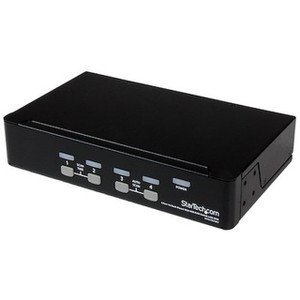
StarTech SV211USB 2-Port VGA USB KVM Switch
Overview
The StarTech SV211USB is a compact, USB-powered 2-port KVM switch that lets you control two VGA-equipped PCs from a single monitor, keyboard, and mouse. It's a practical fit for IT support benches, dual-workstation desks, or small office setups where running two separate displays and input sets isn't practical. At 3.5 × 2.6 × 0.9 inches and 11.3 oz, the SV211USB sits flat on a desk or tucks beside a monitor without demanding dedicated shelf space. It draws power directly from the host USB connection — no wall adapter to source or lose.
Switching between hosts is available three ways: a physical push button on the unit, keyboard hotkey sequences, or optional software — giving you the flexibility to match whatever workflow you're running without being forced into a single input method. For a full overview of desktop KVM options across form factors and port counts, browse the KVM switches category.
Key Features
- 2-Port VGA KVM, single monitor output: Controls two VGA-connected PCs through one console — one VGA port, two USB 2.0 Type-A ports on the console side. Eliminates the second keyboard, mouse, and monitor on a two-machine bench without any complex cabling.
- 2048×1536 maximum resolution: Supports resolutions up to 2048×1536 over the VGA connection. That covers every standard VGA display mode including QXGA, so you won't find yourself downscaling a higher-resolution panel to make the KVM work. Most 1080p and 1440p VGA monitors will run at their native resolution without adjustment.
- Three switching methods — push button, hotkeys, and software: Push-button switching works without any drivers installed, which matters when you're toggling to a freshly imaged machine or a system in BIOS. Hotkey switching keeps your hands on the keyboard. Software switching suits workflows where you prefer a visible UI. All three are available simultaneously — you're not locked into one.
- USB-powered from the host: The SV211USB draws 5V DC directly from the connected USB port on the active host — no separate power brick required. One fewer cable to manage, and nothing to forget when moving the unit between locations.
- 1.5m (5 ft) remote switch cable: The included remote switch cable extends physical button access 1.5 meters from the unit. Useful if the KVM itself is positioned behind a monitor or in a rack shelf while the button needs to be reachable on the desk surface.
- Compact desktop footprint: At 88 × 66 × 23mm and 321g, the unit is small enough to be cable-managed to the back of a monitor stand or parked on a crowded bench without dominating the workspace.
- Standard interface compatibility: Host side uses one VGA (15-pin) and one USB 2.0 Type-A per port — matching the standard connection set on legacy workstations, point-of-sale terminals, and industrial PCs that still ship with VGA outputs.
- Operating range 0°C to 40°C: Rated for standard indoor office and data center ambient temperatures. Storage is rated down to -20°C and up to 60°C, so shipping and warehouse storage in non-climate-controlled environments won't damage the unit.
- 2-year warranty: Covered by a 2-year manufacturer warranty — relevant when deploying across a fleet of support benches where you'd want consistent replacement coverage.
Integration and Compatibility
The SV211USB is built around VGA and USB 2.0 — the common denominator for legacy and embedded PC platforms. It's a direct fit for industrial control systems, ruggedized workstations, and older enterprise desktops that haven't moved to DisplayPort or HDMI outputs. The console side provides two USB 2.0 Type-A ports to cover a standard keyboard and mouse; no USB hub functionality is documented, so plan peripheral connections accordingly.
Because the unit is USB-powered, it relies on the active host's USB port for power. This means switching to the second machine cuts power from the first host's USB — a factor to account for if either machine has USB-dependent peripherals that need to stay active on the inactive port. No external power input is available on this model.
VGA remains common in industrial display environments and point-of-sale hardware. If your environment is transitioning to HDMI or DisplayPort outputs, evaluate a KVM from the HDMI KVM switches range instead. For teams sizing out multi-user IT support environments, the KVM switch buying guide covers port count, video interface, and USB vs. PS/2 tradeoffs worth reviewing before committing to a model. The StarTech product line also includes multi-port and dual-monitor KVM options if two ports isn't sufficient for your bench configuration.
Frequently Asked Questions
Q: Does the SV211USB require driver installation to operate?
A: Push-button switching works without drivers — the unit is operational as soon as it's connected. Hotkey and software switching may require driver installation depending on your operating system. Check StarTech's support page for the current driver package for your OS version.
Q: What is the maximum video resolution supported by the SV211USB?
A: The SV211USB supports up to 2048×1536 (QXGA) over VGA. This covers virtually all standard VGA monitor resolutions including 1920×1200 and 1920×1080, so most deployments will run at native panel resolution without adjustment.
Q: Does the SV211USB need a separate power supply?
A: No. The unit is USB-powered at 5V DC and draws power directly from the active host's USB port. No external adapter is required.
Q: What switching methods does the SV211USB support?
A: Three methods are available: a physical push button on the unit (or via the 1.5m remote switch cable), keyboard hotkey sequences, and optional software. All three can be used without reconfiguring the unit.
Q: What is the warranty period for the SV211USB?
A: The SV211USB carries a 2-year manufacturer warranty.
Q: Can the SV211USB be used with HDMI or DisplayPort monitors?
A: The SV211USB uses VGA (15-pin D-Sub) on both the console and host interfaces. It is not compatible with HDMI or DisplayPort natively. You could use a passive VGA-to-HDMI adapter on the console side if your monitor requires it, but signal quality and compatibility depend on the adapter — verify before deploying at scale.
The SV211USB is a no-frills, USB-powered 2-port VGA KVM that covers a specific and common gap — two legacy VGA machines that need to share a single console without adding another monitor or input set. The USB-bus power design is genuinely useful here: because it pulls 5V DC from the host, there's nothing to provision separately, and the unit can move between benches without hunting for a power brick. Where I've seen this deployed well is in IT support environments where a tech has a primary workstation and a second machine (often a test or imaged spare) that needs occasional access but doesn't warrant its own full console.
Technical Highlights:
- 2048×1536 max resolution: Covers every practical VGA panel in use today — 1080p, 1440p, and legacy QXGA panels all run at native resolution without the KVM bottlenecking the output.
- Three switching methods: Push button, hotkey, and software switching are all available simultaneously. Push-button access works without drivers, which means you can toggle to a machine mid-BIOS session or during OS reinstall without losing control.
- 1.5m remote switch cable: The physical button extends 5 feet from the unit — practical when the KVM is mounted behind a monitor or stored in a shallow shelf and button access needs to stay at the desk surface.
Deployment Considerations:
- USB power is drawn from the active host only — any USB-dependent peripheral on the inactive host's side of the KVM will lose power when that port is not selected. Audit your peripheral setup before deploying if either machine runs USB-powered devices that must stay active.
- This is a VGA-only unit. If either connected machine outputs HDMI or DisplayPort natively, you'll need an active adapter on the host side — and adapter compatibility with KVM signal timing isn't guaranteed, so test before purchasing at volume.
For a dual-machine IT support bench, a spare-parts workstation station, or a POS environment where two legacy VGA terminals share a single operator console, the SV211USB handles the job cleanly without over-engineering the solution.