StarTech 309B-USBC-HUB 4-Port USB-C Hub with 100W Power Delivery
Overview
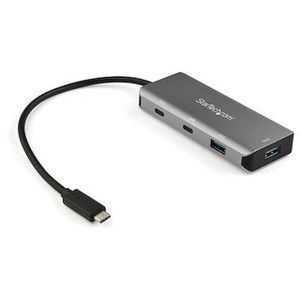
The StarTech 309B-USBC-HUB is a compact USB-C hub that turns a single USB-C host port into four usable connections — three USB-C data ports running at USB 3.2 Gen 2 speeds plus one dedicated USB-C Power Delivery pass-through port. At 3.8 inches long and 1.5 oz, it sits flat on a desk or travels with a laptop without adding meaningful bulk. The 8-inch attached cable gives you enough reach to connect without straining your host port, while the 90% PCR aluminum and 75% PCR plastic construction keeps the unit rigid without the weight of a full aluminum enclosure. If you're running a tight mobile workstation, a field-deployed laptop, or a conference room setup where port real estate is the bottleneck, the 309B-USBC-HUB (often searched as 309B USBC HUB) addresses that constraint directly.
For security integrators and IT architects connecting USB-C peripherals — external drives for footage offload, NVR management adapters, or USB-C display links — the 10Gbps throughput per port means you're not waiting on the hub when moving large video files. Explore the broader StarTech connectivity lineup for complementary docking and cabling solutions.
Key Features
- USB 3.2 Gen 2 at 10Gbps per port: Each of the three data ports runs at a full 10Gbps — not a shared bus throttled when all ports are active simultaneously. That means an external SSD pulling sequential reads won't choke a simultaneous USB-C adapter on an adjacent port. For USB-C hubs and docking accessories, this is the spec that separates Gen 2 products from slower Gen 1 (5Gbps) alternatives.
- 100W Power Delivery input, 85W laptop charging: The PD port accepts up to 100W from your power adapter and passes up to 85W through to the connected laptop. That 15W delta is the hub's own operating overhead. In practice, this means a 65W or 85W laptop charges at or near full speed while all data ports stay active — you don't have to choose between charging and connectivity.
- Four ports from one host connection: Three USB-C 10Gbps data ports plus one USB-C PD + Data combo port. The PD port is not data-only — it handles data alongside charging, giving you a fourth functional connection for peripherals if needed.
- 8-inch attached cable: The fixed 8-inch host cable eliminates a loose adapter that can work itself free on a busy desk or in a mobile kit bag. It's long enough to reach a laptop port without awkward angles but short enough that it doesn't create cable clutter across a workstation.
- 15W maximum power consumption: The hub itself draws at most 15W during operation. On a bus-powered setup without a PD source, this is the load your host port needs to support. With a PD adapter attached, the hub draws from that source rather than taxing your host device's battery.
- 90% PCR aluminum shell: Post-consumer recycled aluminum handles heat dissipation better than plastic, which matters when three 10Gbps ports are running sustained transfers. The aluminum also resists flex — the unit won't bow or crack in a laptop bag under daily use.
- Operating range 0°C to 45°C: Rated for standard indoor environments. This is not a ruggedized device — it's built for controlled environments like offices, mobile workstations, and equipment racks in conditioned spaces, not for field enclosures or outdoor deployments.
- Compact form factor — 3.8 × 1.1 × 0.4 inches: The flat profile sits under a monitor stand, clips to a laptop lid, or drops into a pocket. At 1.5 oz, it adds negligible weight to a travel kit.
Integration and Compatibility
The 309B-USBC-HUB connects to any USB-C host port that supports USB 3.2 Gen 2 (10Gbps). Hosts limited to USB 3.2 Gen 1 (5Gbps) or USB 2.0 will cap throughput at the host's maximum — the hub does not upgrade a slower host. Confirm your laptop or workstation's USB-C specification before deploying in bandwidth-sensitive applications.
The power delivery pass-through requires an upstream USB-C PD power adapter rated at 100W to deliver the full 85W to the laptop. Lower-wattage adapters will proportionally reduce pass-through charging output. For laptops with 100W+ charging requirements (some high-performance workstation-class machines), the 85W pass-through may result in slower charging under sustained CPU/GPU load — a relevant consideration for video review workstations. Pair with a quality USB-C power adapter rated at 100W to get full performance from the PD port.
No driver installation is required on modern operating systems. The hub is plug-and-play on Windows, macOS, and Linux distributions that support USB 3.2 natively. For IT architects managing device inventories, StarTech's 2-year hardware warranty covers the unit against defects. See the full range of network and connectivity accessories for complementary peripheral infrastructure.
Frequently Asked Questions
Q: How many ports does the 309B-USBC-HUB provide and what speeds do they support?
A: The 309B-USBC-HUB provides four USB-C ports total: three USB-C data ports running at USB 3.2 Gen 2 (10Gbps each) and one USB-C port that handles both Power Delivery (up to 100W input / 85W pass-through) and data simultaneously.
Q: Can I charge my laptop through the 309B-USBC-HUB while using all three data ports?
A: Yes. With a 100W USB-C PD adapter connected to the PD port, the hub passes up to 85W to the laptop — enough to charge most laptops at full or near-full speed. The 15W difference covers the hub's own operating overhead. All three data ports remain active simultaneously.
Q: Does the 309B-USBC-HUB require driver installation?
A: No. The hub is bus-powered and plug-and-play on operating systems with native USB 3.2 support including current versions of Windows, macOS, and Linux. No additional software is required.
Q: What is the warranty on the 309B-USBC-HUB?
A: StarTech provides a 2-year hardware warranty on the 309B-USBC-HUB covering manufacturing defects.
Q: Will the 309B-USBC-HUB work at full 10Gbps speed if my laptop only has a USB 3.2 Gen 1 port?
A: No. The hub's throughput is limited by the host port. A Gen 1 (5Gbps) host will cap all ports at 5Gbps regardless of the hub's Gen 2 capability. Verify your host port specification before expecting 10Gbps performance.
Q: Is the 309B-USBC-HUB suitable for outdoor or industrial environments?
A: No. The operating temperature range is 0°C to 45°C and the unit has no ingress protection rating. It is designed for controlled indoor environments — offices, mobile workstations, and conditioned equipment spaces.
The spec that gets overlooked on the 309B-USBC-HUB is the 85W pass-through ceiling on the PD port. At 100W input and 85W output, the hub reserves 15W for its own operation — which is exactly what you'd expect from a Gen 2 hub running three active 10Gbps ports simultaneously. That math works cleanly for the vast majority of business laptops rated at 65W or 85W charging, but if you're deploying this alongside a high-performance mobile workstation that demands 100W or more under sustained load, you'll see the battery drain slightly during heavy use. Know your laptop's charging spec before committing.
Technical Highlights:
- USB 3.2 Gen 2 (10Gbps): Each data port runs a full 10Gbps — not shared across the bus. Sustained external SSD transfers or simultaneous peripheral connections won't degrade each other's throughput the way they would on a shared-bandwidth hub.
- PCR Aluminum Shell: The 90% post-consumer recycled aluminum body is functional, not just a sustainability checkbox — aluminum dissipates heat from the controller chip more effectively than plastic, which matters during extended 10Gbps transfers.
- Form Factor — 3.8 × 1.1 × 0.4 in, 1.5 oz: This is a genuinely pocketable hub. The fixed 8-inch cable is the right call for field kits — one less loose connector to lose or leave behind.
Deployment Considerations:
- Pair the 309B-USBC-HUB with a verified 100W USB-C PD adapter to unlock the full 85W laptop charging pass-through. A 65W adapter upstream caps pass-through output proportionally — fine for lighter laptops, a problem for power-hungry ones.
- Operating temperature tops out at 45°C — this is an office-grade device. Don't install it in a poorly ventilated AV rack, server closet without cooling, or any space that regularly exceeds that threshold or it won't operate reliably.
The 309B-USBC-HUB is the right fit for a mobile security technician or IT field engineer running a single USB-C laptop who needs to simultaneously connect an external NVR management drive, a USB-C display adapter, and maintain laptop charging during a site visit — all from one host port, at full Gen 2 speed, without carrying a separate power brick just for the hub.