StarTech 10G2A1C25EPD-USB-HUB 3-Port USB-C Hub with 2.5GbE and 100W Power Delivery
Overview
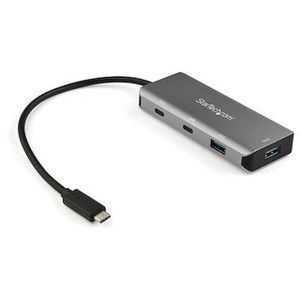
The StarTech 10G2A1C25EPD-USB-HUB is a compact USB-C hub that consolidates wired 2.5 Gigabit Ethernet, two USB-A ports, one downstream USB-C port, and 100W Power Delivery pass-through into a single 12-inch tethered dongle. If you're deploying laptops or tablets at field stations, edge compute nodes, or temporary workstations where desk real estate is tight and a wired network connection is non-negotiable, this is the hub to reach for. It connects via a single USB-C host cable and handles charging, data, and networking simultaneously without requiring a second adapter or a wall outlet for the hub itself.
Key Features
- 2.5 Gigabit Ethernet (IEEE 802.3bz): The RJ-45 port supports 2.5G, 1G, 100M, and 10Mbps auto-negotiation via the Realtek RTL8156B chipset. On a 2.5GbE-capable switch, you get roughly 2.5x the throughput of standard Gigabit — meaningful when transferring large video files, syncing NAS volumes, or running high-bitrate camera streams directly to an edge recorder. If your existing switch is only Gigabit, it auto-negotiates down cleanly.
- 100W USB Power Delivery 3.0 Pass-Through (85W delivered to host): The USB-C PD port accepts up to 100W input from your charger and passes up to 85W through to the host laptop — the 15W overhead is consumed by the hub's own operation. This means a 65W or 85W laptop charges at full speed while you're using the hub. You keep your single-cable desk setup without sacrificing charge rate.
- USB 3.2 Gen 2 (10Gbps) Host Interface: The VIA VL822 controller delivers a 10Gbps upstream connection to the host, so the two USB-A ports and the downstream USB-C port share a 10Gbps pool. Moving large datasets from an external SSD won't saturate the upstream bus the way older 5Gbps hubs do. Backward compatible with USB 3.0, 2.0, and 1.1 devices — older peripherals connect without adapters.
- 2x USB-A + 1x USB-C Downstream Ports: Total bus-powered output across all data ports is 4.5W — enough for a keyboard, mouse, and USB flash drive simultaneously, but not sufficient to charge a smartphone at speed from the USB-A ports. Plan external device power requirements accordingly.
- 9K Jumbo Frame Support: The Ethernet controller supports jumbo frames up to 9K MTU. In storage-heavy environments — NAS backups, iSCSI traffic, large file transfers — enabling jumbo frames can reduce CPU overhead and improve effective throughput. Requires matching jumbo frame configuration on the connected switch port.
- 286,500+ Hour MTBF: The published MTBF of 286,501 hours is relevant for deployment planning in always-on edge workstations or semi-permanent mobile deployments where reliability over multi-year service cycles matters. This isn't a consumer grab-and-go accessory — it's specced for sustained commercial use.
- 12-inch Attached Cable: The fixed 12-inch cable keeps the hub positioned near the laptop without dangling excess cable, useful on height-adjustable desks and in vehicle mount or panel mount configurations. It is not detachable — factor this in if your deployment uses cable management conduit.
- Space Gray Finish, 2.4 oz: At 2.4 oz and 6.4 x 1.3 x 0.6 inches, the hub fits in a laptop bag side pocket and doesn't shift a lightweight laptop off-balance when used on a flat surface or mounted panel.
Integration & Compatibility
The 10G2A1C25EPD-USB-HUB (often searched as 10G2A1C25EPD USB HUB) is driver-supported across Windows, macOS, Linux, ChromeOS, iPadOS, and Android. The Realtek RTL8156B Ethernet chipset has broad OS-level driver support, though Linux deployments should verify kernel version compatibility for 2.5GbE enumeration — kernel 5.6 and later include native RTL8156B support. The hub operates within a 0°C to 40°C ambient range, making it suitable for standard office and light industrial environments but not for outdoor enclosures or unventilated server closets running above ambient. No external power supply is required — the hub draws operating power from the PD pass-through chain, meaning it needs a PD-capable charger connected to the PD port to function at rated performance. Operating it host-bus-powered only (without a charger on the PD port) will still work for data and Ethernet but will not charge the host laptop.
Frequently Asked Questions
Q: Does the 10G2A1C25EPD-USB-HUB require a driver installation on Windows or macOS?
A: The hub is designed for OS-native driver support on Windows, macOS, ChromeOS, iPadOS, and Android. The Realtek RTL8156B Ethernet chipset is supported natively on recent versions of these platforms. Linux users should confirm kernel 5.6 or later for full 2.5GbE support without manual driver installation.
Q: Will the hub deliver 100W to my laptop?
A: No. The hub accepts up to 100W input from a PD 3.0 charger on the PD port and passes a maximum of 85W to the host laptop. The hub itself consumes approximately 15W of the input power budget. A laptop that requires 85W or less will charge at full speed.
Q: Can I use the hub without a charger connected to the PD port?
A: Yes — data, Ethernet, and USB peripherals will function using bus power from the host. However, without a PD charger connected to the PD pass-through port, the hub will draw power from the host laptop, and the host will not receive any charging current through the hub.
Q: Does the 10G2A1C25EPD-USB-HUB support jumbo frames?
A: Yes. The Ethernet controller supports jumbo frames up to 9K MTU. You will need to enable jumbo frames on both the hub's network adapter settings and the connected switch port — mismatched MTU configurations will cause performance issues rather than improve them.
Q: What is the warranty on this hub?
A: StarTech covers the 10G2A1C25EPD-USB-HUB with a 2-year hardware warranty.
Q: Is the 4.5W USB output shared across all downstream ports?
A: Yes. The total bus-powered output for data ports (2x USB-A + 1x USB-C downstream) is 4.5W combined. This is sufficient for low-draw peripherals like keyboards, mice, and USB storage devices, but do not expect fast smartphone or tablet charging from the USB-A ports.
The spec I keep coming back to on the 10G2A1C25EPD-USB-HUB is the 85W actual laptop delivery — because most competing hubs in this form factor advertise 100W pass-through but bury the host delivery number in the fine print, and a lot of 15-inch workstation laptops pull 80–90W under load. StarTech publishes the 85W figure directly, which tells you exactly where you stand before you buy rather than after you notice your battery draining at a presentation.
Technical Highlights:
- 2.5GbE via RTL8156B: Auto-negotiates across 2.5G/1G/100M/10M — if your facility switches are still Gigabit, this hub will work today and carry you forward when you upgrade the edge switching. The 9K jumbo frame ceiling is relevant for iSCSI and NAS-heavy edge workstation builds.
- USB 3.2 Gen 2 Upstream (10Gbps): The VIA VL822 controller gives you a full 10Gbps upstream pool across all three downstream data ports — a meaningful improvement over Gen 1 hubs when you're reading from a fast external NVMe enclosure while Ethernet is also active.
- 286,501-Hour MTBF: That figure is published, not estimated — it positions this hub well above consumer-grade dongles for deployments where the unit lives on a desk or in a vehicle cradle 24/7 over a multi-year contract period.
Deployment Considerations:
- Operating temperature ceiling is 40°C — this hub is rated for conditioned spaces. Do not install it in an unventilated enclosure or in a vehicle interior that exceeds that threshold in summer.
- The 4.5W total across all downstream data ports is the hard ceiling. If your workflow involves USB-powered hard drives on multiple ports simultaneously, verify each drive's power draw — bus-powered 2.5-inch drives typically need 0.9–1.5W each, but spinning drives or drives with activity LEDs can spike higher at spin-up.
This hub is the right fit for a mobile or semi-permanent workstation deployment where a technician needs wired 2.5GbE access, full-speed laptop charging, and two or three low-draw USB peripherals — all off a single cable. Think field diagnostics stations, temporary NOC deployments, or a hot-desk environment where staff rotate in and out with the same laptop model and need a consistent one-cable dock without purchasing a full thunderbolt docking station.