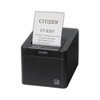
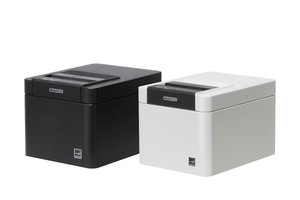
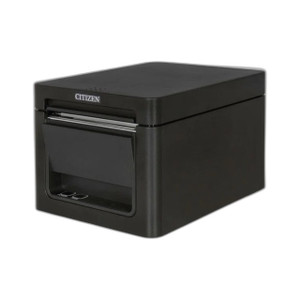
Citizen CT-E301TRUBK Thermal POS Receipt & Label Printer
The Citizen CT-E301TRUBK is a multi-interface thermal receipt and label printer engineered for retail point-of-sale, hospitality, and commercial print-on-demand environments. The single-SKU approach to USB, Serial (RS-232), and Ethernet connectivity eliminates the need to stock separate printer models across direct workstation, legacy serial terminal, and networked deployment scenarios. This flexibility directly reduces capex and inventory overhead on multi-site rollouts where system architectures vary by location.
Key Features
- Multi-Connectivity: USB, Serial (RS-232), and Ethernet in one unit. Deploy across modern workstations, legacy terminals, and networked print queues without model substitution.
- Thermal Print Technology: No ink cartridges, lower per-receipt cost, and zero maintenance on consumables beyond paper stock. Suited for high-volume receipt and label output.
- Compact Desktop Form Factor: Countertop footprint optimized for POS registers, kiosks, and order-fulfillment stations with minimal workspace impact.
- ESC/POS Command Set Support: Native compatibility with industry-standard POS drivers and raw thermal printer protocols. Integrates with virtually any modern POS software (Square, Toast, Oracle Micros legacy systems, proprietary platforms).
- USB and AC/USB Hybrid Power: USB bus power for direct workstation connection; optional AC adapter for standalone networked operation or high-duty-cycle environments.
- Cross-Platform Driver Support: Windows, Linux, macOS, and browser-based management interfaces. No proprietary OS lock-in.
- Paper Roll and Label Stock Flexibility: Accepts standard thermal paper widths; configurable cut modes support receipts, labels, and continuous tape applications.
- Quiet Operation: Thermal printing generates minimal acoustic noise compared to impact printers — suitable for open retail floors and hospitality service counters.
USB connectivity pairs directly with any modern workstation without external power or network infrastructure, making it ideal for pop-up retail, temporary kiosks, and single-terminal sites. Serial (RS-232) mode maintains integration with legacy point-of-sale terminals, industrial automation systems, and specialized equipment that rely on parallel or serial data streams — critical for retailers with aging infrastructure unable to migrate immediately. Ethernet deployment transforms the printer into a shared print resource on standard IP networks, enabling multi-terminal retail locations, cloud-based POS dispatch, and remote print-queue management across geographically distributed counters or fulfillment centers.
The absence of ink cartridges simplifies total cost of ownership. Thermal paper is the only consumable; no ribbons, toner, or liquid cartridges to stock or replace. This is especially valuable in high-volume environments (food service, ticketing, logistics label printing) where per-receipt cost and operational simplicity drive ROI. Maintenance footprint shrinks to paper loading and occasional platen roller cleaning — tasks requiring minutes, not service calls.
Driver availability across Windows, Linux, and macOS ensures the printer works in heterogeneous IT environments. ESC/POS command-set support means custom or legacy POS applications can issue raw printer commands without relying on OS-level drivers, adding resilience to proprietary or air-gapped retail systems. Browser-based management (when Ethernet-connected) allows IT teams to assign IP addresses, check supply status, and apply firmware updates from a central console — critical for multi-location chains managing dozens of printers across stores or warehouses.
Thermal printing is inherently quiet compared to impact dot-matrix printers, making the CT-E301TRUBK suitable for customer-facing service areas, hospitality venues, and open retail floors where acoustic comfort matters. The compact countertop form factor occupies minimal real estate, important in cramped checkout stands or order-taking kiosks where space is at a premium.
Marty AllisonPerspective based on aggregated IP Security Depot and affiliated engineering team experience.
We've deployed the Citizen CT-E301TRUBK across retail locations ranging from single-terminal pop-ups to 15+ checkout stands, and its multi-connectivity posture is the real operational asset. In environments where you're integrating a modern cloud POS (Ethernet/IP dispatch) alongside a legacy card reader running serial handshakes, this single printer type eliminates the need to maintain two different models in inventory or to negotiate adapter complexity. We've seen integrators cut their printer SKU footprint by 30-40% on multi-site rollouts simply by standardizing on the CT-E301TRUBK. The thermal technology itself is table-stakes for modern retail — no moving parts beyond the motor, no ribbon tension troubleshooting, just paper loading and occasional platen maintenance. That said, this is not a premium photo-quality label printer; if you need color output or high-resolution graphics, this isn't the tool. But for receipts, transaction logs, thermal shipping labels, and point-of-sale tickets, the output quality is crisp and legible, and the per-receipt cost is hard to beat. We'd caution against undersizing power on serial deployments; if your legacy system's flow control is loose, you may need to add handshake discipline in firmware config. Ethernet setups are usually plug-and-play once you DHCP assign the printer.
Technical Highlights:
- Thermal Print Head Lifespan: Thermal printers (including this unit) typically deliver 5–8 million impressions before head degradation becomes visible. On moderate-volume retail (500–1,000 receipts/day), that's 5–15 years of service — well beyond typical store refresh cycles. No cartridge swaps, no toner waste.
- ESC/POS Native Support: The printer recognizes raw thermal command sequences from POS software, making driver installation optional on many platforms. Your legacy or custom app can talk directly to the printer's serial or USB interface without OS middleware — valuable for air-gapped or specialized retail systems.
- Multi-Interface in Single Unit: USB, Serial, and Ethernet eliminate the need to stock or configure separate printer models per deployment type. One SKU, three connectivity modes. Network boot or manual IP assignment via web interface; no console access required after initial config.
- Thermal Paper Compatibility: Accepts standard 80mm rolls (most common) and supports variable width labels and tickets. Verify your paper stock width and adhesive type before large orders; some specialty labels require slightly different thermal density or cooling time.
- Quiet, Low-Maintenance Operation: No ribbon tensioning, no toner disposal, minimal acoustic output. Suitable for open retail spaces and customer-facing counters where noise isolation is a concern.
Deployment Considerations:
- USB-powered operation works only when the printer is physically attached to a host device; if you need standalone networked printing (remote dispatch), use Ethernet with AC adapter. Don't assume USB bus power alone will sustain continuous printing on all workstations — some laptops throttle USB power under load.
- Serial (RS-232) deployments require confirmation of flow control handshake discipline on the legacy terminal. If the host system doesn't respect RTS/CTS or uses loose timing, buffer overruns can drop characters mid-receipt. Validate handshake behavior before going live on large terminals.
- Ethernet assignment via DHCP is standard, but in retail environments with unstable WiFi or frequent DHCP lease churn, consider static IP or reserved DHCP leases to prevent print job routing failures. Check your network documentation before install.
- Thermal paper width and roll orientation vary by region and vendor. Confirm your paper stock matches the printer's native width (usually 80mm) and that you have adequate supplies on hand before deployment. Changing paper width may require hardware adjustment or firmware config.
- Platen roller (the rubber-coated roller behind the print head) is the wear item. Inspect every 6–12 months and clean with isopropyl alcohol on a lint-free cloth if receipt quality degrades. Replacement is inexpensive and user-serviceable on most thermal printers.
The CT-E301TRUBK is the standard choice for retail integrators who need a reliable, low-maintenance thermal printer that bridges legacy serial systems, modern USB workstations, and networked cloud POS in a single SKU. If your deployment includes mixed connectivity or high print volume, this printer reduces operational overhead and capex significantly. For details on other Citizen thermal solutions, see the Citizen catalog.