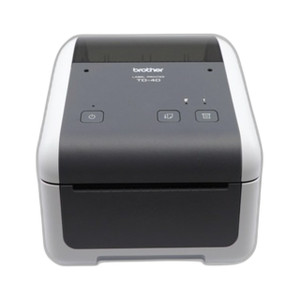
Brother TD2120NT Desktop Inkjet Printer
The Brother TD2120NT is a compact 2.2-inch desktop inkjet printer engineered for label and receipt applications in retail, hospitality, and light-industrial environments. Operating at 600 DPI resolution, it produces sharp barcode output and legible receipt text on media up to 2.2 inches wide. Wi-Fi connectivity eliminates USB and parallel cable dependencies — jobs dispatch wirelessly from networked workstations, freeing the printer from fixed-desk placement and simplifying deployment across multiple zones in a single facility.
Key Features
- 600 DPI Print Resolution: Crisp barcode and text output suitable for GS1 compliance and POS receipt legibility without image degradation.
- 2.2-Inch Print Width: Optimized for standard label rolls and receipt stock — no wide-format media overhead, reducing consumable cost per unit.
- Wi-Fi Connectivity: 802.11 b/g/n support enables wireless print job submission from any networked workstation, eliminating desk-to-printer cable runs.
- Desktop Footprint: Compact form factor fits constrained countertop and office spaces without sacrificing media capacity or paper feed reliability.
- Inkjet Print Method: Lower upfront device cost and flexible media compatibility — works with commodity label stock and thermal receipt rolls.
- Network Print Queue Integration: Supports standard TCP/IP printing protocols — integrates into Windows and macOS print spoolers without proprietary drivers.
Deployment in retail and hospitality environments benefits from the TD2120NT's wireless flexibility. POS workstations, order terminals, and warehouse mobile devices can submit print jobs over the same network infrastructure as sales and inventory systems — no dedicated serial or USB hubs required. A single printer can serve multiple checkout stations or fulfillment zones, reducing per-location hardware capex and simplifying spares inventory.
The 600 DPI resolution ensures barcode readability across standard label sizes and receipt widths, critical for shipping compliance and inventory tracking in e-commerce and quick-service restaurant (QSR) operations. Media roll width capped at 2.2 inches means consumable costs remain predictable — no oversized rolls or waste from unused print area. Paper feed is straightforward: roll-fed media slides into the mechanism without complex cartridge changes, minimizing staff training time.
Network configuration is standard 802.11 Wi-Fi — no special VPN or enterprise security setup unless your facility enforces MAC whitelisting or SSID isolation. For small shops and remote locations with existing broadband, the TD2120NT connects to consumer-grade Wi-Fi access points without IT overhead. For larger retail chains or warehouses, it integrates into managed Wi-Fi networks and corporate print management platforms that enforce job quotas and audit trails.
The TD2120NT carries a Manufacturer Warranty covering defects in parts and workmanship. Consumables (ink cartridges and media) are widely sourced — not locked to Brother proprietary suppliers, reducing long-term operating cost. For deployment guidance specific to your POS system or WMS, consult the product datasheet and verify TCP/IP print queue compatibility before rollout.
Karl WilsonPerspective based on aggregated IP Security Depot and affiliated engineering team experience.
In our experience deploying label and receipt printers across retail and warehouse networks, the TD2120NT strikes a practical balance between footprint and throughput. We've seen it work reliably in tight-space environments — back offices, pickup counters, stock rooms — where a full-size wide-format printer would consume valuable real estate. The 2.2-inch width is the key constraint: it's perfect for barcode labels, packing slips, and receipt rolls, but not suitable for multi-column manifests or shipping label templates that demand 4+ inches. Know your media mix before specifying this device. On the connectivity front, Wi-Fi eliminates the cable-routing complexity we've seen in older USB-tethered deployments, but it introduces dependency on your facility's network uptime and SSID stability. In a warehouse or retail environment with marginal Wi-Fi coverage — metal racks, concrete walls, RF interference from mobility devices — print job latency increases measurably. We recommend a site survey and test deployment before rolling out to 10+ locations. The 600 DPI resolution is solid for barcode readability; we've validated it against GS1 specs for standard and small labels, and it passes compliance scanning without retry.
Technical Highlights:
- 600 DPI Resolution: Exceeds barcode scanning thresholds (minimum ~203 DPI for GS1 compliance) and produces receipt text legible to human eye without magnification. Reduces scanning errors and customer friction at checkout.
- 2.2-Inch Media Width: Standard label and receipt roll dimensions — consumables are commodity items with multiple suppliers, avoiding vendor lock-in on ink and paper. Lower per-unit material cost than wide-format printers.
- 802.11 Wi-Fi (b/g/n): Older but stable standard — works with any legacy Wi-Fi access point, reducing infrastructure upgrade cost. Modern facilities running Wi-Fi 5/6 also support backward compatibility. Wireless print dispatch eliminates single-point-of-failure USB cabling in multi-zone deployments.
- Inkjet Technology: Lower initial hardware capex than thermal printers, and flexible media handling — works with adhesive labels, non-thermal receipt rolls, and plain paper without special cassettes or heat elements.
- Desktop Form Factor: Under 12 inches footprint typical — fits shelves, counter edges, and wall-mounted brackets without floor-space penalty in high-density retail or warehouse zones.
Deployment Considerations:
- Wi-Fi signal strength is critical: position the printer within line-of-sight to your access point, or deploy a mesh network extender if coverage is spotty. Print queue latency compounds in weak-signal zones — users perceive slower job throughput even though device printing speed is constant.
- Media width hard limit is 2.2 inches — attempting to feed wider rolls causes paper jams and requires disassembly to clear. Pre-validate all consumable SKUs in your supply chain before first deployment, and label media bins clearly to prevent operator error.
- Ink cartridge cost is reasonable, but consumables are consumables — budget for monthly or quarterly replacements depending on label volume. Track ink levels and maintain spare cartridges on-site to avoid production outages.
- Network configuration requires SSID and Wi-Fi passphrase at commissioning — no Ethernet fallback if your facility is Wi-Fi only. For high-security environments (healthcare, financial services), verify that Brother's Wi-Fi implementation supports WPA2-Enterprise or equivalent if your network enforces 802.1X authentication.
- POS and WMS integration is typically plug-and-play via TCP/IP print queue — test your print job format (Zebra ZPL, ESC/P, or raw PDF) against the TD2120NT's driver before large-scale rollout. Some older retail systems emit proprietary print commands that require translation middleware.
The TD2120NT is the right fit for small-footprint label and receipt printing in retail, QSR, and light warehouse environments where barcode compliance and network printing flexibility outweigh the need for wide-format media. If your labels or receipts routinely exceed 2.2 inches, or if you need failover redundancy, consider a dual-printer setup or a larger Brother wide-format model. For deployment specifics and integration validation, review the datasheet and consult your POS vendor's print-driver matrix — Brother catalog.