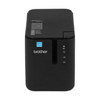
Brother PTP950NW Wireless Thermal Transfer Label Printer
Overview
The Brother PTP950NW is a compact wireless label printer engineered for mobile and field labeling workflows. It prints via thermal transfer at 3.1 inches per second with 360 dpi resolution — sufficient clarity for barcodes, QR codes, and human-readable text on small-format labels without tethering to USB or a stationary workstation. Wi-Fi connectivity means warehouse technicians, security integrators, and logistics teams can print directly from mobile devices or networked management systems, reducing setup friction and enabling label production at the point of work.
Key Features
- Thermal Transfer Print Method: Produces durable, high-contrast labels that resist water, oils, and temperature extremes — critical for outdoor asset tags, cable markers, and shipping labels that must survive rough handling or exposure to elements.
- 3.1 Inches per Second Print Speed: Fast enough to generate 10–15 labels per minute in typical labeling tasks. Avoids bottlenecks in high-volume warehouse picking or incident response scenarios where rapid asset identification is needed.
- 360 DPI Resolution: Guarantees crisp barcode and QR code reproduction that standard label scanners can read reliably at typical scanning distances. Eliminates the need for oversized labels or rescan failures that waste time in logistics operations.
- Wi-Fi Connectivity: No USB cables or docking stations required. Print from smartphone apps, tablets, or networked back-office systems. Particularly valuable for field technicians installing security hardware who need to label equipment on-site without returning to a base station.
- Monochrome Output: Straightforward black-on-white or black-on-clear printing. No color cartridge maintenance, lower consumable cost per label, and predictable output for compliance labels and regulatory markings.
- Compact Footprint: Designed for portable deployment in vans, field kits, or temporary command centers. Fits easily into a technician's toolkit without requiring dedicated bench space.
Integration & Compatibility
The PTP950NW integrates with Brother P-Touch software and label design applications that export to standard thermal transfer formats. Compatible with most enterprise labeling workflows, inventory management platforms, and mobile printing frameworks that support Wi-Fi-enabled peripherals. Field teams accustomed to Brother's P-Touch ecosystem will find minimal learning curve; existing label templates and design assets transfer directly.
When to Choose a Different Model
If your labeling demand requires color output (photo-quality product labels, high-volume marketing graphics), a color thermal inkjet printer from another manufacturer may be more cost-effective. If label volume exceeds 100+ labels per day consistently, investigate higher-speed industrial thermal transfer printers in Brother's lineup or competitor offerings — the PTP950NW is optimized for field mobility, not high-throughput production lines.
Deployment Considerations
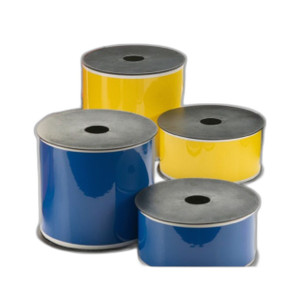
Confirm Wi-Fi coverage in your deployment area — remote outdoor sites or steel-frame warehouses with poor signal may require a portable Wi-Fi hotspot or mesh network extension. Stock thermal transfer ribbon and label media from Brother or compatible third-party suppliers; thermal transfer consumables are inexpensive compared to inkjet cartridges but must be on hand. For cold-storage or freezer environments, verify label adhesive performance; thermal labels perform well at standard temperatures but may need special stock for sub-zero conditions.
Frequently Asked Questions
Q: Can the Brother PTP950NW print labels larger than 4 inches wide?
A: No. The PTP950NW is designed for compact label formats, typically up to 4 inches wide. For larger custom labels, consider a wider thermal transfer printer in Brother's industrial range.
Q: How long does a thermal transfer ribbon last on the PTP950NW?
A: Ribbon life depends on label length and density. A standard 50mm × 74m ribbon typically prints 1,500–3,000 labels before exhaustion. Brother supplies replacement ribbons in standard sizes.
Q: Does the PTP950NW support cloud-based label printing or printing from a mobile app?
A: Yes, Wi-Fi connectivity enables printing from compatible mobile apps and cloud-integrated label design software that supports the printer's protocol. Verify app compatibility with the printer before deployment.
Q: What power requirements does the PTP950NW have?
A: The printer operates on AC power via a standard mains adapter. Confirm local power availability in field locations; portable battery packs with AC inverter output can enable limited mobile operation.
Q: Is thermal transfer ribbon toxic or hazardous to handle?
A: Thermal transfer ribbon is non-toxic and safe to handle. No special safety gear is required for field technicians or warehouse staff managing ribbon changes.
Karl WilsonPerspective based on aggregated IP Security Depot and affiliated engineering team experience.
The Brother PTP950NW fills a specific and practical niche: field label printing for teams that move between sites. At 3.1 ips with 360 dpi, it's fast enough to avoid workflow delays while maintaining barcode legibility that standard laser scanners expect. The wireless capability is the real win here — no tethering, no returning to a base station to print a cable label or asset tag.
Technical Highlights:
- 360 DPI Resolution: Produces scannable barcodes and QR codes without requiring enlarged label formats — means lower label media cost per unit and fewer rescan failures in inventory workflows.
- Thermal Transfer (vs. Inkjet): No wet ink means labels dry instantly and resist moisture, solvents, and temperature swings. A printed asset tag in a freezer will not smudge or degrade like an inkjet label would.
- Wi-Fi + Portable Footprint: Eliminates the two biggest friction points in field labeling: cable management and bench space. A technician can print from a smartphone while standing next to equipment, reducing rework and label placement errors.
Deployment Considerations:
- Wi-Fi is a feature, not a guarantee — sites with poor signal or heavy RF interference (metal warehouses, underground areas) may experience connection drops. Always verify coverage before committing.
- Thermal transfer consumables (ribbon and media) must be stocked and compatible; sourcing from non-approved suppliers can cause jams or poor print quality. Verify supply chain before large deployments.
- Print speed is adequate for ad hoc field labeling but will bottleneck if you need to label hundreds of items in a single shift — that scenario calls for a faster industrial model.
Deploy the PTP950NW where your workforce is distributed across sites and labels are needed intermittently: security system installations, equipment asset tagging in multi-location enterprises, logistics return centers, or field service call-outs. It's a genuine time-saver for technicians who otherwise return to an office to print a label. Not a data-center tool — it's a field tool, and it does that job well.