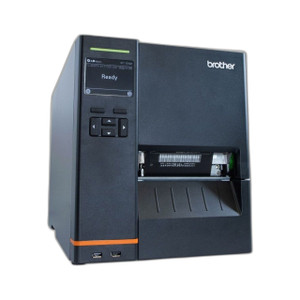
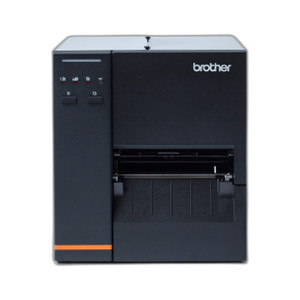
Brother TJ4121TN Industrial Thermal Transfer Label Printer
Overview
The Brother TJ4121TN is a 4.7-inch industrial thermal transfer label printer engineered for high-volume barcode and shipping label production in warehouses, logistics hubs, and retail distribution centers. Built around a 7 inches-per-second print engine with 300 dpi resolution, the TJ4121TN delivers crisp, scannable output on labels and receipts without the consumable cost of inkjet cartridges — thermal transfer uses ribbon consumables, which cost less per label over time in large-volume deployments. The touch panel interface and multiple connectivity options (Wi-Fi, LAN, USB, Host-USB, and Serial) make this printer suitable for both networked label management systems and standalone warehouse workflows.
Key Features
- Print Speed of 7 inches per second: At this speed, you can produce roughly 500–600 4x6 shipping labels per hour per printer. In a busy warehouse dock, that translates to fewer printers needed to meet throughput demands, reducing both capital and space footprint.
- 300 dpi resolution: High dot density ensures barcodes remain readable even after minor label handling, dust, or temperature fluctuations. This matters because barcode scan failures in a warehouse cascade into data quality issues and shipping delays.
- Thermal transfer printing: Unlike direct thermal, thermal transfer uses a separate ribbon, so your labels won't fade if exposed to heat, light, or warehouse humidity over weeks or months. Critical for compliance labeling and long-shelf-life products.
- 4.7-inch media width: Accommodates standard 4x6 shipping labels as well as smaller label formats (2x3, 3x4) without waste. Wider than entry-level desktop printers but narrower than industrial wide-format systems, making it a middle ground for distributed warehouse printing.
- Touch panel display: Reduces setup time for label templates and job changes. Warehouse staff can swap between label formats without reaching for a PC or mobile app in every instance.
- Multiple connectivity (Wi-Fi, LAN, USB, Host-USB, Serial): Wi-Fi allows placement away from fixed network drops — valuable in warehouses where dock reconfiguration is frequent. LAN and Serial options provide redundancy for legacy WMS integrations or offline-resilient configurations.
Integration & Compatibility
The TJ4121TN integrates with standard label management platforms used in warehouse management systems (WMS), point-of-sale networks, and shipping software. Its multi-protocol connectivity ensures compatibility with both modern networked environments and legacy serial-connected barcode systems. If you're upgrading from an older parallel-port or serial printer, the TJ4121TN's Host-USB option can often accept print jobs from existing label software without major workflow rewrites.
When to Choose a Different Model
If you require printing on media wider than 4.7 inches—such as 6-inch or 8-inch labels for oversized pallets or cartons—look toward Brother's larger industrial thermal transfer models. If you need integrated barcode scanning or RFID encoding on the same device, seek a dedicated scanner or dedicated RFID solution paired alongside the printer rather than an all-in-one. If volume is very low (fewer than 50 labels per day), a lower-cost desktop direct thermal printer may be more economical, though it sacrifices label durability.
Frequently Asked Questions
Q: What is the difference between thermal transfer and direct thermal printing?
A: Thermal transfer uses a ribbon between the print head and label, producing durable prints that resist fading from heat and light over months. Direct thermal prints directly on heat-sensitive label stock, which is cheaper upfront but fades faster. The TJ4121TN uses thermal transfer, so it's better for labels that need to remain scannable long-term.
Q: Can the Brother TJ4121TN print on pre-printed label stock?
A: Yes, as long as the stock is designed for thermal transfer printing and fits within the 4.7-inch maximum width. Check with your label supplier to ensure compatibility with the ribbon type and label adhesive.
Q: What connectivity option should I choose for my warehouse setup?
A: Wi-Fi is best if your dock or warehouse has existing Wi-Fi coverage and label printers need to move frequently. LAN (Ethernet) is more reliable in high-density RF environments and integrates easily with fixed WMS infrastructure. USB and Serial are legacy options for integration with older barcode systems or offline workstations.
Q: How often do I need to replace the printer ribbon?
A: Ribbon life depends on label material and print darkness settings, but most thermal transfer ribbons run 1,000–10,000 labels per roll. A 4.7-inch printer using standard ribbon widths typically processes a roll in 1–4 weeks at moderate volume (100–300 labels per day).
Q: Is the TJ4121TN suitable for shipping label compliance (FedEx, UPS, USPS)?
A: Yes, 300 dpi is well above the minimum barcode resolution required by major carriers. Ensure your label software is configured for the carrier's format (4x6 is standard), and test barcode scans with the carrier's equipment before large-scale deployment.
Q: Can multiple TJ4121TN printers share a single Wi-Fi network?
A: Yes. Each printer can be assigned its own IP address on your LAN, and your WMS or label software can distribute print jobs across multiple printers for load balancing. This is common in high-throughput distribution centers.
Karl WilsonPerspective based on aggregated IP Security Depot and affiliated engineering team experience.
The Brother TJ4121TN occupies a practical middle ground in industrial label printing. At 7 ips with 300 dpi, it strikes a balance between speed and print quality that works well for mid-sized distribution operations—not the fastest for ultra-high-volume dock environments, but faster and more durable than consumer desktop printers. The thermal transfer mechanism is the key differentiator here: your labels won't degrade sitting in a warehouse under fluorescent lights or temperature swings.
Technical Highlights:
- 300 dpi resolution: Sharp enough to pass barcode verification on most label verification systems. High enough that barcode readability remains stable even after label wear in the field.
- 7 inches per second throughput: Translates to roughly 600 labels per hour at a standard 4x6 footprint. In a three-shift dock with 3–4 TJ4121TN units, you're looking at 7,000–10,000 compliant labels daily without bottleneck.
- Thermal transfer with ribbon: Ribbon consumables cost significantly less per label than inkjet cartridges in large-volume settings. A single ribbon roll prints 1,000–10,000 labels depending on darkness; plan your consumable budget around 500–1,500 label batches per ribbon.
- Multiple connectivity (Wi-Fi, LAN, USB, Host-USB, Serial): The Wi-Fi option removes the need for fixed Ethernet runs to the dock—valuable if your layout changes seasonally or if your WMS system doesn't support legacy serial anymore.
Deployment Considerations:
- Thermal transfer requires both label stock and ribbon consumables; don't cut corners on ribbon quality or you'll see print head wear accelerate. Use OEM-certified ribbon from Brother or a trusted third-party supplier.
- 4.7-inch maximum width is a hard ceiling. If you need 6-inch or pallet-size labels, this printer won't cut it—upgrade to a wider industrial model instead of trying to workaround with separate label software or hardware.
- Wi-Fi reliability can degrade near metal racking and RF noise from scanners. If you install multiple printers via Wi-Fi in a busy warehouse, conduct a site survey first and consider LAN-wired printers in high-density RF zones.
The TJ4121TN is the right choice for a regional distribution center or mid-market fulfillment operation that ships 5,000–15,000 labels per week and needs durable output with manageable ribbon costs. Skip it if you're running a massive parcel hub (you need faster printers or a wider format) or a small e-commerce closet (direct thermal would be cheaper). For everybody in between, it's solid hardware that integrates with modern WMS platforms without drama.