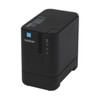
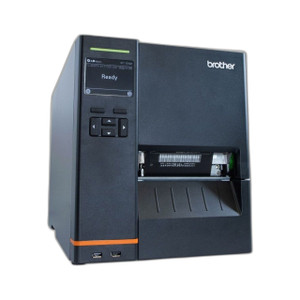
Brother PTP900WC Wireless Thermal Transfer Label Printer
The Brother PTP900WC is a Wi-Fi enabled desktop label printer engineered for warehouse, logistics, and facility management operations. Unlike direct thermal printers that fade under heat, UV, or moisture, the PTP900WC uses thermal transfer technology—meaning your labels remain legible in cold storage, outdoor environments, or harsh chemical exposure. This durability matters: asset tags printed on thermal transfer media survive where direct thermal output becomes unreadable within months.
Key Features
- 360 dpi resolution at 3.1 inches per second print speed: Delivers sharp, scannable barcodes and readable text even on small label stock. At 3.1 ips, you're printing roughly 190 labels per hour (4x6 format), so batch labeling workflows move faster than slower compact printers.
- Wi-Fi connectivity with no network cable required: Flexible workstation placement—mount near your packing line, warehouse staging area, or dock without running Ethernet. Wireless reduces cable clutter and installation time compared to tethered thermal printers.
- Thermal transfer operation: Requires ribbon cartridges instead of direct thermal media. Your consumable cost is ribbon + media, not just media. Plan your supply chain: thermal transfer ribbons add ~$15–$40 per cartridge depending on volume and material type (wax, wax-resin, or full-resin for extreme durability). Direct thermal would be cheaper per label, but labels fade—thermal transfer wins if label lifespan matters.
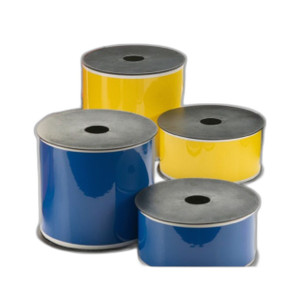
- Standard label media compatibility: Confirm your specific label stock width and length before ordering media in bulk. Brother thermal transfer printers typically handle 4x6, 4x8, and custom widths—verify your exact use case so you don't over-commit to media that won't feed properly.
- Desktop form factor: Compact footprint suitable for counter-top operation in shipping departments, asset management offices, or inventory control rooms. Not a high-volume production printer—designed for on-demand label generation, not roll-fed continuous printing.
- Durable label output for extreme environments: Thermal transfer media withstands temperature extremes, moisture, abrasion, and UV—critical for cold-chain labeling, outdoor asset tracking, or industrial equipment tagging where direct thermal labels deteriorate.
Integration & Compatibility
The PTP900WC integrates into existing warehouse management and asset-tracking workflows via standard drivers and print-from-application support. Verify driver availability for your operating system and labeling software (Brother, Seagull, Bartender, or in-house label design tools) before deployment. Wi-Fi provisioning requires your network SSID and credentials—ensure your wireless network covers the printer location and can handle occasional print jobs without congestion.
When to Choose a Different Model
If you need faster production speeds (6+ ips) or roll-fed continuous labeling, explore Brother's industrial-grade thermal transfer line. If label durability is not a concern and consumable cost is the primary driver, a direct thermal printer may lower total cost of ownership—but accept that labels will fade in 6–12 months under sunlight or heat.
Frequently Asked Questions
Q: What's the difference between thermal transfer and direct thermal printing?
A: Direct thermal uses heat-sensitive media and no ribbon—cheaper consumables but labels fade under UV, heat, or moisture within months. Thermal transfer uses a ribbon to fuse ink onto media, producing durable labels that survive extreme temperatures, outdoors, and chemical exposure. The PTP900WC is thermal transfer, so plan for ribbon costs.
Q: Does the PTP900WC support my labeling software?
A: Standard Windows/Mac drivers are available for most label design applications (Brother, Seagull, Bartender, etc.). Confirm driver compatibility with your software vendor and operating system before purchase.
Q: What's the maximum label size the PTP900WC can print?
A: Verify media width and length limits in the product datasheet. Standard support includes 4x6 and 4x8 labels; confirm custom sizes with the manufacturer before committing large media orders.
Q: How often do I need to replace the ribbon?
A: Ribbon lifespan depends on media type and label volume. Wax ribbons are cheapest but wear faster; wax-resin and full-resin ribbons cost more but last longer. Estimate consumable costs based on your monthly label volume before deployment.
Q: Can I print wirelessly from multiple devices?
A: Wi-Fi connectivity allows print jobs from any device on your network. Confirm your IT policy allows shared printer access and that wireless coverage is stable near the print location.
Q: Is the PTP900WC suitable for outdoor or cold-storage labeling?
A: Yes—thermal transfer media survives outdoor UV, cold (-40°C freezer environments), and moisture better than direct thermal. However, verify the operating temperature range of your specific label media stock.
Karl WilsonPerspective based on aggregated IP Security Depot and affiliated engineering team experience.
I've seen too many warehouse operations discover—after the fact—that direct thermal labels printed six months earlier are now faded in storage or unreadable in the dock freezer. The Brother PTP900WC sidesteps that entirely by using thermal transfer, which fuses ink onto media. Yes, you'll spend more per label on ribbon consumables, but if your asset tags, shipping labels, or inventory markers need to survive outdoors, cold chain, or chemical exposure, thermal transfer is the only rational choice. The 360 dpi resolution at 3.1 ips is respectable for a desktop unit.
Technical Highlights:
- 360 dpi print resolution: Sharp enough for 1D and 2D barcodes that scan reliably on first attempt. Not bleeding-edge, but proven and sufficient for standard warehouse barcode densities.
- 3.1 inches per second print speed: Translates to roughly 190 labels per hour in 4x6 format. Not race-horse fast, but acceptable for on-demand labeling workflows. If you need 8+ ips, you'll outgrow the PTP900WC and move to industrial thermal printers.
- Wi-Fi connectivity: Cable-free placement is a genuine operational win—no Ethernet runs to the dock, no power cord stretched across walkways. Just SSID, password, and you're live. Confirm your wireless AP coverage before installing near the building edge or in a Faraday-prone area (metal racking, RF interference).
- Thermal transfer operation: Consumable cost includes ribbon + media. Full-resin ribbon on polyester media can run $30–$50 per cartridge in small quantities. Budget your supply chain—don't get caught without ribbon stock during peak season.
Deployment Considerations:
- Thermal transfer requires two consumables (ribbon and media) instead of one. Your procurement lead time is now the longest of the two; plan inventory accordingly.
- Verify your label stock width and length before ordering in bulk. A mismatch between printer specs and media dimensions wastes both consumables and time. Test a sample roll first.
- Wi-Fi print jobs can queue unexpectedly if your network is congested. Ensure your AP isn't serving 200 access points or 802.11g-only legacy devices competing for bandwidth.
The PTP900WC is the pragmatic pick for cold-chain, outdoor asset tracking, or shipping label environments where label longevity is non-negotiable. Skip it if you're printing 2,000+ labels per day—move to a higher-speed industrial unit. But for on-demand, durable label generation in logistics and warehouse asset management, this printer delivers solid ROI.