ASUS HYPER M.2 X16 GEN 4 CARD PCIe 4.0 Quad NVMe Expansion Card
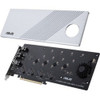
The ASUS HYPER M.2 X16 GEN 4 CARD is a quad-slot PCIe 4.0 NVMe expansion card that adds four M.2 drives to a single x16 slot — delivering up to 256 Gbps of aggregate throughput for AMD Ryzen Threadripper (sTRX40), AM4, and Intel VROC NVMe RAID platforms. If your workstation or server chassis is bottlenecked by the number of native M.2 slots on the motherboard, this card is the direct solution.
Overview
Purpose-built for high-density NVMe storage builds, the HYPER M.2 X16 GEN 4 CARD occupies a single PCIe 4.0 x16 slot and exposes four independent M.2 ports — each running PCIe 4.0 x4 to its installed drive. That architecture preserves full-bandwidth isolation per drive rather than sharing a lane pool, which matters when all four slots are populated with Gen 4 NVMe SSDs running sequential workloads simultaneously. The silver-finished card measures 12.90 × 10.60 × 2.20 inches and weighs 1.95 lb, sized for full-length PCIe slots in standard ATX and EATX builds. An active cooling fan with an LED access indicator keeps drive thermals in check during sustained read/write cycles — relevant for video surveillance storage, media ingest, or AI training data pipelines where NVMe drives can sustain high temperatures under continuous load.
Key Features
- 256 Gbps Aggregate Bandwidth: With PCIe 4.0 x4 per slot and four slots populated, total throughput reaches 256 Gbps — roughly double what PCIe 3.0 equivalents deliver. For video surveillance deployments writing high-bitrate streams from multiple cameras continuously, that headroom prevents I/O saturation even as drive counts scale.
- Four Independent M.2 Slots: Each of the four M.2 ports operates independently at PCIe 4.0 x4. Compared to shared-lane designs, independent lanes mean one drive's workload doesn't degrade another's throughput — important in mixed read/write scenarios like simultaneous camera recording and VMS playback retrieval.
- Broad M.2 Form Factor Support (2242 / 2260 / 2280 / 22110): All four common M.2 lengths are supported, including 22110 (110mm enterprise-grade drives). This gives you flexibility to use whatever NVMe drive your storage spec calls for — from compact 2242 drives in tight builds to full-length 22110 enterprise SSDs.
- PCIe 4.0 Expansion Card Standard: The card itself conforms to PCIe 4.0, which means it also runs in PCIe 3.0 slots (at reduced bandwidth) on compatible motherboards. That backward compatibility matters if you're staging hardware across platforms with different generation PCIe support.
- Active Cooling with Access LED: The onboard fan actively manages drive thermals — a non-trivial factor when four Gen 4 NVMe drives are generating heat in an enclosed chassis. The LED access indicator provides at-a-glance confirmation of drive activity without opening the case, which is useful in rack-mount NVR or storage server deployments.
- Intel VROC NVMe RAID Support: Validated for Intel VROC (Virtual RAID on CPU), which enables NVMe RAID 0/1/5/10 directly through the CPU's PCIe lanes rather than a discrete controller. For enterprise NVR builds on Intel platforms requiring redundant storage without a separate RAID card, this is the relevant certification to note.
- AMD Platform Compatibility (sTRX40 and AM4): Supports AMD 3rd-gen Ryzen Threadripper (sTRX40) and Ryzen (AM4) platforms. Threadripper sTRX40 provides enough PCIe lanes to feed all four NVMe slots at full Gen 4 bandwidth simultaneously — the right platform pairing for maximum throughput out of this card.
- NVMe Interface (Not SATA M.2): The card is NVMe-only. SATA-keyed M.2 drives will not work. Confirm your target drives are NVMe before purchasing — this is the most common compatibility mismatch in M.2 expansion projects.
Integration and Compatibility
Platform compatibility is the critical variable for this card. On AMD sTRX40 (Threadripper) and AM4 platforms, the card draws its lanes directly from the CPU's PCIe 4.0 allocation — verify that your motherboard's x16 physical slot is wired to CPU lanes (not chipset lanes) for full Gen 4 operation. Chipset-routed slots may cap bandwidth or reduce operational lane count.
For Intel platforms, Intel VROC NVMe RAID is supported, but VROC requires an Intel VROC hardware key (sold separately by Intel) to enable RAID modes beyond RAID 0. Factor that into your BOM if redundancy is a requirement. Consult your specific motherboard's PCIe lane allocation documentation before finalizing platform selection — lane bifurcation support (x4x4x4x4 mode on the host x16 slot) is required for all four M.2 ports to operate simultaneously.
For NVMe storage expansion in surveillance NVR builds, pair this card with a compatible network video recorder platform that supports PCIe expansion. Workstation-class ASUS boards validated for this card are documented in the ASUS compatibility list. When sourcing drives, reference your NVMe SSD selections against the board's QVL (qualified vendor list) for VROC configurations.
Frequently Asked Questions
Q: Does the ASUS HYPER M.2 X16 GEN 4 CARD work in a PCIe 3.0 slot?
A: The card is built to the PCIe 4.0 standard but is backward compatible with PCIe 3.0 x16 slots. In a PCIe 3.0 slot, aggregate bandwidth will be reduced to approximately 128 Gbps — half the Gen 4 maximum — since PCIe 3.0 provides ~1 GB/s per lane versus ~2 GB/s per lane on Gen 4.
Q: Can I use SATA M.2 drives with the HYPER M.2 X16 GEN 4 CARD?
A: No. This card supports NVMe (PCIe) M.2 drives only. SATA-keyed or SATA-protocol M.2 drives are not compatible. Confirm your drives use the NVMe protocol (M-key or M+B key with PCIe lanes) before installing.
Q: What M.2 drive lengths does this card support?
A: All four slots support M.2 form factors 2242, 2260, 2280, and 22110 — covering the full range from compact 42mm drives to full-length 110mm enterprise NVMe SSDs.
Q: Is Intel VROC NVMe RAID supported out of the box?
A: The card supports Intel VROC NVMe RAID on compatible Intel platforms. Note that enabling RAID modes beyond RAID 0 on Intel VROC typically requires a separate Intel VROC hardware key, which is not included with the card. Verify your motherboard and CPU support PCIe 4.0 VROC before planning a RAID configuration.
Q: Does the HYPER M.2 X16 GEN 4 CARD require bifurcation support on the host slot?
A: Yes. The host motherboard's PCIe x16 slot must support x4x4x4x4 bifurcation to run all four M.2 ports simultaneously at full bandwidth. Without bifurcation support, not all slots may be recognized or may operate at reduced bandwidth. Check your motherboard's BIOS and specifications for bifurcation support before purchasing.
Q: What is the maximum aggregate throughput of the ASUS HYPER M.2 X16 GEN 4 CARD?
A: Maximum aggregate throughput is 256 Gbps (32 GB/s), achieved when all four PCIe 4.0 x4 M.2 slots are populated with Gen 4 NVMe drives on a platform with full PCIe 4.0 x16 bandwidth available to the slot.
The HYPER M.2 X16 GEN 4 CARD is the right answer when you've exhausted native M.2 slots on a Threadripper sTRX40 or high-lane-count Intel platform and need to add NVMe capacity without compromising per-drive bandwidth. The 256 Gbps ceiling — four independent PCIe 4.0 x4 channels — means you're not bottle-necking Gen 4 drives the way shared-lane designs do. That distinction matters the moment you're running simultaneous write workloads across all four slots.
Technical Highlights:
- 256 Gbps Aggregate, Independent Lanes: Each of the four M.2 slots gets its own PCIe 4.0 x4 channel — 8 GB/s per slot, 32 GB/s total. No bandwidth sharing means a saturated drive in slot 1 doesn't rob throughput from slot 4.
- 22110 Support Across All Four Slots: Enterprise-grade 110mm NVMe drives fit every slot — not just the bottom one. That's a detail that gets overlooked in competitive comparisons and matters when speccing high-capacity enterprise SSDs.
- Active Cooling: The onboard fan is not decorative. Four Gen 4 NVMe drives under sustained load in a 2U chassis can throttle without active airflow assistance. The included fan keeps drive thermals manageable and the access LED gives you drive activity confirmation without a panel.
Deployment Considerations:
- Bifurcation is non-negotiable — confirm your motherboard BIOS exposes x4x4x4x4 bifurcation on the target x16 slot before the card ships. This is the number-one installation failure point on x16 expansion cards of this type.
- Intel VROC RAID modes beyond RAID 0 require a separately purchased VROC key. If your NVR or storage server design requires RAID 1 or RAID 5, budget for the key and verify CPU/platform VROC tier (Standard vs. Premium) against your target RAID level.
For high-density NVMe surveillance storage builds on AMD Threadripper sTRX40 platforms — particularly workstation-class NVR configurations that need four full-bandwidth NVMe drives in a single expansion slot — this card is the cleanest solution in its class.