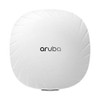
HPE JZ357A Aruba 550 Series Wi-Fi 6 Dual Radio Campus Access Point
Overview
The HPE Aruba 550 Series JZ357A is a Wi-Fi 6 (802.11ax) campus access point built for high-density enterprise environments — lecture halls, open-plan offices, warehouses, and hospital wings where dozens to hundreds of concurrent clients compete for airtime. With a combined aggregate data rate of 5.37 Gbps across dual 4x4 MU-MIMO radios, it handles the throughput demands of modern mixed device fleets without requiring a forklift upgrade to your wiring closet. The 550 Series fits neatly into the HPE Aruba networking management stack, supporting Aruba Central cloud, on-prem Mobility Controller, and Instant autonomous modes — meaning you can deploy it in a greenfield cloud-managed campus or drop it into an existing controller-based architecture without replacing your management plane.
Beyond raw throughput, the JZ357A integrates IoT radio support — Bluetooth 5.0/BLE, Zigbee (802.15.4), and NFC — making it a legitimate single-infrastructure play for facilities that need to onboard asset trackers, environmental sensors, or access-control badges alongside standard Wi-Fi clients. That matters if you're planning a converged IoT+Wi-Fi rollout and want to avoid running separate IoT gateways per floor. Explore the full range of enterprise wireless access points to compare coverage profiles and radio configurations across the portfolio.
Key Features
- 5.37 Gbps aggregate throughput (HE80/HE20): The 5GHz radio tops out at 4.8 Gbps and the 2.4GHz at 1,147 Mbps. In a dense lecture hall or trading floor, 802.11ax's OFDMA sub-channel scheduling means multiple clients are served simultaneously within the same time slot — you're not just adding raw rate, you're reducing queuing latency for every device in the cell.
- 4x4 MU-MIMO with 8 spatial streams on 5GHz (dual mode): Eight spatial streams in dual-radio mode means the AP can maintain independent data pipes to up to four clients simultaneously on 5GHz. That's the difference between a conference room that degrades under load and one that holds throughput when 40 people join a video call at once.
- Tri-radio capable (optional): In tri-radio mode the 5GHz drops to 4 spatial streams per radio, but you gain a dedicated scanning radio for WIDS/WIPS or a third client-serving radio — a meaningful architectural choice for high-security or ultra-dense deployments. Confirm the tri-radio hardware SKU is specified at order time; not all 550 Series configurations ship with the third radio enabled.
- IoT radio suite — BLE 5.0, Zigbee, NFC: Native Bluetooth 5 and Zigbee 802.15.4 radios let the JZ357A act as a gateway for asset-tracking beacons, HVAC sensors, and environmental monitors without deploying separate IoT infrastructure. NFC support adds proximity-based use cases at the AP itself. If your facility management team is evaluating smart-building integrations, this is the spec to evaluate first.
- Dual uplink ports — HPE Smart Rate + 5GbE: One HPE Smart Rate RJ45 port (capable of multi-gig speeds) pairs with a dedicated 5 Gigabit RJ45, giving you link aggregation or redundant uplink paths back to the distribution layer. For environments already cabling Cat6A infrastructure, this avoids the bottleneck of a single 1GbE uplink starving a 5+ Gbps radio stack.
- 802.3at/bt PoE input (Class 4+): The AP draws power over standard 802.3at or 802.3bt PoE — no separate power brick, no additional cabling run. Class 4 minimum means a PoE switch with per-port budgeting is required; verify your switch's per-port watt allocation before deploying tri-radio mode, which may draw more than standard 802.3at Class 4 allows.
- USB 2.0 host port (up to 1A/5W): The Type-A USB port supports peripheral attachment — barcode scanners, additional IoT dongles, or USB-based environmental sensors — extending the AP's role as a wired IoT aggregation point at the ceiling mount. Practical in retail, healthcare, or manufacturing floor deployments where wired sensor drops are costly.
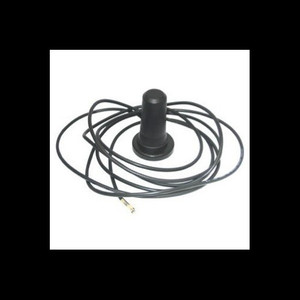
- Internal omnidirectional antennas (4.5 dBi peak): Built-in antennas eliminate the external antenna planning and theft risk of exposed dipole setups, while the 4.5 dBi gain is appropriate for standard ceiling-mount cell sizing. If you're covering long corridors or outdoor-adjacent spaces with specific azimuth patterns, evaluate the external-antenna variants in the 550 family.
- Serial console access via micro-B USB: On-site troubleshooting doesn't require network connectivity — the micro-B USB console port gives field technicians direct CLI access without a dedicated console server. Useful during initial commissioning or when the management plane is unreachable.
Integration and Compatibility
The JZ357A is managed through Aruba Central (cloud SaaS), ArubaOS Mobility Controller (on-prem), or Aruba Instant (controller-less cluster). All three management paths share the same radio firmware, so migration between management modes — cloud to controller, or Instant to controller-managed — is possible without hardware replacement. For network architects evaluating wireless network management platforms, this flexibility is a real operational hedge against future infrastructure decisions.
The dual-uplink design — Smart Rate + 5GbE — supports pairing with multi-gig network switches at the distribution layer, which is the correct infrastructure path for sustaining aggregate 5+ Gbps radio throughput to wired uplinks. 802.11 b/g/n/ac/ax backward compatibility is maintained, so legacy 802.11ac Wave 2 and 802.11n clients connect without reconfiguration.
Frequently Asked Questions
Q: What management platforms does the JZ357A support?
A: The JZ357A supports three management modes: Aruba Central (cloud-managed SaaS), Aruba Mobility Controller (on-premises controller), and Aruba Instant (controller-less autonomous clustering). All three share the same radio firmware, and migration between modes is supported without hardware changes.
Q: What is the maximum aggregate throughput of the JZ357A?
A: The JZ357A delivers up to 5.37 Gbps aggregate (HE80/HE20) — 4.8 Gbps on the 5GHz radio and 1,147 Mbps on 2.4GHz. Actual throughput depends on client capabilities, channel width, and environmental RF conditions.
Q: Does the JZ357A require a specific PoE standard?
A: Yes. The JZ357A requires 802.3at or 802.3bt PoE at Class 4 or higher. Alternatively, it accepts 48Vdc nominal (±5%) via a 1.35mm/3.5mm center-positive DC connector. Verify your PoE switch's per-port watt budget before deploying, especially if enabling tri-radio mode.
Q: What IoT radio protocols does the JZ357A support?
A: The JZ357A integrates Bluetooth 5.0 (BLE 5.0), Zigbee (802.15.4), and NFC radios alongside the Wi-Fi radios. These allow the AP to serve as an IoT gateway for asset tracking, environmental sensing, and proximity-based applications without separate IoT infrastructure.
Q: Can the JZ357A operate as a tri-radio access point?
A: The 550 Series supports an optional tri-radio configuration. In tri-radio mode, the 5GHz radio provides 4 spatial streams (vs. 8 in dual-radio mode) while the third radio can be dedicated to WIDS/WIPS scanning or additional client service. Confirm the specific tri-radio configuration is ordered — not all 550 Series SKUs include the third radio enabled by default.
Q: What is the warranty on the JZ357A?
A: The JZ357A carries a 365-day (1-year) manufacturer warranty.
The JZ357A is one of those APs where the IoT radio suite changes the deployment conversation more than the raw Wi-Fi throughput does. Most enterprise Wi-Fi 6 APs at this tier deliver comparable 802.11ax performance — the differentiator here is that native Zigbee 802.15.4, BLE 5.0, and NFC are baked in, not bolted on. I've seen facilities teams spend real money running separate IoT gateway infrastructure on every floor when an AP like this would have consolidated it from day one.
Technical Highlights:
- 8 spatial streams on 5GHz (dual-radio mode): That's full 4x4 MU-MIMO on both the transmit and receive chains — meaningful in high-density seating where four simultaneous client streams per AP is the difference between smooth video conferencing and choppy calls.
- Dual uplink ports (Smart Rate + 5GbE RJ45): Running 5.37 Gbps aggregate over a single 1GbE uplink is a known bottleneck in high-throughput Wi-Fi 6 deployments. The dual-port design — Smart Rate paired with 5GbE — gives you the path to actually deliver on the radio's throughput promise to the distribution switch, assuming Cat6A cabling is in place.
- BLE 5.0 + Zigbee + NFC IoT radios: Three distinct IoT protocols onboard means a single AP can serve as the edge aggregation point for Zigbee-based HVAC sensors, BLE asset tags, and NFC proximity triggers simultaneously — no additional gateway SKUs on the BOM.
Deployment Considerations:
- Tri-radio mode drops the 5GHz spatial stream count from 8 to 4 — if WIDS/WIPS scanning is a compliance requirement, budget that performance tradeoff into your cell sizing before committing to tri-radio density. You may need to reduce cell radius to compensate for the halved MU-MIMO capacity.
- Class 4 PoE minimum is the baseline, but tri-radio configurations may exceed standard 802.3at budgets — verify per-port wattage on your distribution switches before finalizing the BOM, or plan for 802.3bt ports at the stack.
The JZ357A is a strong fit for converged smart-building campuses — hospitals, manufacturing facilities, and corporate campuses where the IT team is being asked to absorb the IoT infrastructure budget alongside Wi-Fi. The multi-protocol IoT radio stack justifies the selection in those environments specifically; in a pure Wi-Fi-only office refresh, a lower-cost AP in the same family may be the better call.