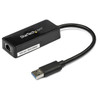
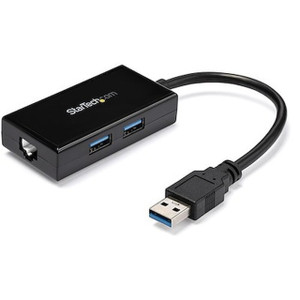
StarTech USB31000SPTB USB 3.0 to Gigabit Ethernet Adapter with USB Pass-Through
Overview
The StarTech USB31000SPTB solves a specific, recurring problem on modern ultrabooks and thin laptops: you lose a USB port the moment you plug in a wired Ethernet adapter. This adapter eliminates that tradeoff by pairing a full Gigabit Ethernet port with a USB 3.0 pass-through port on a single, compact dongle — one port consumed, two functions gained. Measuring just 11.0 in (28.0 cm) with an attached 5.7 in (14.5 cm) cable, it drops into a laptop bag without adding meaningful bulk at 1.6 oz (44.0 g). The ASIx AX88179A chipset underpins the design, a controller with broad OS driver support that makes the adapter genuinely plug-and-play across Windows, macOS, Ubuntu, and Chrome OS environments.
Key Features
- Gigabit Ethernet via USB 3.2 Gen 1 (5 Gbps bus): The USB 3.2 Gen 1 interface delivers up to 5 Gbps of raw bus bandwidth, which is more than enough headroom for Gigabit Ethernet. There is no bus bottleneck choking your wired connection down to USB 2.0 speeds — a common limitation on older adapters still sold today.
- 2 Gbps Full-Duplex Ethernet throughput: Full-duplex operation means simultaneous 1 Gbps up and 1 Gbps down on a switched Gigabit network — practically relevant for engineers transferring large configuration backups or video files to NAS storage while streaming camera feeds in the opposite direction at the same time.
- 10/100/1000 Mbps auto-negotiation: The RJ-45 port auto-negotiates down to 10 or 100 Mbps, so it works cleanly on legacy infrastructure without manual configuration. Plug into any managed or unmanaged switch and the adapter finds the right speed on its own.
- USB 3.0 pass-through port: The additional USB 3.0 Type-A port restores the host port you consumed plugging in the adapter. Connect a USB drive, a security dongle, a second adapter, or any USB peripheral without hunting for a hub — the form factor keeps cable clutter minimal at the workstation.
- ASIx AX88179A chipset: This chipset carries native driver support across Windows, macOS, Ubuntu, and Chrome OS, reducing IT deployment friction. No third-party driver packages to manage in enterprise imaging workflows; the OS recognizes the adapter on connection.
- IEEE 802.3az Energy Efficient Ethernet: Compliance with 802.3az means the adapter automatically reduces power draw during low-traffic periods — useful for laptop users on battery who keep a wired connection active throughout a shift without the adapter drawing full power continuously.
- Jumbo Frame support up to 4K: The 4K jumbo frame ceiling covers the most common jumbo frame sizes used on enterprise LANs (typically 4096 or 4500 bytes). If your storage network or VMS backend is configured for jumbo frames, the adapter can participate without fragmenting frames at the client end.
- 100m (328 ft) reach over Cat5e/Cat6: Full IEEE 802.3ab compliance means standard Gigabit distance rules apply — up to 100 meters from the adapter to the nearest switch. No special cabling required.
- USB-powered, no external supply needed: The adapter draws power entirely from the host USB port. No wall adapter, no power brick. For field engineers moving between job sites, that is one fewer item to track.
- Operating temperature 0°C to 50°C (32°F to 122°F): Suitable for climate-controlled offices and equipment rooms. Storage down to -20°C (-4°F) covers shipment and warehouse environments without risk of damage.
Integration and Compatibility
The USB31000SPTB integrates with any host running a USB 3.0 or later port. Confirmed OS compatibility covers Windows (current and recent releases), macOS, Ubuntu Linux, and Chrome OS — which makes it viable for security operations centers running mixed-OS workstations, IT teams deploying Chromebooks in managed enterprise environments, and field engineers using Ubuntu-based diagnostic tools on site. The adapter conforms to IEEE 802.3i (10BASE-T), 802.3u (100BASE-TX), 802.3ab (1000BASE-T), and 802.3az (Energy Efficient Ethernet), meaning it plugs cleanly into any standards-compliant managed switch without VLAN or QoS configuration issues on the adapter itself. Pair it with a PoE or managed network switch when deploying a temporary wired workstation at a camera commissioning site. For integrators standardizing on StarTech connectivity solutions, the USB31000SPTB fits the same sourcing workflow as StarTech's broader USB network adapters line.
Frequently Asked Questions
Q: What operating systems does the USB31000SPTB support?
A: The USB31000SPTB supports Windows, macOS, Ubuntu, and Chrome OS. The ASIx AX88179A chipset has native driver support across all four platforms, so no third-party driver packages are typically required.
Q: Does the USB31000SPTB require an external power supply?
A: No. The adapter is fully USB-powered, drawing all necessary power from the host USB port. No wall adapter or external power supply is needed.
Q: What is the maximum Ethernet speed supported by the USB31000SPTB?
A: The adapter supports 10/100/1000 Mbps auto-negotiation and delivers up to 2 Gbps in full-duplex mode (1 Gbps transmit + 1 Gbps receive simultaneously) on a Gigabit network.
Q: Does the USB31000SPTB support jumbo frames?
A: Yes. The adapter supports jumbo frames up to 4K, which covers the most common jumbo frame sizes configured on enterprise LANs and NAS storage networks.
Q: What is the warranty on the USB31000SPTB?
A: StarTech provides a 2-year manufacturer warranty on the USB31000SPTB.
Q: Can the USB31000SPTB be used with a USB 2.0 host port?
A: The adapter uses a USB 3.2 Gen 1 (5 Gbps) interface and is backward compatible with USB 2.0 ports; however, running it on a USB 2.0 host will limit throughput to USB 2.0 speeds (480 Mbps bus maximum), which caps effective Ethernet performance below Gigabit rates. A USB 3.0 or later host port is recommended to get full Gigabit Ethernet performance.
I reach for the USB31000SPTB specifically when integrators are commissioning cameras on-site with a laptop that has only USB-C and a couple of USB-A ports — the pass-through design means you can keep a wired connection to the switch and still plug in a USB security dongle for VMS licensing without pulling out a hub. The 5 Gbps USB 3.2 Gen 1 bus gives the Gigabit link genuine headroom; this is not a USB 2.0 adapter rebadged with a USB-C plug, and that distinction matters when you are transferring multi-gigabyte firmware packages or exporting camera configuration backups mid-deployment.
Technical Highlights:
- 2 Gbps full-duplex throughput: Simultaneous 1 Gbps in each direction on a Gigabit switch — relevant for any workflow pushing large data in both directions at once, such as pulling NVR footage while uploading configuration templates.
- ASIx AX88179A chipset: Native OS recognition on Windows, macOS, Ubuntu, and Chrome OS means no driver drama on mixed-OS job sites. The adapter just works when you plug it in.
- IEEE 802.3az Energy Efficient Ethernet: Reduces power draw automatically during idle periods — a practical consideration for engineers running the adapter all day on battery-powered laptops during site surveys or commissioning runs.
Deployment Considerations:
- The 5.7 in (14.5 cm) attached cable is long enough to clear most laptop port spacing but short enough to avoid tangling at a busy workstation — position the adapter flat on the desk rather than hanging free to avoid stress on the host port over extended use.
- Jumbo frame support tops out at 4K frames. If your storage network is configured for 9K jumbo frames (common on high-throughput NAS environments), the adapter will not participate at that MTU — factor that in if you are also using this adapter to access a video archive server over a jumbo-frame LAN.
For a field engineer running commissioning workflows on a Chromebook or MacBook where a wired connection is mandatory and every USB port counts, the USB31000SPTB is the right tool — it solves the port-budget problem without introducing a hub into the kit list.