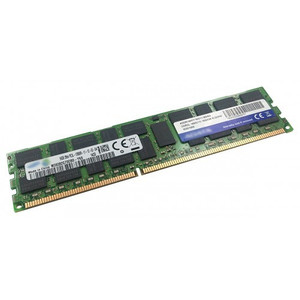
QNAP RAM-8GDR4ECT0-RD-3200 8GB DDR4-3200 ECC Registered DIMM
Overview
The RAM-8GDR4ECT0-RD-3200 is an 8GB DDR4-3200MHz ECC Registered DIMM (288-pin) designed as a capacity expansion module for compatible QNAP NAS systems. ECC (Error-Correcting Code) memory detects and corrects single-bit memory errors in real time — critical in always-on NAS environments where a silent memory fault can corrupt a RAID array or cause an unexpected system crash. The registered (buffered) design reduces electrical load on the memory controller, which matters in multi-DIMM configurations where unbuffered modules would destabilize the bus. If you are running a QNAP NAS that ships with a baseline RAM configuration and needs headroom for heavier concurrent workloads — virtualization, container stations, or high-channel surveillance recording — this module is the direct upgrade path QNAP specifies for those platforms.
Compatibility
This module is designed for QNAP NAS platforms that support DDR4-3200 ECC RDIMMs. The 288-pin R-DIMM form factor is required by QNAP's high-capacity enterprise NAS families — it is not compatible with consumer or entry-level QNAP units that use SO-DIMM slots (such as the TS-x63 series, which uses DDR3L SODIMMs). Before ordering, confirm your specific QNAP model explicitly lists DDR4 RDIMM support in its hardware specification — SO-DIMM and UDIMM platforms will not accept this module physically or electrically. Consult the QNAP compatibility list for your exact model to verify slot type, maximum supported capacity, and approved module combinations. For QNAP NAS storage systems requiring matched-pair installations, verify whether your platform requires identical modules in all populated slots for optimal memory interleaving.
Installation Notes
RAM installation on QNAP NAS platforms typically requires loosening rear panel screws and removing the chassis cover to access the DIMM slots — no specialized tools beyond a Phillips screwdriver are needed. Always power down and disconnect the unit before handling memory. Ground yourself to the chassis or use an ESD wrist strap before touching the module; DDR4 RDIMMs are sensitive to electrostatic discharge. Seat the module firmly and evenly until both retention clips engage — a partially seated RDIMM will prevent the system from posting. After reassembly, verify the new capacity is recognized in QNAP's system information panel before returning the unit to service.