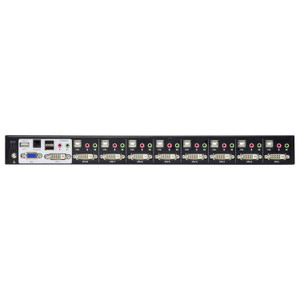
Product images are provided for reference and may not represent the exact model, configuration, or included components.

Overview

SKU: VS174
UPC: 672792003707
Condition: New
Write a Review 47% OFF

ATEN 4PORT DVI Dual Link Splitter + AUDIO/RS2 - VS174

ATEN VS174 4-Port DVI Dual Link Splitter with Audio and RS-232 ControlOverviewThe ATEN VS174 is a 4-port DVI dual-link video splitter that distributes…

$508.00 $269.99 SAVE $238
Ships same business day
In stock

Quantity:

Adding to cart… The item has been added
Compatibility guidance available for your deployment
Senior specialists for pre and post-sales support
Authorized sourcing and documentation support
Shipping and lead-time confirmation before install

Laura Bennett, IPSD Senior Specialist

Talk to Laura

200+ hrs training • U.S - based

Senior Specialist • 877-277-7147

ATEN 4PORT DVI Dual Link Splitter + AUDIO/RS2 - VS174

$508.00
$269.99

Overview

SKU: VS174
UPC: 672792003707
Condition: New

No Bots, Just Experts

Questions about this product? Free pre-sales support from a senior specialist — product questions, compatibility checks, BOM quotes, price confirmation — typically answered within one business day. Need camera placement or system design work? Engineering time is $175 per hour (qty 1 = 1 hour). Hardware buyers get up to one hour ($175) credited back on their order.

Description

ATEN VS174 4-Port DVI Dual Link Splitter with Audio and RS-232 Control

Overview

The ATEN VS174 is a 4-port DVI dual-link video splitter that distributes a single DVI source signal to four displays simultaneously, with integrated stereo audio distribution and RS-232 serial control. This is the right unit for digital signage installations, control rooms, training environments, and AV integration scenarios where one source — workstation, media player, or controller — must drive four independent DVI monitors without a separate audio matrix. The VS174 also supports rack mounting, making it a practical fit inside a standard 19-inch AV or IT rack alongside source equipment.

Compatibility

The VS174 accepts DVI dual-link input and distributes to four DVI dual-link outputs, compatible with any DVI-D or DVI-I dual-link source and display. EDID management supports three modes — Default, Port 1, and Auto — so the source negotiates correctly whether you're driving matched panels or mixed-resolution displays. The RS-232 port (DB-9 female, 19200 baud, 8N1, no flow control) pairs with the included Windows RS-232 Control Tool, compatible with the ATEN VS172 and VS174 control protocol. Firmware is field-upgradeable; current release is v1.1.103 (2021-06-30). Stereo audio is distributed via four 3.5mm mini stereo jack outputs (green), compatible with any standard powered speaker or amplifier input — 100Ω impedance, suitable for direct connection without an impedance matching transformer in most installations.

Installation Notes

Maximum cable run from unit to display is 1.8 m on the output side — plan display placement and rack position accordingly, as this is a hard limit not a guideline. The unit draws power from a single DC jack; no PoE or bus power. Operating humidity ceiling is 80% RH non-condensing, which rules out uncontrolled outdoor enclosures or high-moisture environments without additional protection. RS-232 control requires the Windows Control Tool (v1.0.064); no native IP control interface is documented in available evidence. Rack installation should account for the LxWxH dimension convention used in ATEN rack-mount product documentation.

Specifications
Mount Type: Rack
Max. Distance: 1.8 m
Impedance: 100 Ω
Output: 4 x Mini Stereo Jack Female (Green)
Edid Settings: EDID Mode: Default / Port 1 / Auto
Humidity: 0 - 80% RH, Non-Condensing
Carton Lot: 5 pcs
Firmware Upgrade: v1.1.103
s: Description
Windows: RS-232 Control Tool
Q&A
Reviews
Have Questions?

RELATED PRODUCTS

System Design, Deployment & Technical Support

Support services and planning resources for commercial surveillance, access control, and infrastructure deployments.

Fixed scope • Fixed price

System Design Assistance

  • Get help validating product compatibility
  • Coverage requirements
  • Storage planning and deployment architecture before you buy.
Request Design Help

Deployment & Configuration Support

  • Access fixed-scope support for rollout planning
  • User setup guidance
  • Migration and system standardization across single-site or multi-site deployments
View Support Services

Guides, Tools & Calculators

  • PoE requirements
  • Storage retention
  • Camera selection and deployment methodology
Open Technical Resources