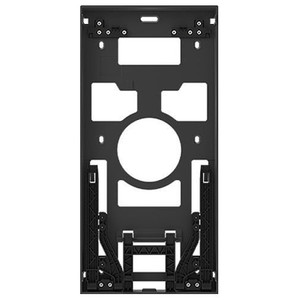
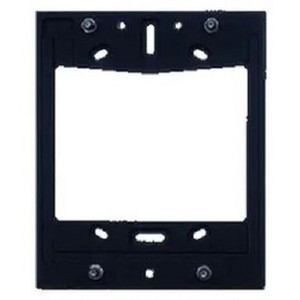
2N 02405-001 IP Style Flush Box
The 2N 02405-001 is a purpose-built recessed wall mounting enclosure designed to integrate 2N IP intercom systems and compatible Axis network security devices into standard wall cavities. Unlike surface-mounted boxes that protrude visibly, this flush-mount accessory sits inside the wall itself, leaving only the device faceplate exposed—a meaningful aesthetic and security advantage in customer-facing environments where equipment visibility undermines the interior design or creates a tampering vector.
Key Features
- Recessed Cavity Mounting: Installs into standard 2×4 stud wall framing cavities during new construction or drywall retrofit. The enclosure body sits entirely within the wall, so the installed device sits flush with the finished surface. This eliminates the bulk and visible hardware of a surface-mounted junction box—a real consideration in lobbies, executive suites, and other client-visible areas.
- 2N IP Style Intercom Compatibility: Engineered to accommodate the physical and electrical footprint of 2N door stations, call panels, and related network endpoints. The mounting template ensures proper device alignment and cable routing within the cavity before final wall closure.
- Axis Network Device Support: Works with compatible Axis network cameras and access control modules, enabling mixed-vendor deployments where 2N handles voice and door control while Axis provides video or additional sensor integration. This flexibility is standard in larger access control architectures.
- Indoor Climate-Controlled Environments Only: Not rated for outdoor, wet, or extreme temperature exposure. Suitable for interior corridors, stairwells, lobbies, mechanical rooms, and facility access points where temperature and humidity remain stable year-round. Outdoor or semi-protected applications require a different enclosure class.
- Reduces Installation Complexity: Eliminates the need for external surface conduit runs, stand-off brackets, or exposed junction boxes. The cavity installation approach keeps network and power cabling routed inside the wall during rough-in, simplifying the visual footprint and reducing service disruption during retrofit scenarios.
- Standard Wall Cavity Dimensions: Fits conventional drywall and masonry wall cavities used in North American residential and light commercial framing. Verify cavity dimensions and confirm mounting-template alignment before final wall closure to avoid installation delays.
Integration & Compatibility
The 02405-001 is engineered for 2N intercom systems, meaning it accommodates the physical envelope and electrical connections of 2N door stations and call panels. It also integrates with Axis network devices commonly deployed in the same control structure—typical in facilities where 2N manages voice and access control while Axis handles perimeter or interior video surveillance.
Installation requires coordination with your electrical and framing contractor early in the construction or renovation phase. Network and power drops must reach the cavity location before drywall is closed. After mounting the 02405-001 and securing the 2N or Axis device inside, confirm that the mounted device remains accessible for future service calls or hardware replacement—the flush design means you will need to remove drywall to reach the rear of the enclosure.
Deployment Considerations
The primary tradeoff with flush-mount design is installation timing and access. Unlike surface-mounted enclosures, the 02405-001 requires wall-cavity preparation during framing or involves cutting and patching drywall during retrofit. This cost and logistics burden is justified in customer-facing areas—lobbies, executive suites, conference rooms, and reception areas—where visible equipment racks or surface-mounted conduit detract from the interior aesthetic or create security concerns. In technical closets, back-of-house areas, or temporary deployments, surface mounting is simpler and faster.
Plan electrical rough-in carefully: power and network cables must be routed to the cavity before drywall is closed. Once the enclosure is mounted and the device is installed, service access requires removing drywall panels or junction covers. In retrofit scenarios, budget for drywall repair and finishing after installation. Coordinate with your integrator to confirm cavity dimensions match the mounting template and that cable slack is adequate for device removal.
Frequently Asked Questions
Q: Can I retrofit the 02405-001 into an existing finished wall?
A: Yes, but it requires cutting a cavity opening in the finished drywall, installing the enclosure, and patching and finishing the surrounding area. This is more involved and costly than surface mounting. Plan retrofit installations during scheduled renovations when drywall work is already budgeted.
Q: What is the mounting cavity size for the 02405-001?
A: The enclosure is designed for standard 2×4 stud framing cavities typical in North American construction. Verify your wall cavity dimensions against the mounting template provided with the unit before cutting or finalizing the installation location.
Q: Does the 02405-001 work with 2N IP intercom systems only, or can it mount other devices?
A: It is purpose-built for 2N IP intercom endpoints. It also supports compatible Axis network devices in multi-vendor deployments. For other device types, contact the manufacturer to confirm mechanical and electrical compatibility.
Q: Is the 02405-001 suitable for outdoor or wet installations?
A: No. The enclosure is rated for indoor, climate-controlled environments only. It does not provide environmental sealing beyond what a standard wall cavity offers. Outdoor or wet-location applications require an IP67-rated or equivalent enclosure designed for environmental exposure.
Q: How do I access the mounted device for service if it is installed flush in the wall?
A: The enclosure is accessible by removing the drywall panel or cover plate around it. For routine service, most network and power connections are accessible from the front. If you need to remove or replace the internal device, plan for drywall removal and patching. Ensure adequate cable slack during initial installation to allow device repositioning without breaking connections.
Q: What tools or materials do I need to install the 02405-001?
A: Basic carpentry tools (drywall saw, drill, level), a mounting template (provided), and standard electrical rough-in materials (cable clips, conduit if required by code). Your installer should follow local electrical codes and coordinate with the general contractor for framing and drywall work.
Ted PerryPerspective based on aggregated IPSD and affiliated engineering team experience.
The 2N 02405-001 is a straightforward recessed enclosure accessory that solves a real problem: visible surface-mounted junction boxes in customer-facing spaces undermine interior design and expose hardware to tampering. If your deployment includes a 2N intercom system and you care about aesthetics—lobbies, executive suites, reception areas, conference rooms—this flush-mount approach delivers a professional, integrated appearance that a surface box simply cannot match.
Technical Highlights:
- Standard 2×4 Wall Cavity Mounting: Fits conventional North American stud framing, eliminating visible surface conduit and stand-off brackets. The entire enclosure body sits within the wall; only the mounted device faceplate is exposed. This reduces visual clutter and the surface area available for tampering.
- 2N IP Style System Integration: Mechanically and electrically optimized for 2N door stations and call panels. The mounting template ensures proper alignment and cable routing during installation—a detail that matters when you're cutting a cavity and closing drywall; mistakes here mean expensive rework.
- Indoor Climate-Controlled Environments Only: No outdoor rating. This is a limitation but also a reality: if your installation is outdoors or semi-protected (covered entry, semi-conditioned space), you need a different enclosure class entirely. Know this upfront to avoid ordering the wrong unit.
Deployment Considerations:
- Installation Timing is Critical: The 02405-001 must be installed during the framing or rough-in phase for new construction. Retrofit installations into finished walls require cutting, patching, and drywall finishing—budget accordingly. This is not a "quick weekend project" in existing buildings.
- Cable and Power Routing Must Reach the Cavity Before Drywall Closes: Coordinate with your electrical contractor early. If network or power drops are not run to the cavity location during rough-in, you will face expensive wall cutting and patching later. Confirm cable slack is adequate for device removal and future service.
- Service Access Requires Drywall Removal: If you need to remove or replace the internal 2N device or perform deep maintenance, you will need to remove drywall panels or covers. This is a real gotcha: ensure your design and specifications account for planned service intervals and access requirements.
The 02405-001 is the right choice for interior, customer-visible 2N intercom deployments where aesthetics and reduced tampering surface matter more than installation speed. For back-of-house, technical closets, or outdoor/semi-protected installations, a surface-mounted enclosure or an IP-rated box is a better fit. Plan installation early—flush mounting always demands coordination with construction timelines.