Product images are provided for reference and may not represent the exact model, configuration, or included components.

Overview

SKU: VP-16-V3
Condition: New
Write a Review 12% OFF

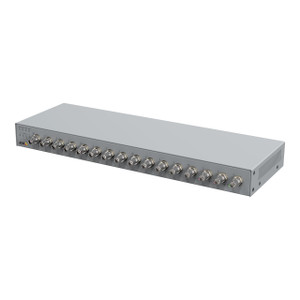
i-PRO 16 Chan. Hdtvi Encoder - VP-16-V3

i-PRO VP-16-V3 16-Channel HDTVI Encoder Overview The VP-16-V3 is a 16-channel HDTVI encoder that bridges analog and HD-TVI camera infrastructure into …

$1,295.00 $1,141.99 SAVE $153
Usually Ships Same Business Day
In stock

Quantity:

Adding to cart… The item has been added
Compatibility guidance available for your deployment
Experts for pre and post-sales support
Technical and documentation support
Shipping and lead-time confirmation before install

Laura Bennett, IPSD Senior Specialist

Talk to Laura

Specialized training • U.S - based

Senior Specialist • 877-277-7147

i-PRO 16 Chan. Hdtvi Encoder - VP-16-V3

$1,295.00
$1,141.99

Overview

SKU: VP-16-V3
Condition: New

No Bots, Just Experts

Questions about this product? Free pre-sales support from a senior specialist — product questions, compatibility checks, BOM quotes, price confirmation — typically answered within one business day. Need camera placement or system design work? Engineering time is $175 per hour (qty 1 = 1 hour). Hardware buyers get up to one hour ($175) credited back on their order.

Description

i-PRO VP-16-V3 16-Channel HDTVI Encoder

Overview

The VP-16-V3 is a 16-channel HDTVI encoder that bridges analog and HD-TVI camera infrastructure into IP-based network video recorders (NVRs). If you're retrofitting an analog CCTV plant or expanding a legacy coaxial camera system without full IP migration, this encoder extends camera lifespan by converting HD-TVI and analog signals to network streaming — eliminating costly camera replacement while preserving existing coaxial wiring runs. The unit connects to HD-TVI and analog cameras via long-distance coaxial transmission and outputs H.264-encoded video streams to your NVR or VMS.

Compatibility

The VP-16-V3 accepts HD-TVI cameras and legacy analog (CVBS) cameras on its 16 coaxial input channels. Output streams integrate with IP-based NVRs and video management systems that support RTSP/RTMP protocols — standard for most commercial-grade recorders. Verify your NVR or VMS vendor supports external RTSP encoder input before deployment. The unit does not convert standard analog PAL/NTSC directly to high-definition; it requires HD-TVI front-end cameras or HD-TVI capable analog transmitters to deliver resolution above 720p.

Installation Notes

Mount the encoder in a climate-controlled cabinet or rack near your NVR. Each coaxial input supports long transmission distances — a key advantage over point-to-point IP deployment in extended warehouse or perimeter installations. Provide 24V DC power to the encoder; do not rely on PoE. Confirm your NVR has sufficient network bandwidth and storage for 16 concurrent video streams before wiring. Test signal integrity on each coaxial run (impedance, shield grounding) to prevent frame loss or artifacting, especially on runs exceeding 200 meters.

What's in the Box

  • VP-16-V3 encoder unit
  • 16 coaxial BNC input connectors (integral)
  • 24V DC power adapter
  • Ethernet cable for NVR connection
  • Mounting bracket
  • Quick-start guide
Specifications
Brand: i-PRO
MPN: VP-16-V3
Type: 16 Chan. Hdtvi Encoder
Q&A
Reviews
Have Questions? Ask an Expert.

RELATED PRODUCTS

Hanwha SPE-1610 16-Channel Encoder - image 2

Hanwha

SKU: SPE-1610

Hanwha SPE-1610 16-Channel Encoder

16-channel analog-to-IP encoder with H.264/MJPEG and PoE power

  • Converts 16 analog cameras to IP video with H.264 and MJPEG codec options
  • PoE-powered with single Gigabit Ethernet connection for simplified installation
  • ONVIF-compliant with 4-channel audio I/O for third-party VMS integration
Special Order · Usually Ships in 2-3 Weeks
$1,375.00 $1,022.99 Save $352.01
The item has been added

System Design, Deployment & Technical Support

Support services and planning resources for commercial surveillance, access control, and infrastructure deployments.

Fixed scope • Fixed price

System Design Assistance

  • Get help validating product compatibility
  • Coverage requirements
  • Storage planning and deployment architecture before you buy.
Request Design Help

Deployment & Configuration Support

  • Access fixed-scope support for rollout planning
  • User setup guidance
  • Migration and system standardization across single-site or multi-site deployments
View Support Services

Guides, Tools & Calculators

  • PoE requirements
  • Storage retention
  • Camera selection and deployment methodology
Open Technical Resources