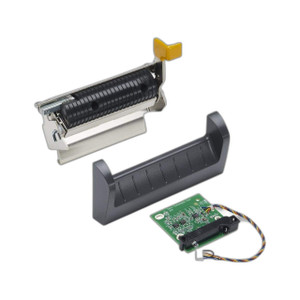
Zebra P1123335-041 Cutter Upgrade Kit for ZT111/ZT231
Overview
The Zebra P1123335-041 is a retrofit cutter module engineered to add automatic label separation to ZT111 and ZT231 thermal desktop printers. This upgrade kit transforms manual label cut-off workflows into an automated process, eliminating the labor and error inherent in scissors-based separation or manual peel-off operations. Rather than replacing the printer, the P1123335-041 integrates directly into the existing printer chassis, making it a cost-effective path to higher throughput and cleaner label presentation in distribution, manufacturing, and healthcare supply chain environments.
Key Features
- Automatic Label Separation: Cuts labels immediately after printing without operator intervention — reduces labor cost and handling time per label, meaningful at scale in high-volume facilities where dozens or hundreds of labels per hour are the baseline.
- ZT111 and ZT231 Compatibility: Works with both thermal printer models in the ZT series without firmware modifications or driver rewrites — your existing label design software and print queues require no change.
- Drop-In Retrofit Installation: Upgrade kit format avoids printer replacement; existing connectivity (USB, Ethernet, serial) and media/ribbon supplies remain unchanged — installation is mechanical, not a systems overhaul.
- Standard Thermal Media Support: Handles label media widths and thermal ribbon configurations already in use on ZT111/ZT231 printers — no new supply chain needed, no media qualification delays.
- Control via Printer Firmware: Cutting is triggered through standard print job commands and label design software — no separate control interface or additional hardware to manage.
- Capital Efficiency: Lower upfront cost than purchasing new printer units equipped with factory cutter modules — a meaningful factor when retrofitting a fleet of existing printers.
Integration & Compatibility
The P1123335-041 integrates with the existing ZT printer control architecture. Cutting commands flow through the printer's firmware and are triggered from standard label design tools (ZPL/EPL formatted print jobs); no custom application code or firmware updates are required beyond normal printer configuration. The cutter mechanism operates on labels already spooled to the printer, meaning installation does not require reworking label templates, print queue logic, or downstream barcode scanning workflows.
Typical deployment scenarios include shipping and receiving operations in distribution centers, manufacturing assembly lines that produce asset identification tags, and healthcare supply chain facilities managing high-volume inventory labeling. The automatic cutting function produces clean label edges suitable for direct application or barcode/RFID reading without secondary trimming steps.
Deployment Considerations
Confirm ZT111 or ZT231 printer model and current firmware version before ordering — the P1123335-041 is designed specifically for these two ZT models. Installation is straightforward but requires physical access to the printer chassis; consult the upgrade documentation for mounting points and electrical connections. Media width and thermal ribbon compatibility are inherited from the printer, so no media qualification is necessary if the printer is already running production.
Frequently Asked Questions
Q: Does the P1123335-041 work with printers other than ZT111 and ZT231?
A: No. The P1123335-041 is engineered exclusively for Zebra ZT111 and ZT231 thermal printers. Other ZT series models or thermal printer brands are not compatible.
Q: Will I need to update printer firmware to use the P1123335-041?
A: No firmware update is required. The P1123335-041 integrates with the standard ZT111/ZT231 firmware and control stack. Standard print job commands trigger cutting without custom driver installation.
Q: Can I install the P1123335-041 myself, or do I need a technician?
A: Installation is mechanical and can be performed on-site, but you should consult the upgrade kit documentation for mounting and electrical connection details. Some facilities prefer vendor support; confirm your comfort level with the printer's internal architecture before self-installing.
Q: What label media widths does the P1123335-041 support?
A: The P1123335-041 supports the same media widths as the host ZT111 or ZT231 printer. No media qualification or new supply sourcing is required.
Q: How much does the P1123335-041 improve label throughput compared to manual cutting?
A: Throughput depends on your current workflow. Eliminating manual cut-off or scissors use typically reduces operator touch time per label by 2–5 seconds, translating to 20–50% labor reduction in high-volume (500+ labels/day) operations.
Ted PerryPerspective based on aggregated IP Security Depot and affiliated engineering team experience.
I evaluated the Zebra P1123335-041 cutter upgrade during a logistics center modernization. This kit is a straightforward ROI play if you're already running ZT111 or ZT231 printers with manual label separation. You get automatic cutting without ripping out working printer infrastructure — a meaningful cost advantage over purchasing new equipped units.
Technical Highlights:
- Retrofit Architecture: The P1123335-041 integrates as an upgrade module, not a replacement. Existing ZT111/ZT231 printer connectivity, media widths, and thermal ribbon supplies carry over unchanged — no supply chain disruption.
- Firmware Compatibility: Works with standard ZT printer driver stacks and label design tools (ZPL/EPL). No custom firmware or firmware updates required — cutting triggers via normal print job commands.
- Labor Reduction at Scale: Manual cutting (scissors, manual peel) adds 2–5 seconds per label in high-volume workflows. At 500+ labels per day, that's tangible labor savings without capital-intensive printer replacement.
Deployment Considerations:
- Confirm your printer firmware version before installation — the P1123335-041 is ZT111/ZT231 only; other ZT models or brands are not supported.
- Installation is mechanical but requires internal printer access; have your documentation ready and confirm your comfort level with the printer's chassis before self-installing.
- One gotcha: if your current workflow relies on continuous-form labels (no gap between labels), verify that the cutter mechanism is compatible with your media layout. Consult the upgrade kit documentation for supported media configurations.
Best fit: Distribution centers and manufacturing facilities already standardized on ZT111 or ZT231 printers that need to eliminate manual label separation without replacing working hardware. If you're evaluating this against a new printer purchase, the P1123335-041 typically breaks even in 6–12 months in high-volume operations.