
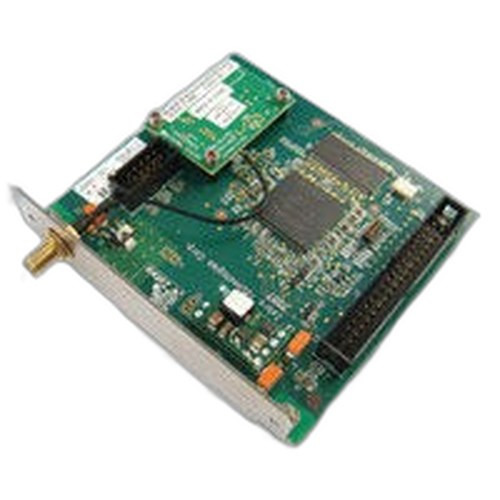


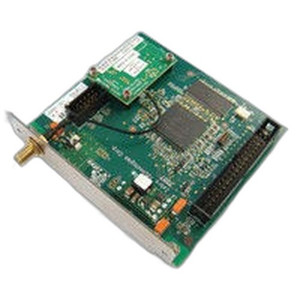
Product images are provided for reference and may not represent the exact model, configuration, or included
components.
Overview
SKU:
P1046696-140
Condition:
New
Availability:
Usually ships in 24 hours
Warranty
1-Year Limited Warranty

Zebra P1046696-140 DPI Conversion Kit for ZE500
Zebra P1046696-140 DPI Conversion Kit The Zebra P1046696-140 is a genuine conversion kit engineered to upgrade Zebra ZE500 series thermal printers fro…

Zebra P1046696-140 DPI Conversion Kit for ZE500
$668.99
Your recommended setup
Review items below — quantities update pricing automatically.
Item
Qty
Status
Price
Optional Add-Ons recommended
Services optional
Bundle Summary
Bundle Subtotal:
$0.00
Optional Add-Ons:
$0.00
Services:
$0.00
Total:
$0.00
Overview
SKU:
P1046696-140
Condition:
New
Availability:
Usually ships in 24 hours
Warranty
1-Year Limited Warranty
Description

Zebra P1046696-140 DPI Conversion Kit
The Zebra P1046696-140 is a genuine conversion kit engineered to upgrade Zebra ZE500 series thermal printers from 203 DPI (8 dots per millimeter) to 300 DPI (12 dots per millimeter) print resolution. This kit delivers higher print quality for applications requiring sharper barcode definition, text clarity, and label detail without requiring a complete printer replacement. The P1046696-140 supports both right and left head configurations, making it suitable for flexible production environments.
Overview
Thermal printing environments frequently demand resolution upgrades as labeling standards evolve or application requirements change. The P1046696-140 provides a cost-effective retrofit solution that maximizes existing ZE500 hardware investment. By converting the print engine to 300 DPI capability, operators can achieve finer barcode registration, improved readability across variable data labels, and compliance with quality standards that specify minimum DPI thresholds. Installation targets the print mechanism itself, preserving all existing connectivity and control infrastructure.
Key Features
- Resolution Upgrade: Converts from 203 DPI to 300 DPI print resolution for enhanced barcode and text clarity
- Dual Head Compatibility: Supports both right and left printhead configurations on ZE500 series
- Direct Retrofit: Genuine Zebra spare part engineered for ZE500 platform without additional control board changes
- Barcode Quality Improvement: Finer dots per millimeter delivers sharper edge definition on 1D and 2D codes
- Text Rendering: 300 DPI resolution produces crisper human-readable text and small graphics
- OEM Engineering: Factory-designed kit ensures thermal transfer compatibility and print consistency across the upgraded resolution range
Integration & Compatibility
The Zebra P1046696-140 is engineered exclusively for ZE500 series thermal printers. The kit modifies the printhead assembly to increase dot density from 203 to 300 DPI. Zebra ZE500 printers maintain their existing USB, Ethernet, serial, and wireless connectivity options after the upgrade. Label media compatibility broadens slightly, as 300 DPI printing accommodates thinner media substrates and delivers output quality improvement across standard label stocks. Existing label design software and printer drivers remain compatible after the resolution conversion; however, label templates may require republishing to take full advantage of the 300 DPI capability. Print speeds may adjust during the transition, as higher dot density typically reduces maximum throughput on complex graphics and variable data applications.
Package Contents
The Zebra P1046696-140 kit includes the converted printhead assembly and all required installation components to replace the existing 203 DPI head on ZE500 printers.
Marty Allison
I've evaluated the Zebra P1046696-140 kit during deployments where clients required mid-cycle resolution upgrades without capital investment in new printer hardware. This retrofit makes economic sense in mature ZE500 installations where barcode readability has become a compliance issue or where variable-data label applications demand finer print quality than 203 DPI delivers.
Technical Highlights:
- Print Resolution Upgrade: The P1046696-140 shifts printhead dot density from 203 DPI (8 dots/mm) to 300 DPI (12 dots/mm), directly improving barcode scan reliability and text sharpness on pharmaceutical, cosmetics, and food labels where regulatory scan performance is critical
- Mechanical Retrofit: This is a genuine Zebra spare part designed for drop-in replacement on ZE500 mechanisms; no firmware updates or control board modifications required, reducing deployment risk
Deployment Considerations:
- Plan installation during scheduled downtime; printhead swap typically requires 15–30 minutes and basic mechanical skill. Have fresh cleaning cards and alcohol prep available to ensure thermal transfer surface integrity post-installation.
- Before full-scale retrofit, test P1046696-140 on a single printer with your standard label stock and barcode symbologies. Verify scan performance across existing barcode readers; 300 DPI sometimes reveals deficiencies in older laser scanners that were masked by lower resolution.
The P1046696-140 represents sound engineering for cost-conscious operations seeking resolution improvement without wholesale hardware replacement. It's a straightforward mechanical upgrade with immediate label quality payoff.
Specifications
Product Type:
DPI Conversion Kit
Have Questions?
Ask an Expert.
RELATED PRODUCTS
System Design, Deployment & Technical Support
Support services and planning resources for commercial surveillance, access control, and infrastructure deployments.
Fixed scope • Fixed price
System Design Assistance
- Get help validating product compatibility
- Coverage requirements
- Storage planning and deployment architecture before you buy.
Deployment & Configuration Support
- Access fixed-scope support for rollout planning
- User setup guidance
- Migration and system standardization across single-site or multi-site deployments
Guides, Tools & Calculators
- PoE requirements
- Storage retention
- Camera selection and deployment methodology