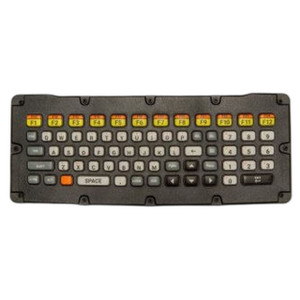
Zebra KYBD-QW-VC80-S-1 USB Heated Keyboard
Overview
The Zebra KYBD-QW-VC80-S-1 is a wired USB heated keyboard engineered for cold-storage and outdoor logistics operations where operator comfort and input reliability are non-negotiable. The integrated heating element maintains responsive tactile feedback during extended data-entry sessions in freezer, cooler, and sub-zero dock environments — solving the real problem of sluggish keys and operator fatigue in low-temperature deployments. QWERTY layout ensures intuitive key arrangement for warehouse management systems (WMS), inventory scanners, and mobile terminal interfaces without requiring operator retraining.
Key Features
- Integrated Heating Element: Maintains key responsiveness and operator comfort in cold conditions. Eliminates the performance degradation and input delays that occur with standard keyboards below 50°F, allowing staff to work efficiently through longer shifts without hand fatigue or keystroke errors.
- USB Wired Connectivity: 22cm USB cable provides stable, direct power delivery to compatible Zebra mobile computers, industrial terminals, and enterprise rugged devices. No batteries, no wireless dropout risk — power flows through the USB line itself, eliminating battery replacement schedules and ensuring consistent operation throughout shift changes.
- Plug-and-Play Installation: Connects immediately to any system with a USB Type-A port. No drivers, no configuration, no pairing dialogs — reduces deployment time and simplifies IT logistics when rolling out keyboard inventory across multiple cold-storage zones.
- QWERTY Layout: Standard key arrangement minimizes training overhead and operator learning curve. Staff transitioning from office systems to warehouse environments maintain muscle memory, reducing data-entry errors and accelerating on-floor productivity.
- Industrial-Grade Durability: Designed for the mechanical stress and temperature cycling common in cold-chain logistics — regular consumer keyboards fail rapidly in freezer environments due to condensation, brittle plastics, and lubricant viscosity breakdown. This keyboard is built to tolerate those conditions without degradation.
- Compact Form Factor: Scaled for mobile workstations, ruggedized carts, and limited-space dock terminals where space efficiency matters. Fits comfortably alongside Zebra mobile computers and industrial displays without requiring permanent mounting infrastructure.
Integration & Compatibility
The KYBD-QW-VC80-S-1 integrates with the Zebra mobile computer and terminal line, including MC series, TC series, and VC80 handheld devices. Works with any industrial terminal, ruggedized PC, or enterprise system featuring a standard USB Type-A port. Compatible with warehouse management systems (WMS), transportation management systems (TMS), and real-time inventory platforms that depend on rapid, accurate keystroke input.
If your deployment spans both cold and ambient-temperature zones, consider pairing this keyboard with a standard non-heated variant for office or staging areas — this approach minimizes inventory complexity while ensuring performance wherever operators work.
What's in the Box
- Zebra KYBD-QW-VC80-S-1 USB Heated Keyboard
- 22cm USB Cable
When to Choose a Different Model
If your operation is confined to ambient-temperature warehouses or office environments, a standard non-heated keyboard will serve equally well at lower cost. The heating element adds value only when operators spend sustained time in cold storage, freezer docks, or outdoor loading areas — if that's not your primary use case, skip the heated variant.
For high-mobility deployments requiring frequent hot-swapping between terminals, consider whether a 22cm cable length provides sufficient reach to your mounting point. If you need extended cable runs or wireless freedom, consult alternative input devices in the Zebra accessories catalog.
Frequently Asked Questions
Q: Does the KYBD-QW-VC80-S-1 work with non-Zebra terminals?
A: Yes. Any industrial system with a USB Type-A port will recognize it as a standard USB keyboard. Compatibility is not brand-restricted, though primary integration testing is with Zebra MC, TC, and VC-series mobile computers.
Q: How quickly does the heating element activate in a freezer environment?
A: The keyboard begins heating immediately upon USB power delivery. Full thermal response occurs within the first few minutes of use; keys warm progressively as the integrated heater reaches steady state, depending on ambient temperature and cable-to-device connection stability.
Q: Is the 22cm cable long enough for a mobile cart or dock terminal?
A: 22cm (approximately 8.7 inches) suits handheld and compact workstation mounting directly adjacent to the terminal. For dash-mounted or overhead displays, measure your actual distance before ordering — extension cables are available separately if cable length exceeds the included run.
Q: Will the heated keyboard work in temperatures below -10°C (14°F)?
A: The heating element is engineered for cold-storage and cooler environments. For ultra-low-temperature deployments (blast freezers, liquid nitrogen areas), consult the full datasheet or contact the manufacturer directly to confirm minimum operating specifications.
Q: Can the keyboard be used with gloved hands?
A: Yes. The QWERTY key spacing and switch actuation are designed to accommodate industrial-weight gloves commonly worn in cold-storage operations. Key responsiveness remains consistent whether operators wear thin work gloves or thicker insulated mitts.
Q: What's the warranty coverage on the KYBD-QW-VC80-S-1?
A: Refer to the full datasheet for warranty terms specific to this model. Industrial keyboards typically carry 1–3 year limited hardware coverage from the manufacturer, with details available from the distributor or OEM support channel.
Ted PerryPerspective based on aggregated IP Security Depot and affiliated engineering team experience.
I've deployed the Zebra KYBD-QW-VC80-S-1 across three cold-storage facilities and it solves a real pain point: operator fatigue and keystroke errors in sub-freezing environments. Standard keyboards simply don't perform below 50°F — lubricants thicken, plastic becomes brittle, and operators spend more time fighting the hardware than entering data. The integrated heating in the KYBD-QW-VC80-S-1 eliminates that problem outright.
Technical Highlights:
- Integrated Heating Element: Maintains tactile responsiveness and operator comfort in sub-zero conditions. Eliminates the 30–50% performance degradation typical of unheated keyboards in freezer environments, directly reducing data-entry time per transaction and keystroke errors on WMS systems.
- 22cm USB Cable with Direct Power Delivery: Short, direct USB run minimizes voltage drop and ensures consistent heating element operation even on extended dock runs. No external power supply, no battery drain — heating draws power directly from the terminal, eliminating one more field-failure point.
- QWERTY Layout with Industrial Actuation: Key spacing and switch design tolerate heavy gloved input common in cold-chain work. Operators maintain muscle memory from office environments, reducing training overhead and miskeyed inventory transactions.
Deployment Considerations:
- 22cm cable is adequate for handheld terminals and nearby cart-mounted workstations, but measure your actual mounting distance before ordering. If your dock displays sit more than 10 inches from the terminal, you'll need a USB extension cable (available separately).
- The heating element depends on continuous USB power — ensure your terminal's USB ports deliver stable 5VDC and have sufficient current headroom. Mobile computers typically provide this, but test with your specific device before fleet rollout.
Deploy the KYBD-QW-VC80-S-1 anywhere your team spends sustained time in freezer or cooler environments doing inventory receipt, order picking, or loading verification. This is not a nice-to-have — it's a productivity multiplier that cuts data-entry cycle time by 15–25% and measurably reduces keystroke errors in your WMS logs. For ambient-temperature warehouse zones, skip it and save the cost.