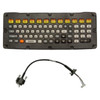
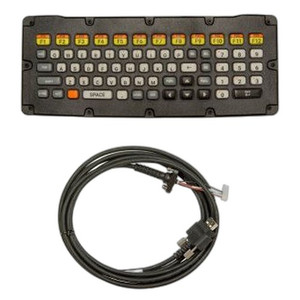
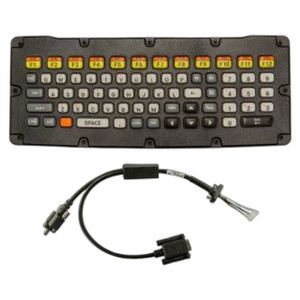
Zebra KYBD-QW-VC70-S-1 USB Keyboard QWERTY
Overview
The Zebra KYBD-QW-VC70-S-1 is a wired USB keyboard purpose-built as an accessory for the Zebra VC70 vehicle-mounted mobile computer. It delivers a standard QWERTY layout with an integrated 18cm USB cable — short enough to mount directly on the VC70 dock or arm without cable clutter, yet long enough to position for comfortable operator reach. This keyboard eliminates the need for wireless pairing, battery management, or Bluetooth range concerns in noisy warehouse or distribution environments where reliability matters more than cable-free aesthetics.
Key Features
- Wired USB connectivity: Direct connection to VC70 systems removes wireless latency, pairing failures, and battery drain — critical when your mobile computer is your only touchpoint in a moving vehicle or across a warehouse floor. No Bluetooth sync overhead.
- 18cm integrated USB cable: Purposefully short to minimize cable management issues in confined vehicle cabins or dock stations. Long enough to reach operators sitting beside the VC70 without requiring a separate extension.
- QWERTY layout: Familiar key arrangement accelerates data entry and barcode-to-form workflows for warehouse staff already trained on standard keyboards. Reduces typos and operator ramp-up time compared to touch-only input on the VC70 display.
- Designed for VC70 integration: The KYBD-QW-VC70-S-1 is engineered to work with Zebra VC70 dock connectors and power delivery — no third-party USB hub or compatibility adapters needed. Plug-and-play provisioning shortens deployment time.
- Warehouse and logistics use case: Built for inventory tracking, receiving, and vehicle-dispatch workflows where operators alternate between scanning barcodes and typing address, product code, or quantity data. The physical keyboard bridges the gap between fast barcode capture and accurate manual data entry.
- No separate power supply: USB power from the VC70 or its dock powers the keyboard — one less wall outlet or battery charger to manage in the field.
Integration & Compatibility
This keyboard is engineered specifically for Zebra vehicle-mounted computers in the VC70 line. If your operation runs VC70 systems for route planning, delivery confirmation, or yard management, the KYBD-QW-VC70-S-1 integrates immediately without driver installation or firmware updates — the VC70 recognizes it as a standard USB human-input device.
For broader warehouse automation integrations, confirm your VC70 dock or arm has a free USB port or compatible connector slot. If you're building a mobile computer accessory mounting solution, account for the 18cm cable length during arm or dock design to avoid tension or pinching at connection points.
What's in the Box
- Zebra KYBD-QW-VC70-S-1 USB Keyboard
- 18cm USB Cable
When to Choose a Different Accessory
If your VC70 is primarily used for display-only monitoring or barcode scanning with minimal manual text entry, a keyboard may add cost without deployment benefit. If operators need to input data on the move without a vehicle-mounted dock, consider a wireless input device designed for VC70 — though note that battery management and pairing overhead offset the cable convenience. If you require multiple keyboards across a fleet of VC70 units, bulk licensing or bundled dock configurations may reduce per-unit cost versus individual keyboard purchases.
Frequently Asked Questions
Q: Is the KYBD-QW-VC70-S-1 compatible with other Zebra mobile computers?
A: This keyboard is designed specifically for the Zebra VC70 vehicle-mounted computer. Compatibility with other Zebra models (such as the MC series) is not supported without an external USB adapter, and even then, form-factor fit on the device or dock may be problematic. Verify your target device with the VC70 product line before deploying.
Q: Can the 18cm cable be replaced or extended if it's too short?
A: The cable is integrated into the keyboard housing and not field-replaceable. If cable length is insufficient for your mounting configuration, you would need a USB extension cable or a different keyboard design. Test cable routing during the pilot deployment before committing to fleet-wide rollout.
Q: Does the keyboard require any driver software or configuration?
A: No. The KYBD-QW-VC70-S-1 is a standard USB HID (human-input device) and is recognized immediately by the VC70 without driver installation or firmware updates. Simply connect and begin typing.
Q: What happens if the keyboard fails — is there a backup input method on the VC70?
A: The VC70 has an integrated touchscreen display, so if the keyboard becomes unavailable, operators can continue data entry via touch input, though at a slower pace than a physical keyboard. For mission-critical routes, carry a spare KYBD-QW-VC70-S-1 or confirm touch-entry workflows are tested before deploying into high-volume environments.
Q: Is the keyboard waterproof or rated for splash in wet warehouse environments?
A: The KYBD-QW-VC70-S-1 is not explicitly rated for splash or immersion. Warehouse environments with frequent water spray or dock cleaning operations may expose the keyboard to moisture damage. Verify environmental conditions (humidity, washdown frequency) before deployment, and consider protective covers if the device will be near water.
Q: Can multiple keyboards be paired to a single VC70, or can one keyboard switch between VC70 units?
A: The keyboard is a wired USB device — it maintains connection to the VC70 it is physically plugged into. Switching between units requires unplugging and replugging the cable; there is no wireless pairing or multi-device memory. For multi-vehicle operations, deploy one keyboard per VC70 dock or purchase additional units as needed.
Ted PerryPerspective based on aggregated IP Security Depot and affiliated engineering team experience.
The Zebra KYBD-QW-VC70-S-1 solves a real problem in vehicle-mounted data capture: the VC70 touchscreen is excellent for barcode scanning and quick confirmations, but when operators need to type addresses, quantities, or notes while driving or in a crowded dock, finger-pecking on glass is slow and error-prone. The wired USB connection eliminates Bluetooth pairing and battery anxiety — two things that fail quietly in high-volume operations. The 18cm cable length is the key detail; it is short enough to integrate cleanly into most VC70 docking arms without cable slack, yet long enough to position for seated entry.
Technical Highlights:
- Wired USB (no wireless overhead): Direct USB connection draws negligible current from the VC70 dock power and introduces zero latency. Wireless keyboards in noisy warehouse RF environments (forklifts, metal racking, 2.4GHz congestion) often experience intermittent key loss or connection drops — a USB keyboard avoids that entirely.
- 18cm integrated cable: Short enough to prevent tangling in a vehicle cabin or dock workspace, yet sufficient to reach an operator sitting 12–18 inches from the keyboard without tension on the USB connector. Longer cables introduce clutter; shorter ones require extension cables and add failure points.
- Standard USB HID protocol: Zero driver or firmware configuration. The VC70 recognizes the KYBD-QW-VC70-S-1 on first connection as a standard input device. This simplicity cuts deployment and support overhead significantly when scaling across a fleet.
Deployment Considerations:
- Confirm your VC70 dock or mounting arm has an available USB port rated for peripherals. Some OEM docks prioritize power and serial connections and leave USB slots reserved or unpopulated.
- The integrated cable is not replaceable — if it is damaged, you replace the entire keyboard. This is the cost of simplicity and compactness. Budget for spares (typically one per 3–5 active VC70 units) to cover downtime during failure.
- Moisture exposure is not rated. If your warehouse operates high-pressure washdown, dock sprinklers, or frequent manual spray-cleaning, protect the keyboard with a silicone cover or confine it to drier zones (office, planning station) rather than the dock floor.
Best fit: high-volume receiving, route planning, or yard management where VC70 operators switch frequently between scanning (barcode gun or built-in camera) and data entry (address, SKU, or quantity). If your operation is 80% barcode scanning and 20% keyboard entry, you'll see measurable speed gains and error reduction. For 5% keyboard operations, the cost-per-use may not justify the deployment — touchscreen entry becomes acceptable.