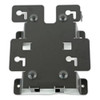
Zebra KT-152097-04 Wall Mount Kit for CC6000
Overview
The Zebra KT-152097-04 (often searched as KT 152097 04) is a wall mount kit engineered specifically for Zebra CC6000 mobile computers. This accessory converts the CC6000 from a handheld device into a fixed scanning or transaction station, eliminating the need for custom fabrication or universal bracket workarounds. If you're deploying CC6000 units in warehouse receiving bays, retail checkout lines, or inventory count stations where workers need a stable reference point, this kit handles the mechanical integration so you don't have to improvise.
Key Features
- Precise Mechanical Fit: Designed to the CC6000's exact form factor, so the device mounts securely without play or vibration — critical when you're scanning barcodes or RFID tags and need consistent optical alignment with label readers.
- Simplified Installation: Bracket mounting reduces deployment time compared to generic mount-and-adapt approaches. You mount once and move on, rather than spending labor hours on alignment and re-testing.
- Wi-Fi Connectivity Support: The mount accommodates the CC6000's Wi-Fi antenna without obstruction or performance degradation. If your facility relies on existing wireless coverage, this mount doesn't force you to run cabled connections.
- Stable Positioning: Wall mounting places the device at ergonomic heights and angles for picking, scanning, or transaction workflows. Workers interact with a fixed point-of-reference rather than managing a device that shifts or requires hand-holding during repetitive tasks.
- Industrial Environments: The kit is built for warehouse, retail, and light industrial settings where devices need to survive daily vibration, accidental bumps, and frequent operator interaction — typical of automated picking lines or high-volume checkout areas.
Integration & Compatibility
The KT-152097-04 mounts exclusively to Zebra CC6000 mobile computers. Confirm your CC6000 model before ordering. If you're integrating this kit into a larger mobile computer deployment, verify that your facility's wall structure and mounting surface can support the combined device and bracket weight. For multi-location rollouts, consider whether standardizing on wall-mounted CC6000 stations simplifies your wireless network coverage planning and reduces the need for individual chargers and docking stations.
Deployment Considerations
Wall mounting changes the operational model for your CC6000 fleet: workers move to the device rather than carrying it. This works well for fixed-position workflows (checkout, receiving, count stations) but is unsuitable for mobile picking or roaming inventory tasks. Plan power and network coverage accordingly — while the kit itself contains only mechanical components, the CC6000 still requires Wi-Fi connectivity and charging. Evaluate whether your existing wireless network reaches intended mounting locations without dead zones.
Frequently Asked Questions
Q: Is the KT-152097-04 compatible with other Zebra mobile computers?
A: No. This kit is designed exclusively for the Zebra CC6000. Other mobile computers in the Zebra portfolio require different mounts.
Q: What does the KT-152097-04 include for installation?
A: The kit includes the wall bracket assembly designed for CC6000 mounting. Verify mounting hardware and specific installation instructions in the product datasheet.
Q: Can the KT-152097-04 be mounted on surfaces other than drywall?
A: The mount is a mechanical bracket system. Confirm your wall material (drywall, concrete, metal stud) and fastening requirements before installation. Metal or concrete surfaces may require different anchor types than standard drywall fasteners.
Q: Does mounting the CC6000 affect Wi-Fi signal strength?
A: The KT-152097-04 is designed to position the CC6000 without blocking its Wi-Fi antenna. However, the mounting location itself (proximity to metal fixtures, concrete walls, or other sources of RF interference) may affect signal. Test coverage at your intended mounting height and location before full deployment.
Q: What power requirements does the mounted CC6000 have?
A: Power supply for the CC6000 is not part of this mount kit. Plan for either wireless charging integration, a nearby power outlet for a charging dock, or a tethered power cable, depending on your facility's infrastructure.
Ted PerryPerspective based on aggregated IP Security Depot and affiliated engineering team experience.
The KT-152097-04 is a no-frills mechanical accessory: it's a bracket, nothing more, and that's exactly what you need if you're converting a mobile device into a workstation. What matters here is fit, stability, and whether you're buying the right mount for your workflow. I've seen too many deployments waste hours trying to make a universal VESA arm work with something it wasn't designed for. This kit eliminates that problem — it's engineered for the CC6000, so installation is fast and alignment is predictable.
Technical Highlights:
- CC6000-Specific Fit: No adapter plates, no improvisation. The bracket interfaces directly with the device's mounting points, so vibration is minimal and re-positioning doesn't require re-alignment of readers or optical devices downstream.
- Wi-Fi Antenna Clearance: The mount is designed to keep the CC6000's wireless antenna unobstructed. In real deployments, a poorly positioned bracket can cut signal strength in half — this one anticipates that problem.
- Wall-Based Deployment Model: Moving from handheld to fixed-position changes your operational flow entirely. You're no longer managing a roaming device; you're creating a scanning station. That has implications for workflow, training, and how densely you can pack workstations in a given floor space.
Deployment Considerations:
- Surface Material Matters: Drywall, concrete, and steel stud require completely different fastening strategies. A wall-mounted device is only as stable as the anchor holding it. Survey your facility's construction before you order 50 kits.
- Power and Charging: This kit mounts the device — it doesn't provide power. You still need to route charging or integrate wireless charging infrastructure nearby. That adds hidden cost if you're not planning for it upfront.
- Coverage Validation: Test Wi-Fi connectivity at the exact mounting height and location. Metal shelving, HVAC ducts, and even some wall materials can create dead zones. One bad mount location kills productivity across an entire zone.
The KT-152097-04 makes sense for receiving bays, checkout lines, count stations, and any workflow where the CC6000 stays in one place and workers rotate through it. If you're running picking routes or need device mobility, this mount is the wrong choice — stick with a handheld CC6000 or a vehicle-mounted dock. For fixed-position scanning, it simplifies setup and removes the guesswork.