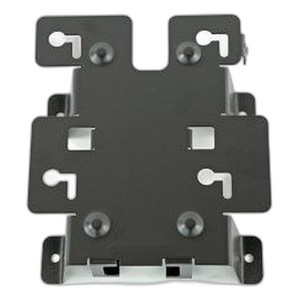
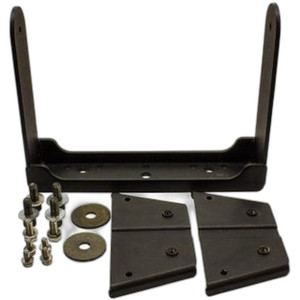
Zebra KT-152097-03 Kiosk Wall Mount Bracket Kit
Overview
The Zebra KT-152097-03 is a wall-mount bracket kit designed to secure Zebra kiosk systems to wall surfaces in retail, hospitality, and enterprise environments. This accessory eliminates floor footprint in high-traffic spaces while maintaining device accessibility for customer or staff interaction. Wall mounting also reduces installation complexity and keeps devices at eye level — a practical advantage in venues where floor-mounted displays compete for floor space or create tripping hazards.
Key Features
- Wall-Mount Design: Engineered specifically for Zebra kiosk solutions, the bracket secures devices vertically to wall surfaces, freeing valuable floor space in retail, hospitality, and warehouse environments where real estate is at a premium.
- Stable Positioning: The kit provides rigid support to prevent drift or vibration, important in high-traffic areas where devices experience frequent customer contact or accidental bumps. Professional mounting ensures consistent screen angle and accessibility.
- Semi-Permanent Installation: Designed for both permanent deployment and repositioning, allowing you to relocate or reconfigure kiosks without replacing the entire mounting system — useful as business needs change.
- Professional Appearance: Eliminates visible cabling and base clutter, presenting a clean, integrated look in customer-facing environments. This matters in retail and hospitality where aesthetics influence customer perception.
- Compatible with Zebra Kiosk Line: Engineered for integration with compatible Zebra kiosk systems, ensuring proper weight distribution and security — do not attempt to adapt this bracket to non-Zebra devices without verification.
Integration & Compatibility
The KT-152097-03 is engineered for integration with Zebra's kiosk product family. Before ordering, confirm your specific kiosk model is listed in the compatibility documentation — wall mounting tolerances are tight, and mismatched hardware can result in unsafe installation or warranty voidance. Installation requires standard wall anchors and fasteners suitable for your wall type (drywall, concrete, tile, etc.); the bracket kit itself does not include wall-specific anchors — you supply those based on your facility's construction.
Deployment Considerations
Wall mounting is ideal for retail point-of-sale kiosks, hospitality check-in stations, and warehouse scanning stations where floor space is constrained. The bracket elevates the display to a comfortable viewing height, reducing neck strain for standing users — an ergonomic factor that matters in all-day operational environments. Ensure your wall can support the total weight of the kiosk plus bracket; drywall alone may not be sufficient — you may need to mount into studs or use heavy-duty anchors. Verify electrical outlet proximity before installation; the bracket does not route power or network cables, so plan wire management separately.
Frequently Asked Questions
Q: What Zebra kiosk models work with the KT-152097-03?
A: Consult the product datasheet or Zebra's compatibility matrix to confirm your specific kiosk model. Mounting tolerances are application-specific, and using the wrong bracket can compromise device security and warranty coverage.
Q: Does the kit include wall anchors?
A: No. The bracket kit includes the mounting hardware for the kiosk itself. You supply wall anchors and fasteners appropriate for your wall type (drywall, concrete, masonry, etc.) based on the total weight of your kiosk system.
Q: Can I mount the kiosk horizontally (landscape) or vertically (portrait)?
A: The bracket is designed for a specific orientation. Refer to the installation guide to confirm whether landscape or portrait mounting is supported — rotating the bracket 90 degrees may void the warranty.
Q: Is professional installation required?
A: While the bracket is straightforward, wall mounting requires proper anchoring and weight distribution. If you lack wall-mounting experience or cannot verify wall stud locations, consult a contractor or your internal facilities team before proceeding.
Q: What is the maximum supported kiosk weight?
A: Weight limits vary by kiosk model. Check the datasheet for the maximum load rating and ensure your wall and anchors can support it. Oversized or heavy kiosks may require reinforced mounting or professional installation.
Ted PerryPerspective based on aggregated IP Security Depot and affiliated engineering team experience.
The Zebra KT-152097-03 solves a real problem: floor-mounted kiosks chew up square footage in retail and hospitality environments. This bracket kit lets you take advantage of vertical wall real estate — a meaningful shift when you're operating in a 800-square-foot retail footprint or a warehouse scanning station where every inch counts.
Technical Highlights:
- Wall-Mount Form Factor: Positions the kiosk at eye level (typically 48–60 inches from floor), reducing neck strain on all-day operators and improving ergonomics in checkout or check-in stations. This isn't a minor comfort factor — it directly reduces fatigue complaints on high-transaction days.
- Space Liberation: Frees 12–18 square feet of floor real estate per installation compared to a pedestal or floor stand. In a dense retail environment, that adds up across multiple kiosks.
- Rigid Support: The bracket is designed to prevent vibration and drift, important because customer-facing touchscreens lose credibility if they wobble or feel unstable. Solid mounting maintains the perception of a professional, purpose-built system.
Deployment Considerations:
- Wall Anchoring is Your Responsibility: The bracket kit provides the kiosk-to-bracket interface only — you must source and install wall anchors rated for your specific wall type and the total load. Drywall alone won't hold a 40–60 lb kiosk; plan for studs or heavy-duty fasteners.
- Verify Compatibility First: The KT-152097-03 is engineered for specific Zebra kiosk models. Using it on an incompatible device risks device damage, installation failure, and warranty voidance. Confirm model compatibility before ordering — this isn't a universal bracket.
- Orientation Matters: The bracket is designed for a specific mounting orientation (landscape or portrait). Rotating it 90 degrees may violate weight distribution assumptions and void the warranty.
The KT-152097-03 is the right choice for retail checkout stands, hotel check-in kiosks, and warehouse quality-control stations where floor space is scarce and ergonomics matter. Skip it if you're deploying a floor-standing information kiosk in a wide-open lobby where real estate isn't a constraint.