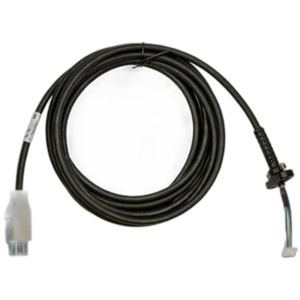
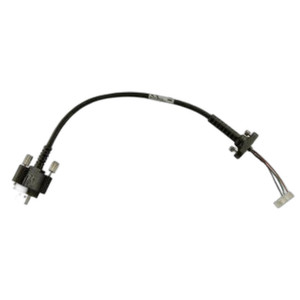
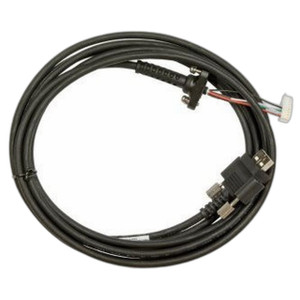
Zebra CBL-VC80-KBUS1-01 USB Keyboard Cable
Overview
The Zebra CBL-VC80-KBUS1-01 is a 22 cm (approximately 8.7 inch) wired USB cable engineered to connect external keyboards to Zebra VC80 mobile computers. This direct-attach accessory is purpose-built for field and warehouse environments where keyboard input extends operational efficiency beyond the mobile device's onboard interface. The compact cable length accommodates vehicle-mounted configurations, docking stations, and portable workstations without excess slack or cable management complexity.
Key Features
- 22 cm Cable Length: Sized specifically for VC80 mounting scenarios—desk cradles, vehicle installations, and mobile workstations. Long enough to reach standard keyboard inputs without extra coil or strain, short enough to avoid tangling in dynamic environments.
- USB Connectivity: Standard USB interface supports any compatible external keyboard, giving operators choice in input device without vendor lock-in on the keyboard itself.
- VC80-Specific Engineering: Designed to interface directly with Zebra VC80 series mobile computers, ensuring connector alignment and power delivery compatibility without adapters or third-party intermediaries.
- Rugged Field Deployment: Wired connection eliminates Bluetooth pairing overhead and battery drain on the mobile device—meaningful for all-shift operations where wireless battery management adds operational friction.
- Warehouse and Logistics Applications: Ideal for supply chain, point-of-sale, and inventory workflows where data entry volume justifies external input and the mobile computer remains stationary for extended periods.
Integration & Compatibility
The CBL-VC80-KBUS1-01 integrates with the complete Zebra VC80 mobile computer ecosystem. Zebra VC80 devices are purpose-built for cold-chain logistics, manufacturing, and warehouse automation—environments where rugged, connected data capture and input capability directly impact throughput. This cable supports standard USB keyboards, meaning your existing input peripherals work without replacement. Install the cable into the VC80's USB port, attach your keyboard, and configure input routing through the device's operating system (Android or Windows, depending on VC80 variant). For warehouse automation deployments, verify that your VC80 model includes a USB host port; earlier VC80 firmware revisions may require driver installation or configuration adjustment through the device's mobile device management (MDM) platform.
Deployment Considerations
Cable length is fixed at 22 cm—no extension is practical without introducing additional adapters, which adds failure points. If your workflow requires keyboard positioning more than 22 cm from the VC80, confirm mounting geometry during pilot or test. Wired USB connectivity means the keyboard must remain physically connected; wireless Bluetooth keyboards are an alternative if mobility is a priority, though they consume device battery and introduce pairing latency. For stationary or vehicle-mounted workflows, the wired approach is more reliable and lower-maintenance.
When to Choose a Different Approach
If your VC80 deployment emphasizes mobile, handheld scanning without stationary keyboard input, this cable is unnecessary. Consider standalone Bluetooth input devices if keyboard portability across multiple VC80 units is required. If you need extended cable reach, consult Zebra for longer USB extension options or alternative mounting strategies rather than adding third-party USB hubs, which may not meet industrial power delivery specifications.
Frequently Asked Questions
Q: Is the CBL-VC80-KBUS1-01 compatible with VC80 running Android?
A: Yes, the cable supports VC80 devices running either Android or Windows operating systems. Verify your specific VC80 variant includes a USB host port and that the OS is configured to recognize USB input devices.
Q: Can I use any standard USB keyboard with this cable?
A: Yes. The cable provides standard USB connectivity, so any USB keyboard with a Type-A female connector will work. Keyboard layout and function key mapping depend on OS configuration on the VC80, not the cable itself.
Q: Will the 22 cm length work for a vehicle-mounted VC80?
A: For most vehicle bracket and cradle configurations, yes. Measure the distance from your VC80 dock position to where the keyboard will sit before ordering. If your setup requires more than 22 cm, confirm alternative mounting geometry or request a longer cable option from your distributor.
Q: Does this cable require a driver or firmware update to work?
A: Most modern VC80 devices recognize USB keyboards automatically. Older firmware revisions may require MDM configuration or an OS update. Test with your target VC80 model and OS version in a controlled environment before rolling out across your fleet.
Q: What is the warranty on the CBL-VC80-KBUS1-01?
A: Consult your distributor or Zebra directly for warranty terms on this accessory cable. Most Zebra cables carry a 1-year limited warranty covering manufacturing defects.
Q: Is the cable shielded for use in RF-heavy environments?
A: The datasheet does not specify shielding characteristics. If your deployment involves strong RF emissions (manufacturing floors, radio-frequency identification areas), test cable operation in your specific environment before full rollout.
Ted PerryPerspective based on aggregated IP Security Depot and affiliated engineering team experience.
The CBL-VC80-KBUS1-01 is a straightforward accessory that solves a specific problem: stationary VC80 deployments that benefit from external keyboard input. At 22 cm, the cable length is deliberate—it matches the typical spacing between a vehicle-mounted or desk-positioned VC80 and a keyboard without introducing cable slack that tangles or catches on rough surfaces. This is the kind of engineering detail that matters in cold-chain logistics and warehouse floors where every second of operator efficiency compounds across a shift.
Technical Highlights:
- 22 cm Fixed Length: Eliminates coil management and tangling—the cable reaches standard keyboard positions without excess. Longer extensions introduce additional connectors and potential failure points; shorter lengths restrict keyboard placement. This length reflects real-world VC80 mounting geometries.
- USB Standard Interface: Any USB keyboard works, so you avoid proprietary keyboard lock-in. This flexibility allows operators to use devices they are familiar with and reduces spare parts inventory.
- Wired Power & Data: No Bluetooth pairing overhead, no keyboard battery drain on the VC80, no wireless latency—meaningful when data entry volume is high and session duration is measured in hours, not minutes.
Deployment Considerations:
- The VC80 must have a USB host port and proper OS/driver support for USB keyboards. Test with your exact VC80 model and firmware version before deploying across a fleet. Older VC80 hardware or firmware may not support USB input without additional configuration.
- Cable length is fixed. If your vehicle or workstation layout requires more than 22 cm between the VC80 and keyboard position, this cable alone will not work. Measure first, or confirm mounting geometry changes before committing to this accessory.
The CBL-VC80-KBUS1-01 is the correct choice for stationary or vehicle-dock VC80 workflows where keyboard input volume justifies external hardware and the mobile device location is fixed for extended periods. If your operators move between multiple VC80 units throughout the shift or work primarily in handheld scanning mode, a wireless alternative or no keyboard at all may be the better trade-off.