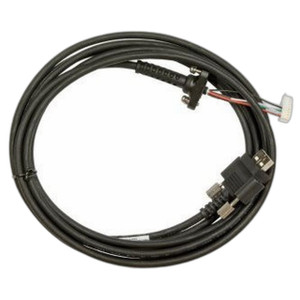
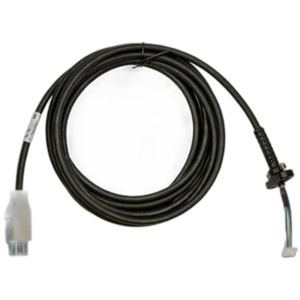
Zebra CBL-ET-KBUSB1-01 USB Type A Keyboard Cable
Overview
The Zebra CBL-ET-KBUSB1-01 is a USB Type A cable designed to connect external keyboards to Zebra mobile computers in warehouse, logistics, and distribution environments. This wired connectivity solution eliminates keyboard pairing delays and RF interference concerns common in high-density warehouse operations—critical when throughput and reliability directly affect picking accuracy and scan-to-ship velocity.
In environments where workers move between multiple fixed or mobile workstations, a reliable hardwired keyboard connection reduces drop-outs and avoids the battery drain of wireless peripherals. The CBL-ET-KBUSB1-01 integrates directly into Zebra's standard dock and connector ecosystem, meaning it plugs into existing infrastructure without requiring additional adapters or configuration.
Key Features
- USB Type A Connectivity: Standard USB Type A connector ensures compatibility with most external keyboard systems in warehouse workstations. No proprietary adapters needed—reduces spare-parts inventory and simplifies replacement cycles.
- Warehouse-Grade Reliability: Designed for the electrical and mechanical demands of 24/7 warehouse operations. Hardwired connection eliminates wireless interference from dense networks of mobile devices, barcode scanners, and RF readers operating on the same floor.
- Dock Integration: Works with Zebra mobile computing platforms via standard dock configurations. Keyboard power and data flow through the same connection point, reducing cable clutter at the workstation.
- Data and Power Transmission: Supports both data and power delivery over a single cable run. Typical warehouse keyboards draw minimal current, so the CBL-ET-KBUSB1-01 handles both streams without strain on the mobile device's charging circuit.
- Reduced Latency: Wired USB eliminates the millisecond-scale latency that wireless keyboards introduce. For high-volume data-entry tasks (receiving, putaway, quality checks), this means fewer correction cycles and faster throughput.
- Low Maintenance Profile: No battery replacements, no Bluetooth pairing failures, no range limitations. The cable itself requires no active power; keyboard power derives from the Zebra device or dock infrastructure.
Integration and Compatibility
Before ordering, confirm that the external keyboard in your warehouse meets Zebra's USB peripheral specifications and that your Zebra mobile computer model supports USB keyboard input via dock connector. Verify dock type and connector pinout against your device documentation to ensure the CBL-ET-KBUSB1-01 mates correctly. Compatibility varies by Zebra mobile computer generation and dock revision—mismatches are rare but installation delays occur if the connector standard shifts between production runs.
This cable is a passive connector; it does not include software drivers or firmware. Installation is mechanical only: insert into the dock connector and secure any retention clips if present. No pairing, commissioning, or VMS integration is required.
Typical Deployment Scenarios
- Fixed Receiving Stations: Dock workers using the same Zebra device docked at a fixed keyboard station throughout a shift. Wired keyboard connection eliminates drift and pairing re-negotiations that slow scan-to-sort cycles.
- Cross-Dock and Sort Facilities: High-velocity operations where workers move between multiple sort stations. A docked Zebra device with hardwired keyboard at each station reduces the cognitive load of managing wireless range and battery state.
- Quality and Compliance Workstations: Areas where every keystroke is logged (e.g., hazmat, pharmaceutical, or food-safety audits). Hardwired connection provides an unambiguous audit trail with no wireless dropout risk.
When to Consider Alternatives
If your warehouse requires worker mobility around a single keyboard station (e.g., mobile device in hand while scanning items at a shelf, then returning to the keyboard for data confirmation), a wireless keyboard or Bluetooth connection may reduce cable tangle. However, wireless introduces battery management overhead and potential RF conflicts—weigh this carefully in high-density RF environments. For standard fixed-station or dock-based workflows, the CBL-ET-KBUSB1-01 remains the lower-complexity choice.
Frequently Asked Questions
Q: Will the CBL-ET-KBUSB1-01 work with any external USB keyboard?
A: The cable itself is a passive connector, so it will physically mate with any standard USB Type A keyboard. However, the Zebra mobile computer must support USB keyboard input via its dock connector. Consult your Zebra device manual to confirm keyboard support before purchase.
Q: Does the cable supply power to the keyboard?
A: The CBL-ET-KBUSB1-01 carries both data and power. Most warehouse keyboards draw minimal current, so power delivery is handled through the Zebra device or dock power supply. Verify that your keyboard's power requirement does not exceed the dock output specification.
Q: Can I use this cable with a mobile device not in a dock?
A: The cable is designed for dock-based connectivity. Direct connection to a mobile device without a dock is not a typical use case and may not be supported by your Zebra model.
Q: What is the cable length?
A: Consult the product datasheet or contact your supplier for exact cable length specifications.
Q: Is there a warranty on the CBL-ET-KBUSB1-01?
A: Zebra cables typically carry a 1-year hardware warranty against manufacturing defects. Confirm warranty terms with your authorized Zebra dealer.
Ted PerryPerspective based on aggregated IP Security Depot and affiliated engineering team experience.
The Zebra CBL-ET-KBUSB1-01 is a straightforward passive cable—no firmware, no configuration—but that simplicity is precisely why it's reliable in warehouse environments where complexity and downtime are expensive. I've seen too many sites burned by wireless keyboard range issues or pairing loops during peak volume. Hardwired USB eliminates that class of failure entirely.
Technical Highlights:
- Dual-Purpose Connector: Data and power over a single line reduces workstation clutter and simplifies cable management—especially important in tight dock-station footprints where every inch of desktop matters.
- Zero Latency Path: Wired USB eliminates the millisecond delays and dropout windows that wireless introduces. For high-speed data-entry workflows (e.g., ASN receive or cycle-count verification), this translates to measurably faster throughput and fewer correction loops.
- Dock-Centric Design: Integrates into existing Zebra mobile computer dock ecosystems—no USB hub, no bluetooth dongle, no extra power supply. Fewer single points of failure.
Deployment Considerations:
- Verify dock connector type and pinout match your Zebra model revision before ordering. Dock standards shift between production runs; a mismatched connector is a costly mis-delivery.
- Confirm your keyboard's power draw against your dock's USB power budget. Most wireless-replacement keyboards are low-current, but industrial keypads or backlighting can push beyond typical 500mA allocations.
Deploy the CBL-ET-KBUSB1-01 at fixed workstations where throughput and reliability are locked: receiving docks, sort-center stations, compliance workstations. If your workflow demands mobility around a single keyboard, re-evaluate—wireless or a second docked device may reduce cable fatigue and ergonomic strain.