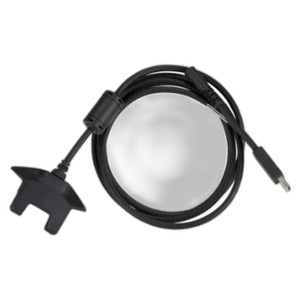
Zebra CBL-TC5X-USBC2A-01 USB-C to USB-A Cable
Overview
The Zebra CBL-TC5X-USBC2A-01 is a wired USB-C to USB-A connectivity cable engineered to pair TC5X mobile computers with standard USB-A host systems, charging docks, and infrastructure common in warehouse, retail, and logistics environments. This is a straightforward replacement or additional cable — no surprises, no compatibility guessing required.
Key Features
- USB-C to USB-A Interface: Connects the USB-C port on Zebra TC5X devices to any standard USB-A port, eliminating the need for adapters when integrating with legacy docking stations or host systems that haven't migrated to USB-C.
- Data Transfer and Charging: Supports both simultaneous data sync and power delivery, so you can charge the TC5X and offload mission-critical data (inventory updates, capture logs, receipts) without unplugging and re-plugging between operations.
- Warehouse-Grade Durability: Built to tolerate daily flex, storage in warehouse bags, and repeated insertion cycles typical of high-turnover mobile computing environments — not a fragile lab cable.
- TC5X Ecosystem Integration: Designed for the Zebra TC5X line of mobile computers, ensuring pin-level compatibility and signal integrity without risk of partial data loss or intermittent charging issues that sometimes plague third-party cables.
- Hot-Swap Ready: Works seamlessly with Zebra docking stations and charging cradles commonly deployed across retail point-of-sale, warehouse management systems (WMS), and field logistics fleets.
Compatibility and Integration
The CBL-TC5X-USBC2A-01 (often searched as CBL TC5X USBC2A 01) is engineered explicitly for Zebra TC5X mobile computers. If you operate a multi-device fleet mixing older Zebra models (e.g., MC series) with newer TC5X units, verify that legacy devices use a different connector — this cable will not retrofit them. Conversely, if you've standardized on TC5X across your warehouse or logistics operation, one cable type simplifies spare-parts inventory and training.
When selecting a mobile computer cable, confirm three things: (1) the TC5X's USB-C port matches your host or dock's USB-A port (yes, it does), (2) you have at least one cable per device or per charging station to avoid bottlenecks during shift changeovers, and (3) you keep a spare in your mobile device kit — cables wear faster than the devices they serve.
Deployment Context
Deploy this cable in any environment where TC5X units dock regularly: warehouse receiving areas, inventory count floors, last-mile delivery vehicle return stations, and retail stockrooms. The cable's wired design (no wireless overhead) ensures reliable, uninterrupted data upload when speed matters — particularly in high-velocity retail or time-sensitive logistics scenarios where re-scans due to lost connections cost labor and customer satisfaction.
For docking station setup, position the CBL-TC5X-USBC2A-01 as part of a multi-cable kit to handle simultaneous charge and data-sync across a bay of TC5X units. One cable per dock reduces device queue time and scales linearly with the number of simultaneous users.
What's in the Box
The package contains the CBL-TC5X-USBC2A-01 cable only. No additional adapters, splitters, or documentation are included. If you require multiple cables or mixed connector types for a heterogeneous fleet, order accordingly.
Frequently Asked Questions
Q: Is the CBL-TC5X-USBC2A-01 compatible with non-Zebra devices that have USB-C ports?
A: While the physical USB-C and USB-A connectors are standard, this cable is engineered and tested specifically for Zebra TC5X devices. Compatibility with third-party USB-C hosts is not guaranteed and is outside the manufacturer's support scope.
Q: Can I use this cable for both charging and data transfer simultaneously?
A: Yes. The CBL-TC5X-USBC2A-01 supports simultaneous charging and data transfer, allowing you to sync inventory or diagnostic logs while the device charges in a docking station.
Q: What's the length of the CBL-TC5X-USBC2A-01 cable?
A: Length specifications are not detailed in the available documentation. Refer to the manufacturer datasheet or contact the manufacturer directly for exact dimensions.
Q: Will this cable work with older Zebra mobile computers like the MC9300?
A: No. The CBL-TC5X-USBC2A-01 is designed for TC5X series only. Older Zebra models use different connectors (typically micro-USB or proprietary dock connectors) and require separate cables.
Q: How many spares should I order for a 50-unit TC5X fleet?
A: Industry practice is a 1:2 ratio (one spare for every two devices). For a 50-unit fleet, order at least 25–30 cables to handle daily wear, loss, and simultaneous docking scenarios without bottlenecks.
Ted PerryPerspective based on aggregated IP Security Depot and affiliated engineering team experience.
I've seen cable failures derail warehouse operations more than once — and it's always the cheapest thing to fix afterward. The Zebra CBL-TC5X-USBC2A-01 is a straightforward piece: it bridges TC5X devices to standard USB-A infrastructure (docks, host PCs, charging hubs). Where it shines is in fleets that have standardized on TC5X and want to eliminate connector mismatch issues that plague mixed-device environments.
Deployment Reality:
- Simultaneous Charge + Data: The cable handles both at once, which matters when your shift-end sync window is tight. Dock a full bay of TC5X units and pull 50+ devices' worth of transaction logs in parallel without unplugging anything.
- Durability in Daily Flex: This cable is built for the flex of insertion/removal cycles and storage in kit bags — it's not a lab-grade connector. That translates to fewer mid-shift failures and lower spare-parts overhead.
- TC5X-Specific Engineering: Zebra engineered this for their hardware. Third-party USB-C cables might work sometimes, but pin alignment and signal integrity are guaranteed only when you use OEM cables.
Watch-Out: This cable does not retrofit older Zebra mobile computers. If your fleet mixes TC5X with MC9300, MC93 series, or other legacy hardware, you'll need separate cables for each connector type. Inventory management gets messy fast.
Sizing Rule: Order at least one spare per two devices. Cables disappear (left on desks, lost in equipment bags) and fail under stress faster than mobile devices do. For a 30-device TC5X operation, 15 cables is the minimum; 18–20 is safer and buys you buffer for inevitable wear and misplacement.
The CBL-TC5X-USBC2A-01 is the right choice if you've committed to TC5X and run a modern dock-and-sync warehouse workflow. If you're still managing a heterogeneous device fleet or relying on ad-hoc USB adapters, standardizing on TC5X first will pay back the cable investment in reduced support burden and faster daily charging cycles.