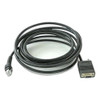
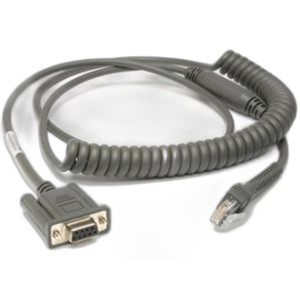
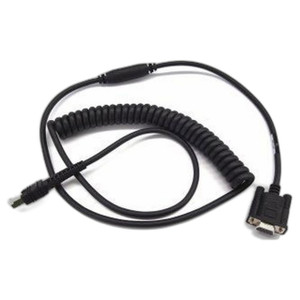
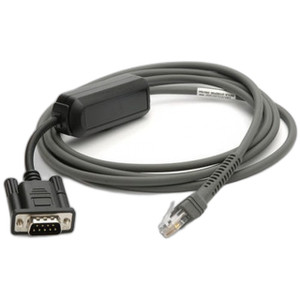
Zebra CBA-R21-S15PAR 15ft RS232 Serial Cable
Overview
The Zebra CBA-R21-S15PAR is a 15-foot RS232 serial cable engineered to connect Zebra thermal printers and compatible peripheral devices to host systems in fixed warehouse, retail, and industrial installations. This cable delivers reliable serial communication over a 15-foot run—long enough to position your printer away from your control point without signal degradation—while remaining cost-effective for legacy system integrations where USB or Ethernet connectivity is unavailable or undesirable. The DB9-F (female) straight connector with TXD-2 and 12V support ensures proper electrical alignment with standard Zebra serial ports and compatible systems requiring RS232 protocol.
Key Features
- 15-foot cable length: Covers typical warehouse and retail counter distances without the cost and complexity of active repeaters or signal boosters. Enough distance for label printers mounted on separate desks or in staging areas while keeping the control system remote.
- DB9-F connector: Female 9-pin D-sub connector matches the serial port found on most Zebra thermal printers and legacy label-print systems. No adapter needed for direct connection.
- TXD-2 support: Carries transmit data on pin 2, ensuring full-duplex serial handshaking. Critical if your printer expects real-time status feedback or command acknowledgment from the host.
- 12V auxiliary line: Powers peripheral devices or enables supply-pass-through for optional serial modules that require auxiliary voltage. Reduces the need for separate power feeds to ancillary hardware.
- Straight pin configuration: No crossed or reversed pins—direct pin-to-pin mapping from cable to connector. Eliminates confusion during installation and reduces troubleshooting time in high-volume deployments.
- Fixed-length design: Pre-terminated to exactly 15 feet; no custom cutting or field soldering required. Plug-and-play deployment shortens commissioning cycles in time-sensitive shipping and receiving environments.
Integration & Compatibility
The CBA-R21-S15PAR (often searched as CBA R21 S15PAR) is designed for Zebra thermal printer models and systems requiring legacy RS232 serial communication. Common deployment scenarios include point-of-sale label printing, shipping label generation, and warehouse receiving stations where the printer is mounted away from the host computer. The cable supports any host system with a standard DB9-M (male) serial port, including older industrial PCs, embedded controllers, and dedicated label-print servers. If your system uses USB or Ethernet natively, a serial-to-USB or serial-to-Ethernet converter may be a better choice; consult your printer documentation to confirm port availability before purchasing this cable.
Deployment Context
Choose the CBA-R21-S15PAR when you are retrofitting an existing Zebra thermal printer into a facility with fixed serial infrastructure, or when you require a simple, low-cost connection for label-print automation in warehouse or retail environments. The 15-foot length accommodates counter-to-desk or shelf-to-control-cabinet distances typical in smaller fulfillment operations. If your run exceeds 15 feet, or if you need multiple printers connected to a single host, consider a USB hub or network switch instead; serial cables degrade signal quality at distances beyond 50 feet, so plan infrastructure accordingly. This cable is not suitable for mobile or temporary installations—it is designed for fixed mounting with strain relief at both ends.
Frequently Asked Questions
Q: Does the CBA-R21-S15PAR work with all Zebra printer models?
A: The CBA-R21-S15PAR is designed for Zebra thermal printers with DB9-M (male) RS232 serial ports. Verify your printer model supports RS232 connectivity in the printer's quick-start guide or spec sheet. Newer Zebra models may use USB or Ethernet exclusively; check your hardware documentation before ordering.
Q: Can I extend the cable beyond 15 feet?
A: RS232 signal quality degrades over distance. The 15-foot length is optimal for reliable communication without active signal conditioning. If you need a longer run, use a serial-to-USB converter positioned near the printer, then run USB or Ethernet back to your host over a greater distance.
Q: What does the 12V auxiliary line do?
A: The 12V line can power optional serial modules, external scanners, or peripheral devices that draw minimal current. Check your peripheral documentation to confirm it expects 12V on the auxiliary pin before relying on it for power.
Q: Is this cable suitable for outdoor or harsh warehouse environments?
A: The CBA-R21-S15PAR is designed for standard indoor warehouse and retail temperatures. If your installation involves temperature extremes, moisture, or dust, consult the cable documentation or Zebra support to confirm environmental suitability for your specific location.
Q: What is the warranty on this cable?
A: Refer to the manufacturer's warranty documentation or contact Zebra support directly for warranty terms and coverage details for the CBA-R21-S15PAR.
Q: How do I know if my printer has a serial port?
A: Check the back or side of your Zebra printer for a 9-pin D-sub connector (DB9). If you see this port and it is not labeled Ethernet or USB, it is likely your RS232 serial port. Consult your printer's manual to confirm.
Ted PerryPerspective based on aggregated IP Security Depot and affiliated engineering team experience.
The Zebra CBA-R21-S15PAR solves a specific problem: connecting legacy thermal printers to modern host systems over a fixed, reliable serial line without incurring USB hub complexity or network infrastructure overhead. If you are integrating a Zebra thermal printer into an existing warehouse automation control system that still carries RS232 ports, this 15-foot cable eliminates custom fabrication and reduces commissioning friction. The DB9-F connector with TXD-2 and 12V support covers both data communication and auxiliary power delivery, which is why it remains relevant even as newer systems migrate to USB and Ethernet.
Technical Highlights:
- 15-foot fixed length: Ideal for counter-to-cabinet or shelf-to-PC distances in receiving and label-print stations. Longer runs degrade RS232 signal quality; if you need more distance, use an active repeater or serial-to-USB converter instead.
- TXD-2 + 12V auxiliary: Supports real-time command acknowledgment from the printer and enables low-current peripheral powering. Verify your printer and any auxiliary devices expect these signals before deploying.
- Straight pin mapping: No crossover wiring, so installation is straightforward and troubleshooting is faster. Pin mismatches are the leading cause of serial failures; this cable eliminates that variable.
Deployment Considerations:
- Confirm your Zebra printer actually has a DB9-M serial port. Many newer models ship with USB or Ethernet only; buying this cable for a USB-only printer is wasted money.
- RS232 is unshielded by nature. If your cable runs alongside power lines or near RF sources (cordless phones, wireless access points), you may see occasional checksum errors. Route the cable away from electrical conduit if possible.
- The 15-foot length is fixed. If your installation requires a different distance, you will need a different cable or an adapter; plan your layout before ordering.
Position the CBA-R21-S15PAR in fixed warehouse label-print and shipping-automation deployments where the printer location is determined and unlikely to move. For mobile carts, temporary staging areas, or multi-printer farms, consider USB hubs or network switches instead—they provide flexibility that serial cables cannot.