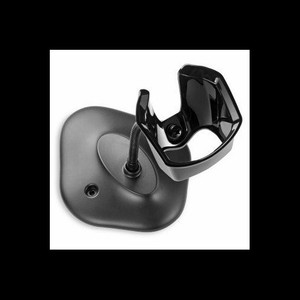
Zebra 20-71043-0BR Gooseneck Intellistand Barcode Scanner Stand
Overview
The Zebra 20-71043-0BR is a gooseneck Intellistand designed to hold barcode scanners in fixed-position point-of-sale, warehouse receiving, and dock operations. This white stand provides flexible positioning for optical scanners, enabling hands-free operation and consistent scan angles across checkout counters, sorting conveyors, and package-handling workflows.
Gooseneck stands eliminate the need for manual scanner handling — your operators keep both hands free for item manipulation, bag placement, or documentation. Consistent scanner height and angle reduce read-misses caused by inconsistent approach geometry, directly improving throughput and reducing operator fatigue during extended shifts. The 20-71043-0BR integrates seamlessly with the broader Zebra barcode scanner product line, making it a natural fit for facilities already standardized on Zebra scan engines.
Key Features
- Gooseneck Design: Flexible arm allows positioning at optimal angle and height for your specific checkout or dock layout. Adjust once during setup; operators benefit from ergonomic, repeatable scan positioning throughout the day.
- Hands-Free Operation: Scanner sits in a fixed mount, freeing operator hands for item handling, bagging, or data entry — reduces fatigue and accelerates transaction or sort cycles.
- Consistent Scan Geometry: Fixed positioning maintains uniform barcode approach angle, reducing read failures caused by manual scanning variations. Improves first-scan read rates in high-volume environments.
- Wired Connectivity: The 20-71043-0BR (often searched as 20 71043 0BR) supports standard barcode scanner cable integration — no batteries or wireless setup required. Scanner power and data pass through existing wired connections.
- White Finish: Clean, professional appearance suits retail, food distribution, and pharmaceutical warehouse environments where appearance and hygiene matter.
- Zebra Ecosystem Integration: Works with Zebra scan engine families including DS and LS series. Compatible with existing Zebra barcode infrastructure, reducing integration effort and training overhead.
Deployment Contexts
Deploy the 20-71043-0BR in checkout counters where high transaction volume demands consistent, rapid barcode capture without operator strain. Warehouse receiving docks benefit from the fixed positioning — packers and sorters keep hands free for labeling and moving items. Food distribution and retail back-office operations see improved cycle times when operators aren't gripping and aiming a handheld scanner for eight-hour shifts.
Choose a gooseneck stand over handheld scanning when throughput, ergonomics, or read-consistency matter more than mobility. If your operators need to scan items at varying heights or distances (e.g., large irregular pallets, mobile sorting carts), evaluate a mobile or articulating mount variant instead. For applications requiring scanning on-the-go, a handheld barcode scanner remains the right choice.
Integration & Compatibility
The stand is a passive mechanical accessory — no configuration required. Mount the 20-71043-0BR to a countertop, wall, or pole using the provided fastening points. Connect your Zebra barcode scanner to the stand's integrated cradle, then route the scanner's wired cable to your POS terminal, scale, or host system. Verify that your scanner's cable length and connector type match your intended mounting location.
Frequently Asked Questions
Q: What barcode scanner models does the 20-71043-0BR fit?
A: The stand is designed for Zebra barcode scanners in the DS and LS product families. Verify your specific scanner model's compatibility with Zebra technical documentation or contact the manufacturer before purchase.
Q: Can I adjust the gooseneck angle after installation?
A: Yes. The gooseneck provides flexible positioning — adjust the angle and height to match your counter layout or operator height. Once positioned for optimal scan geometry, leave it fixed to maintain consistency.
Q: What mounting surface does the 20-71043-0BR require?
A: The stand is designed for countertop or wall mounting using standard fasteners. Ensure your mounting surface (wood, laminate, or metal) can support the scanner weight and provide stable, vibration-free positioning.
Q: Is the 20-71043-0BR suitable for outdoor or high-humidity environments?
A: The stand is designed for indoor point-of-sale and warehouse use. Prolonged exposure to moisture or temperature extremes may affect longevity. For dock areas with direct sun or rain exposure, consider environmental protection or ventilation.
Q: How do I route the scanner cable with the gooseneck stand?
A: Route the cable through or alongside the gooseneck arm to your host system (POS terminal, scale, or computer). Manage cable slack to avoid pinching or tangling with operator movement.
Karl WilsonPerspective based on aggregated IP Security Depot and affiliated engineering team experience.
The Zebra 20-71043-0BR is a straightforward mechanical accessory that delivers measurable benefit in high-throughput scan environments. The gooseneck design — that flexible arm — is the entire value proposition: it positions your barcode scanner at a fixed, optimized angle and height, so your operators don't have to grip and aim a handheld device dozens of times per hour.
Technical Highlights:
- Wired Connectivity: No wireless complexity, no battery recharge cycles. Your scanner's standard cable powers and communicates through the stand without additional configuration. Reduces IT overhead in high-volume retail or warehouse settings.
- Gooseneck Flexibility: The flexible arm lets you dial in the ideal scan geometry for your specific counter height, item size, and operator reach. Once locked in, it stays consistent — eliminates the read-miss variance you get from handheld scanning.
- Zebra Ecosystem: Purpose-built for Zebra DS and LS scanners. No adapter hunting, no compatibility questions — mount, connect, and integrate with your existing Zebra barcode infrastructure.
Deployment Considerations:
- Gooseneck stands are fixed-position devices. If your workflow requires scanning items at radically different heights or distances (pallets, oversized boxes, mobile carts), you'll need a different mounting strategy — consider a mobile arm or handheld approach instead.
- Cable length and routing matter. Verify your scanner cable reaches from the stand mount to your POS terminal or scale. Long cable runs can introduce noise or slack — plan your countertop or wall cable path during installation.
The 20-71043-0BR is the right pick for retail checkouts and warehouse docks where speed, ergonomics, and read consistency trump mobility. If your operators scan from a fixed station eight hours a day, this stand recovers those ergonomic hours and boosts throughput. If they're constantly moving between stations or scanning at wildly varying heights, stick with a handheld or a more flexible mounting solution.