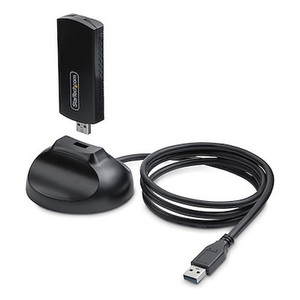
StarTech PAX2235-WIFI-6E-CARD Wi-Fi 6E PCIe Network Card with Bluetooth 5.3
Overview
The StarTech PAX2235-WIFI-6E-CARD is a PCIe 3.0 x1 wireless network adapter that brings Wi-Fi 6E (802.11ax) and Bluetooth 5.3 to any desktop with an available PCIe slot. If you're retrofitting a workstation, surveillance server, or edge compute node that needs wireless connectivity without USB dongles or hub clutter, this card gives you a stable, high-throughput path that supports the full 6GHz band — meaning you're not competing for spectrum with older 2.4GHz and 5GHz devices already on the network. It ships with a magnetic-base external antenna assembly on a 3.6 ft cable, so you can position the antennas for best signal without the card's PCIe slot location dictating your antenna orientation.
Key Features
- Wi-Fi 6E (802.11ax) — 2400Mbps max throughput: The 6GHz band access that Wi-Fi 6E enables is the practical advantage here. Legacy Wi-Fi 5 and 6 devices can't use 6GHz, so your capable clients get dedicated spectrum rather than sharing congested 5GHz channels. The 2400Mbps ceiling matters most in high-density environments where multiple streams are active simultaneously.
- PCIe 3.0 x1 interface: Installs in any standard PCIe x1, x4, x8, or x16 slot — a single slot footprint with no proprietary riser required. PCIe 3.0 delivers more than enough bus bandwidth for the card's wireless throughput, so you won't hit an interface bottleneck.
- Bluetooth 5.3 at up to 2Mbps: Handles keyboard, mouse, and peripheral pairing alongside Wi-Fi without requiring a separate Bluetooth adapter. Bluetooth 5.3 adds improved coexistence mechanisms that reduce interference between Wi-Fi and Bluetooth radios operating simultaneously — relevant when both are active on the same system.
- Dual 5dBi external antennas on a 3.6 ft magnetic base: The 3.6 ft cable lets you route the magnetic antenna base to the top of a case or a nearby metal surface rather than being confined to the rear I/O bracket. The 5dBi gain per antenna is a meaningful step up from the low-profile stub antennas common on budget cards, improving range and link stability in environments where the PC chassis would otherwise block signal.
- WPA3/WPA2 security: WPA3 is the current enterprise-grade Wi-Fi authentication standard and is required by many security-conscious IT policies. WPA2 compatibility ensures backward interoperability with existing APs that haven't been updated to WPA3.
- 4-pin IDC USB motherboard header connection: Bluetooth functionality routes through the internal USB header rather than consuming a rear-panel USB port. This keeps the card self-contained and avoids wasting external USB real estate on a permanent internal peripheral.
- Metal heatsink, aluminum construction: The metal heatsink on the card manages thermal output from the wireless chipset during sustained transfers. An aluminum card body dissipates heat passively — no fan, no noise, no moving parts to fail.
- OS support: Windows 10, 11, and Linux 6.2+: Plug-and-play under current Windows releases. Linux 6.2+ kernel support is specific enough to be useful — if your workstation or edge server runs a recent Ubuntu LTS, Debian, or Fedora release with a 6.2+ kernel, you're covered without custom driver builds.
- Operating temperature 0°C to 40°C: Standard commercial desktop range. This card is rated for conditioned indoor environments, not uncooled outdoor enclosures or industrial panels. Size it to your actual deployment space — if the chassis runs above 40°C ambient, plan for adequate case ventilation.
Integration and Compatibility
The PAX2235-WIFI-6E-CARD (often searched as PAX2235 WIFI 6E CARD) drops into any desktop motherboard with a PCIe 3.0 or later slot and a spare internal USB header for Bluetooth. It supports the full IEEE 802.11 legacy stack — 802.11a/b/g/n/ac/ax — so connecting to mixed-generation access points in the same environment won't require separate adapters. On the networking side, it pairs well with Wi-Fi 6E-capable access points; pairing it with a Wi-Fi 5 AP will cap it at 5GHz 802.11ac rates, so the 6GHz advantage only materializes with a 6E-capable AP on the other end. For deployments involving network switches and wired infrastructure, this card adds wireless fallback capability to workstations already on a wired LAN — useful for hybrid connectivity in environments where cabling a specific workstation is impractical. The 2-year manufacturer warranty covers the card for a reasonable service period in commercial deployments.
Frequently Asked Questions
Q: What PCIe slot does the PAX2235-WIFI-6E-CARD require?
A: The card uses a PCIe x1 interface (PCIe 3.0) and will physically fit in any PCIe x1, x4, x8, or x16 slot on a desktop motherboard. No special riser or adapter is needed.
Q: Does Bluetooth on the PAX2235-WIFI-6E-CARD require a separate USB cable?
A: Yes. Bluetooth functionality is routed through an internal 4-pin IDC USB motherboard header connection. You need a spare internal USB header on your motherboard to enable Bluetooth. The antenna and Wi-Fi functions work independently of this connection.
Q: Will the PAX2235-WIFI-6E-CARD work on Linux?
A: StarTech lists compatibility with Linux kernel version 6.2 and later. Check your distribution's current kernel version before purchasing — older LTS releases shipping with kernels below 6.2 may require a kernel upgrade.
Q: Does the card support WPA3?
A: Yes. The PAX2235-WIFI-6E-CARD supports both WPA3 and WPA2 security protocols, with WPA3 providing current-generation authentication for enterprise and security-conscious deployments.
Q: What is the antenna cable length and can the antenna base be repositioned?
A: The magnetic antenna base connects via a 3.6 ft (approximately 1.1m) cable, giving you enough reach to place it on top of a desktop tower or on a nearby metal surface. The magnetic base adheres to any ferrous metal surface without additional hardware.
Q: What is the warranty on the PAX2235-WIFI-6E-CARD?
A: StarTech provides a 2-year manufacturer warranty on this card.
The PAX2235-WIFI-6E-CARD stands out primarily because of the 6GHz band access — not the 2400Mbps headline number. When I look at this in a workstation or edge server deployment, the real win is spectrum isolation: 6GHz is only accessible to Wi-Fi 6E clients, so you're not fighting for airtime with every legacy device on the floor. That matters in dense office or surveillance workstation environments where the 5GHz band is already crowded.
Technical Highlights:
- Wi-Fi 6E 6GHz access: Only Wi-Fi 6E devices can use 6GHz — this card is one of the few ways to get a desktop workstation onto that band without replacing the entire machine. Paired with a 6E-capable AP, you get a private, low-interference channel that legacy devices simply can't enter.
- Dual 5dBi antennas on 3.6 ft magnetic base: The 3.6 ft cable is more useful than it sounds. Rear-panel stub antennas on PCIe cards are routinely obstructed by the case itself and nearby cabling. Routing these 5dBi antennas to the case top or an adjacent surface is a real-world signal improvement without any additional hardware.
- Bluetooth 5.3 via internal USB header: Keeps Bluetooth off your rear USB ports entirely. In workstation builds where USB ports are at a premium — KVM switches, storage devices, USB hubs — not burning a port on a permanent Bluetooth adapter is a practical advantage.
Deployment Considerations:
- Confirm your motherboard has a spare 4-pin internal USB header before ordering — without it, Bluetooth will not function, and this is a commonly overlooked compatibility check during pre-installation planning.
- The 0°C to 40°C operating range is standard commercial desktop spec. If the card is going into a workstation inside a poorly ventilated AV rack or a compact industrial enclosure, verify case ambient temperatures before deployment — sustained operation above 40°C is outside the rated envelope.
This card is the right fit for surveillance workstations or edge nodes being retrofitted for wireless connectivity in environments running Wi-Fi 6E infrastructure, where the goal is clean, dedicated 6GHz spectrum rather than bolting another USB dongle onto an already-congested setup.