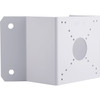
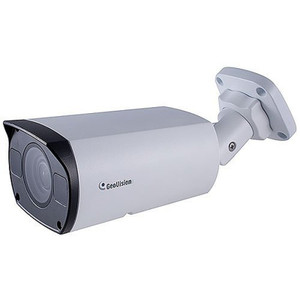
Geovision 150-MT212P-000 Wall Box Mount for Cameras
The Geovision 150-MT212P-000 is a wall-mounted box enclosure designed to house surveillance camera components, power supplies, and cabling infrastructure at edge installation points. This accessory consolidates equipment at the camera location, eliminating cable runs back to a central rack and reducing clutter on exterior walls or interior utility areas. Integrators use this mount to create a weather-sealed, organized junction point for Geovision camera systems and associated hardware.
Key Features
- Wall-Mount Form Factor: Mounts directly to interior or exterior walls. Centralizes camera power, signal conditioning, and cabling at the point of installation.
- Box Enclosure Design: Protects components from dust, moisture, and accidental contact. Maintains structural integrity in standard indoor and outdoor environments.
- Cable Management: Accommodates multiple cable entries and routing channels. Simplifies troubleshooting and maintenance by keeping connections organized and labeled.
- Equipment Accommodation: Houses power injectors, terminal blocks, cable splitters, and Geovision-compatible junction hardware. Supports standard camera connector types and accessories.
- Integration-Ready: Compatible with Geovision camera product lines. Works with PoE switches and power supplies already specified for Geovision deployments.
- Installation Flexibility: Allows equipment placement close to the camera, reducing runs of conduit or external cabling on building facades.
The 150-MT212P-000 addresses a common integration challenge: where to house PoE injectors, terminal blocks, or signal-conditioning hardware when a camera is mounted 50+ feet from the main NVR closet. Rather than running all cable back to the server room, integrators mount this box at the camera location, terminate power and signal there, then run a single consolidated cable trunk to the recording system. This approach reduces material cost, simplifies future maintenance, and avoids unnecessary exposed wiring on exterior walls.
The box design also serves as a protective barrier for outdoor installations where wind, UV exposure, or weather-driven moisture ingress is a concern. The enclosure keeps components dry and prolongs the lifespan of power supplies and connector terminals. On multi-camera deployments (10+ units), this accessory becomes part of the repeatable bill-of-materials, ensuring consistency across sites.
Geovision's broad camera ecosystem — from fixed domes to PTZ units — all benefit from standardized junction infrastructure. The 150-MT212P-000 pairs with Geovision's IP camera lines and older analog/hybrid systems, making it a versatile component in greenfield or retrofit projects. Paired with a managed PoE switch and proper cable labeling, it forms the backbone of a maintainable, field-serviceable camera installation.
Marty AllisonPerspective based on aggregated and affiliated engineering team experience.
We've specified the Geovision 150-MT212P-000 on dozens of deployments where Geovision cameras are mounted in areas far from the control room. The value is straightforward: it gives integrators a place to stage power, signal terminations, and cable transitions at the camera location instead of hiding messy junction hardware behind the camera body or leaving it dangling from a power cord. On exterior walls, that's critical — exposed junction boxes create maintenance headaches and look unprofessional. The box enclosure also isolates equipment from direct weather exposure, extending the life of PoE injectors and terminal blocks. On large campuses with distributed camera installations, standardizing on this mount across all exterior locations makes the operation predictable and repeatable.
Technical Highlights:
- Centralized Power and Signal Conditioning: Allows placement of PoE injectors or power supplies immediately adjacent to the camera, reducing cable runs and simplifying power budgeting across multiple units. Particularly useful on non-PoE cameras or older analog systems still in use.
- Weather Sealing: The box design protects internal components from rain splash, condensation, and UV-driven degradation. On long-term outdoor deployments, this translates to fewer field replacements of connectors and power supplies.
- Modular Integration: Works with Geovision's IP camera portfolio without requiring additional adapters. Compatible with standard terminal blocks, cable glands, and connector types used across Geovision systems.
- Maintenance Access: Wall-mount positioning keeps junction points visible and accessible for troubleshooting without disturbing the camera itself. Reduces mean-time-to-repair on cabling faults.
Deployment Considerations:
- Verify wall material and anchor points before installation — concrete or brick requires lag bolts; drywall alone will not support loaded equipment. Always confirm weight capacity aligns with the components being housed inside.
- Plan cable entry points and conduit routing during site survey. The box accommodates multiple entries, but overcrowding degrades cable management and complicates future moves.
- Label all terminations and power feeds immediately after installation. Field experience shows unlabeled junction boxes become liabilities six months later when a technician has to trace power or signal back to source.
- If using non-PoE Geovision cameras, budget for a separate power supply or PoE injector inside the box — account for thermal buildup in enclosed spaces and ensure adequate ventilation if equipment will be continuously energized.
- On exterior installations, apply silicone sealant around cable entry points to prevent water ingress. Condensation inside the box is a common failure mode in humid climates.
The Geovision 150-MT212P-000 is the right choice for integrators deploying Geovision cameras at distributed locations where a centralized patch panel would require impractical cable runs. It's equally at home on a small multi-camera site that needs organized, protected junction points. For projects standardizing on Geovision IP cameras and leveraging PoE infrastructure, this mount pays for itself in faster installation and lower long-term maintenance cost. See the Geovision catalog for complete camera and mounting accessory options.