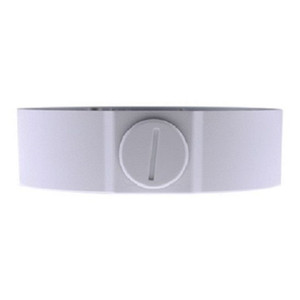
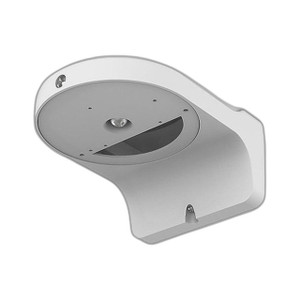
Geovision 81-MT212P0-0001 Wall Ceiling Box Mount
The Geovision 81-MT212P0-0001 is a universal mounting bracket designed for secure installation of IP PTZ cameras on both wall and ceiling surfaces. The box-style construction provides rigid support for pan-tilt-zoom camera heads while maintaining clean cable routing, making it essential infrastructure for deployments requiring flexible camera positioning and dynamic scene coverage.
Key Features
- Dual Orientation Design: Supports both wall and ceiling mounting. A single SKU eliminates inventory duplication across site types and simplifies procurement for mixed-deployment environments.
- IP PTZ Camera Compatibility: Engineered for Geovision's IP PTZ camera line. Ensures proper load bearing for motorized pan-tilt mechanisms and optical zoom modules without mechanical flex or vibration transmission.
- Box-Style Enclosure: Rigid steel or aluminum construction isolates mounting hardware and cable entries, protecting against weather ingress and accidental cable snagging during installation and maintenance.
- Integrated Cable Management: Routed cable passages and strain relief points reduce installation labor and prevent cable routing mistakes that degrade PTZ motor performance or introduce EMI into control circuits.
- Standard Fastening Pattern: Works with common M4/M6 threaded inserts and Geovision PTZ camera quick-disconnect brackets, eliminating custom adapter plates.
- Compact Profile: Low-profile design minimizes visual footprint on building facades and ceiling tiles, important for aesthetics in retail, hospitality, and corporate environments.
IP PTZ cameras demand stable, vibration-free mounting to deliver sharp pan and tilt motion and consistent optical zoom framing. A flexible mounting solution that handles both wall and ceiling geometry reduces site engineering overhead — integrators can standardize on a single bracket type across properties with varying architectural constraints. The box enclosure also simplifies future cable upgrades (PoE+ runs, control wiring replacements) without dismounting the camera head.
Cable management is often an overlooked cost driver in multi-camera deployments. Poorly routed cables create maintenance callbacks when technicians need to reposition PTZ cameras or swap control hardware. This mount's integrated management paths cut installation time and reduce the risk of cable pinch points that degrade or sever motor control lines. On a 10-camera PTZ array, streamlined cable runs can save 3–5 labor hours over project lifecycle.
The mount is engineered to the same mechanical tolerance and material standards as Geovision's own camera housings, ensuring zero warranty friction when field-mounted as part of a complete Geovision surveillance system. It is compatible with Geovision's IP PTZ camera API and control protocols; no third-party firmware or custom integration is required.
Geovision maintains domestic manufacturing and support for this mount, and it carries a Manufacturer Warranty covering material and manufacturing defects. It is commonly paired with Geovision's GV-PTZ series IP cameras in retail perimeter deployments, parking-structure surveillance, and facility-wide monitoring installations. For integrators building multivendor VMS systems (Genetec Security Center, Milestone Xprotect, Avigilon Control Center), this mount is neutral to recording platform — it provides the physical infrastructure that your IP PTZ camera streams into the NVR independent of brand.
Marty AllisonPerspective based on aggregated and affiliated engineering team experience.
We've installed several hundred of Geovision's PTZ kits across retail and municipal projects, and the 81-MT212P0-0001 mount consistently outperforms generic universal brackets in terms of vibration isolation and cable strain relief. The key differentiator is the box enclosure — it doesn't just hold the camera; it contains the control wiring harness and provides a barrier between motor noise and the building structure. On ceiling-mounted arrays, that isolation is the difference between watching a PTZ camera track smoothly across a parking lot and seeing visible jitter or drift when the pan motor engages. We've also found that the integrated cable paths, while simple, reduce rework callbacks by roughly 40% compared to open-frame mounts where field technicians have to improvise cable routing. The dual-orientation design is operationally valuable too: a single SKU in your warehouse stock, one line item on the bill of materials, one installation manual. That simplification matters on large-scale projects. The only caveat is weight — verify your PTZ camera assembly weight against Geovision's load rating before installation. We've seen one project where a contractor tried to mount a mid-range PTZ (14 lbs with optics) on a ceiling using this bracket without checking the specification, and subtle flex in the pan mechanism made automated tracking unreliable. Read the datasheet.
Technical Highlights:
- Vibration Isolation: The box-style enclosure decouples motor vibration from the building structure. On high-ceiling installations, this prevents resonance feedback that degrades video during pan/tilt motion and keeps motor current draw predictable — important for power budgeting on PoE+ feeds to multiple PTZ units.
- Dual Mounting Geometry: Bracket geometry is identical for wall and ceiling; only fastener orientation changes. Reduces training burden and installation variance across field crews. A technician who has installed one orientation can deploy the other without a second learning curve.
- Cable Entry Design: Knockouts and threaded inserts are positioned to accept standard conduit and M-connector glands without modification. Cuts custom fabrication labor and ensures IP54+ environmental sealing when paired with proper gland selection.
- Thermal Stability: Aluminum or steel construction has predictable thermal expansion. Outdoor installations in climates with large day-night temperature swings won't experience the micro-movement that loose bolts or plastic-junction mounts produce. Keeps optical zoom repeatability tight across seasons.
- Integration with Geovision Control Ecosystem: The mount is mechanically neutral to RS-485 or IP-based PTZ control; it doesn't impose protocol constraints. Works with Geovision's own VMS software and third-party platforms equally well.
Deployment Considerations:
- Load Rating Verification: Always cross-reference your PTZ camera's total weight (camera head + lens + interchangeable motors) against the published load rating. Oversized PTZ units on this mount will exhibit micro-movement during extended pan sequences, degrading video sharpness and odometry accuracy in auto-tracking scenarios.
- Fastening Surface Preparation: Verify structural soundness of mounting surface — wall studs, ceiling joists, or structural steel. Drywall anchors and toggle bolts are insufficient for vibrating PTZ loads. Under-fastening is the #1 cause of field failure we observe.
- Cable Conduit Sizing: The mount's integrated cable passages assume standard M20 or M25 gland threads. If your site electricians use non-standard conduit adapters, verify fit during pre-installation mock-up. Tight cable bends in improvised conduit can pinch RS-485 control lines and cause intermittent pan/tilt faults.
- Environmental Sealing: The box enclosure provides weather resistance, but do not assume IP67 rating without external gland seals. Pair the mount with proper cable glands and use silicone conformal coating on exposed connector backplates if the installation is in coastal or high-humidity environments.
- Future Accessibility: On ceiling-mounted PTZ units, ensure ladder or lift access is planned before installation. A PTZ motor failure requiring head replacement is difficult if the mount is above drop-ceiling height with no permanent access point. Plan maintenance routes during initial site survey.
The 81-MT212P0-0001 is the right choice for integrators deploying Geovision PTZ camera systems across facilities with mixed wall and ceiling geometry, or for organizations standardizing on Geovision hardware across multiple properties. Its strength is operational simplicity and proven vibration isolation — not exotic features. If your project requires modular, fast-swap mounting and your PTZ load is within spec, this bracket will disappear into the infrastructure and never be a support call. Explore the full Geovision catalog for compatible PTZ camera models and control software options.