Image coming soon
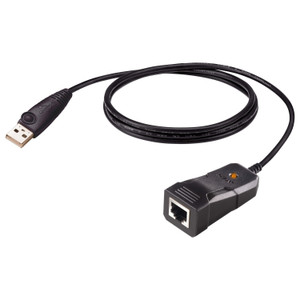
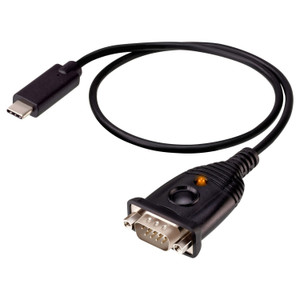
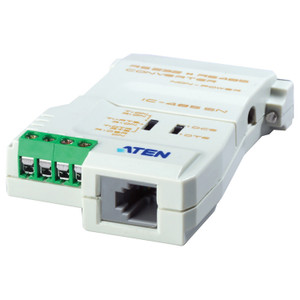
Product images are provided for reference and may not represent the exact model, configuration, or included components.

Overview

SKU: UC232AF
UPC: 672792015977
Condition: New
Write a Review 0% OFF

ATEN USB TO RS-232 Adapter (ftdi Chipset) - UC232AF

ATEN UC232AF USB to RS-232 Adapter (FTDI Chipset)OverviewThe UC232AF is a bus-powered USB-to-RS-232 adapter built around an FTDI chipset, delivering a…

$22.00 $21.99 SAVE $0
Ships same business day
In stock

Quantity:

Adding to cart… The item has been added
Compatibility guidance available for your deployment
Senior specialists for pre and post-sales support
Authorized sourcing and documentation support
Shipping and lead-time confirmation before install

Laura Bennett, IPSD Senior Specialist

Talk to Laura

200+ hrs training • U.S - based

Senior Specialist • 877-277-7147

ATEN USB TO RS-232 Adapter (ftdi Chipset) - UC232AF

$22.00
$21.99

Overview

SKU: UC232AF
UPC: 672792015977
Condition: New

No Bots, Just Experts

Questions about this product? Free pre-sales support from a senior specialist — product questions, compatibility checks, BOM quotes, price confirmation — typically answered within one business day. Need camera placement or system design work? Engineering time is $175 per hour (qty 1 = 1 hour). Hardware buyers get up to one hour ($175) credited back on their order.

Description

ATEN UC232AF USB to RS-232 Adapter (FTDI Chipset)

Overview

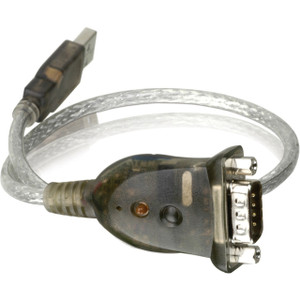
The UC232AF is a bus-powered USB-to-RS-232 adapter built around an FTDI chipset, delivering a clean serial connection for legacy DB-9 devices without requiring a discrete power supply. At up to 921.6 Kbps, it handles the full speed range of RS-232 peripherals — PTZ camera serial controllers, access control panels, legacy KVM equipment, and serial console management ports — making it a practical bridge wherever a modern USB-only workstation or server must communicate with RS-232 hardware. The 120cm cable provides enough reach to route neatly in a rack or at a workstation without requiring an extension.

Compatibility

The UC232AF connects to any host with a standard USB port and exposes a single DB-9 Male RS-232 interface for the downstream device. It is well-suited for use with ATEN KVM switches, serial console servers, and RS-232-controlled AV or IP camera PTZ receivers. The adapter operates within 0–80% RH (non-condensing), covering typical indoor rack and desktop environments. Driver support includes macOS (32-bit, v1.0.061). Confirm driver compatibility with your specific OS version before deployment, particularly in 64-bit-only environments where 32-bit driver support may be restricted.

Installation Notes

Power is drawn entirely from the USB host port — no external power supply or wall adapter needed. Connect the USB end to the host and the DB-9 Male connector to the target RS-232 device. The orange Power LED confirms the adapter is recognized and receiving bus power. For USB serial adapters used in rack environments, route the 120cm cable through a cable management arm or panel to avoid strain on the DB-9 connector. Verify that the target device's baud rate falls within the adapter's supported range (up to 921.6 Kbps) — most legacy RS-232 peripherals operate well within this ceiling. Reference the serial console management category for compatible infrastructure.

Specifications
Mount Type: Rack
Data Rate: Up to 921.6 Kbps
Serial: 1 x DB-9 Male
Cable Length: 120cm
Leds: Power (Orange)
Power Mode: Bus Powered
Usb Specification: USB compliant
Humidity: 0–80% RH, Non-condensing
s: Description
Macos: 32 bits
Q&A
Reviews
Have Questions?

RELATED PRODUCTS

System Design, Deployment & Technical Support

Support services and planning resources for commercial surveillance, access control, and infrastructure deployments.

Fixed scope • Fixed price

System Design Assistance

  • Get help validating product compatibility
  • Coverage requirements
  • Storage planning and deployment architecture before you buy.
Request Design Help

Deployment & Configuration Support

  • Access fixed-scope support for rollout planning
  • User setup guidance
  • Migration and system standardization across single-site or multi-site deployments
View Support Services

Guides, Tools & Calculators

  • PoE requirements
  • Storage retention
  • Camera selection and deployment methodology
Open Technical Resources