Image coming soon
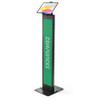
Product images are provided for reference and may not represent the exact model, configuration, or included components.

Overview

SKU: 140WSMP01W
UPC: 819472025998
Condition: New
Availability: Special Order · Usually Ships in 2-3 Weeks
Write a Review

Compulocks Universal Invisible Mount Brandable - 140WSMP01W

Compulocks 140WSMP01W Universal Invisible MountOverviewThe Compulocks 140WSMP01W is a universal invisible mount engineered for warehouse, retail, and …

$447.99
Special Order
Usually Ships in 2-3 Weeks

Quantity:

Adding to cart… The item has been added
Compatibility guidance available for your deployment
Experts for pre and post-sales support
Technical and documentation support
Shipping and lead-time confirmation before install

Laura Bennett, IPSD Senior Specialist

Talk to Laura

Specialized training • U.S - based

Senior Specialist • 877-277-7147

Compulocks Universal Invisible Mount Brandable - 140WSMP01W

$447.99

Overview

SKU: 140WSMP01W
UPC: 819472025998
Condition: New
Availability: Special Order · Usually Ships in 2-3 Weeks

No Bots, Just Experts

Questions about this product? Free pre-sales support from a senior specialist — product questions, compatibility checks, BOM quotes, price confirmation — typically answered within one business day. Need camera placement or system design work? Engineering time is $175 per hour (qty 1 = 1 hour). Hardware buyers get up to one hour ($175) credited back on their order.

Description

Compulocks 140WSMP01W Universal Invisible Mount

Overview

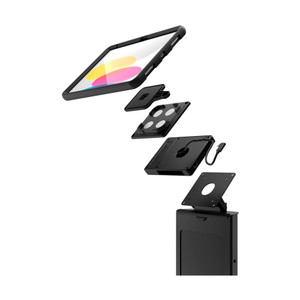
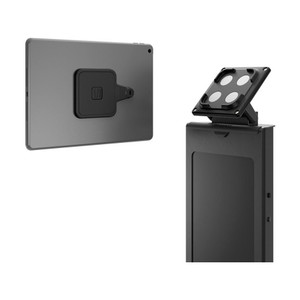
The Compulocks 140WSMP01W is a universal invisible mount engineered for warehouse, retail, and point-of-sale environments where you need to secure tablets or lightweight mobile devices without visible hardware protrusion. The 140WSMP01W solves the aesthetic problem — minimize device visibility while maintaining clean sightlines in customer-facing or inventory-heavy spaces. The brandable surface accommodates custom graphics, labels, or facility branding, letting you integrate device mounting into your existing visual identity rather than making it stand out. Deploy this in cross-dock environments, WMS workstations, logistics sorting areas, or retail kiosks where a concealed mounting footprint matters.

Compatibility

The 140WSMP01W is a universal mount supporting a broad range of tablets and mobile devices. Before deployment, verify your specific device's weight and footprint against the mount's load rating — the mount will tell you its weight limit, but you must confirm your target hardware fits that envelope. The brandable surface does not compromise structural integrity when custom graphics or labels are applied; it's designed to accept facility branding without degrading mechanical strength.

Installation Notes

Mount to wall or fixture using appropriate fasteners for your substrate — drywall, concrete, or metal stud. Ensure the mounting surface can support the combined weight of the mount and your attached device before final installation. The invisible design minimizes protrusion, but always confirm clearance with adjacent equipment, shelving, or traffic zones before commissioning. No specialized tools are required for basic mounting; follow the hardware pattern provided with the unit.

Specifications
Brand: Compulocks
MPN: 140WSMP01W
Type: Universal Invisible Mount Brandable
Mount_Type: Wall; Fixture
Form_Factor: Universal Invisible Mount
Compatible With: custom
Form Factor: Mount
Q&A
Reviews
Have Questions? Ask an Expert.

RELATED PRODUCTS

System Design, Deployment & Technical Support

Support services and planning resources for commercial surveillance, access control, and infrastructure deployments.

Fixed scope • Fixed price

System Design Assistance

  • Get help validating product compatibility
  • Coverage requirements
  • Storage planning and deployment architecture before you buy.
Request Design Help

Deployment & Configuration Support

  • Access fixed-scope support for rollout planning
  • User setup guidance
  • Migration and system standardization across single-site or multi-site deployments
View Support Services

Guides, Tools & Calculators

  • PoE requirements
  • Storage retention
  • Camera selection and deployment methodology
Open Technical Resources