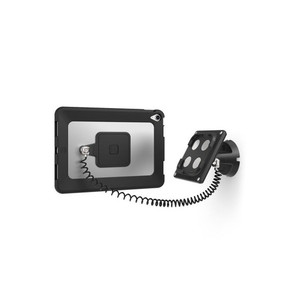
Product images are provided for reference and may not represent the exact model, configuration, or included components.

Overview

SKU: 505BUCLGVWMB
UPC: 810157342690
Condition: New
Write a Review 7% OFF

Compulocks Universal Cling Tilting Wall Mount - 505BUCLGVWMB

Compulocks 505BUCLGVWMB Universal Cling Tilting Wall MountOverviewThe Compulocks 505BUCLGVWMB is a tilting wall mount designed for secure, low-profile…

$199.00 $184.99 SAVE $14
Ships same business day
In stock

Quantity:

Adding to cart… The item has been added
Compatibility guidance available for your deployment
Senior specialists for pre and post-sales support
Authorized sourcing and documentation support
Shipping and lead-time confirmation before install

Laura Bennett, IPSD Senior Specialist

Talk to Laura

200+ hrs training • U.S - based

Senior Specialist • 877-277-7147

Compulocks Universal Cling Tilting Wall Mount - 505BUCLGVWMB

$199.00
$184.99

Overview

SKU: 505BUCLGVWMB
UPC: 810157342690
Condition: New

No Bots, Just Experts

Questions about this product? Free pre-sales support from a senior specialist — product questions, compatibility checks, BOM quotes, price confirmation — typically answered within one business day. Need camera placement or system design work? Engineering time is $175 per hour (qty 1 = 1 hour). Hardware buyers get up to one hour ($175) credited back on their order.

Description

Compulocks 505BUCLGVWMB Universal Cling Tilting Wall Mount

Overview

The Compulocks 505BUCLGVWMB is a tilting wall mount designed for secure, low-profile display installations in commercial environments. The cling-style attachment mechanism allows the mount to sit flush against wall surfaces, keeping the display tight to the wall when not tilted — useful in high-traffic corridors, reception areas, or retail floors where protruding hardware creates a snag or liability risk. If you need adjustable vertical viewing angle without a full articulating arm, this is the hardware to spec.

Compatibility

The 505BUCLGVWMB is positioned as a universal tilting wall mount within the Compulocks mounting line. For confirmed fit with a specific display model or series, cross-reference the VESA pattern and weight rating against your panel's specifications before ordering. Universal mounts in this category typically support standard VESA hole patterns — verify your display's VESA compatibility before procurement. If you are sourcing mounts for a broader display mounting deployment, confirm panel dimensions and wall construction (drywall, concrete, metal stud) match the hardware's rated load.

Installation Notes

Wall mount installations in commercial settings should account for wall substrate — concrete and masonry require appropriate anchors not typically included with the mount itself. Tilt range determines usable viewing angles post-install; set the tilt before finalizing cable routing behind the panel. For multi-display rollouts or kiosk enclosure projects, pair with compatible security enclosures or cable management accessories from the Compulocks catalog to maintain a clean, tamper-resistant finish. Confirm cable drop length accounts for tilt range — slack requirements increase as tilt angle grows.

Specifications
Device Width: 165mm – 216mm
Maximum Thickness: 9.1mm
Tilting Angle: 130 degree
Mounting Type: Wall Mount
Cable Management: Through arm
Rotation: Portrait and landscape modes
Q&A
Reviews
Have Questions?

RELATED PRODUCTS

System Design, Deployment & Technical Support

Support services and planning resources for commercial surveillance, access control, and infrastructure deployments.

Fixed scope • Fixed price

System Design Assistance

  • Get help validating product compatibility
  • Coverage requirements
  • Storage planning and deployment architecture before you buy.
Request Design Help

Deployment & Configuration Support

  • Access fixed-scope support for rollout planning
  • User setup guidance
  • Migration and system standardization across single-site or multi-site deployments
View Support Services

Guides, Tools & Calculators

  • PoE requirements
  • Storage retention
  • Camera selection and deployment methodology
Open Technical Resources