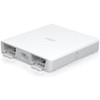
Ubiquiti UISP-P Management Device
The Ubiquiti UISP-P is a dedicated management and provisioning appliance designed as the central orchestration hub for distributed UISP infrastructure deployments. If you're running more than a handful of UISP-managed devices across customer sites or multiple locations, the UISP-P eliminates the operational burden of managing each endpoint individually. This compact controller (9.05 lb) deploys as a standard network appliance and acts as the single point of control for device discovery, firmware management, configuration, and service provisioning across your UISP ecosystem.
Key Features
- Centralized Device Management: Single console for discovery, provisioning, and lifecycle management of distributed UISP endpoints — eliminates per-device configuration overhead and reduces time-to-deployment for customer premises equipment and network nodes.
- Bulk Operations Support: Provision, configure, and firmware-update hundreds or thousands of managed devices in parallel — critical when scaling ISP fiber-to-the-premises rollouts or managed service provider multi-tenant environments without proportional NOC staffing increases.
- REST API Integration: Full REST API enables third-party integration with your existing billing platforms, NOC dashboards, and provisioning tools — you maintain control of your workflow instead of being locked into Ubiquiti's native management interfaces.
- Encrypted Management Channels: All communication between the UISP-P and managed endpoints uses encrypted channels — protects configuration data and service credentials across untrusted network segments.
- High-Availability Configuration Support: Deploy in active/passive or active/active redundancy models for critical carrier-grade environments where management plane downtime is not acceptable.
- Flexible Deployment: Operates as on-premises appliance within your secure management VLAN or as a remote controller — scales from greenfield UISP installations to integration into existing mature networks already running UISP components without architectural rework.
Integration & Compatibility
The UISP-P integrates directly into standard Ethernet networks and communicates with all UISP Wired product family endpoints through standardized protocols. REST API design allows integration with external IPAM, billing, and service assurance platforms — meaning you can automate customer onboarding, service provisioning, and compliance reporting within your existing toolchain. NTP synchronization ensures accurate provisioning timestamps across distributed deployments, critical for audit trails and service activation records.
Deployment Architecture
Install the UISP-P in a 19-inch rack or network closet with standard 10/100/1000 Ethernet connectivity and consistent power. Place it on a dedicated management VLAN to isolate control traffic from customer data; all managed UISP endpoints must have Layer 3 reachability to the controller (direct connectivity not required). Initial setup involves importing managed device credentials, defining customer account hierarchies, and establishing time synchronization — typical commissioning takes under one hour. Bandwidth consumption for management traffic is minimal; a single UISP-P handles hundreds of endpoints on standard office-grade connectivity without saturation.
Why the UISP-P Matters in Your Deployment
For ISPs and MSPs managing distributed UISP infrastructure, the UISP-P is table-stakes operational tooling. Without centralized management, per-site configuration becomes unsustainable at scale — you lose visibility into firmware versions, service status, and customer changes. The bulk provisioning and API automation capabilities collapse weeks of manual deployment work into hours. If you're deploying UISP access points, routers, or other wired infrastructure across 10+ customer sites or managing multi-tenant carrier networks, the UISP-P pays for itself in reduced operational overhead within the first deployment cycle.
Frequently Asked Questions
Q: Can I manage UISP devices without deploying an UISP-P?
A: Yes — individual UISP devices can be managed through their web interfaces or via third-party ONVIF/REST integrations. However, this becomes operationally impractical beyond a handful of devices. The UISP-P is designed for deployments where centralized lifecycle management and bulk provisioning deliver measurable time and cost savings.
Q: What network bandwidth does the UISP-P consume?
A: Management traffic from the UISP-P to endpoints is lightweight — typically kilobits per second per device. No special WAN provisioning is required unless you're managing thousands of globally distributed endpoints over congested links. Standard office-grade connectivity (100 Mbps or better) is sufficient for most deployments.
Q: Is the UISP-P redundant or high-availability capable?
A: Yes — the UISP-P supports HA configurations for critical deployments. Contact your systems integrator or authorized Ubiquiti partner for specific HA architecture guidance.
Q: What happens if the UISP-P goes offline?
A: Managed UISP endpoints continue to operate with their cached configuration. New provisioning, firmware updates, and service changes cannot be deployed until the UISP-P is restored — which is why HA deployment is recommended for carrier-grade environments.
Q: Does the UISP-P work with other Ubiquiti product families?
A: The UISP-P is designed specifically for UISP Wired infrastructure. For UniFi or EdgeMax ecosystems, use UniFi Network Management or EdgeRouter EdgeOS controllers instead.
Q: What are the API rate limits on the UISP-P?
A: Consult the UISP platform API documentation for specific rate limits and performance guidelines when integrating third-party automation tools.
Ted PerryPerspective based on aggregated IP Security Depot and affiliated engineering team experience.
The UISP-P is the operational backbone for any ISP or MSP deploying distributed UISP infrastructure at scale. If you're managing 50+ UISP endpoints across multiple customer sites, the centralized provisioning and device discovery capabilities of the UISP-P eliminate the per-site configuration friction that kills deployment schedules. The bulk operations support means you can push firmware updates or configuration changes across your entire installed base without touching individual devices — that alone justifies the hardware investment in a multi-site deployment.
Technical Highlights:
- REST API Integration: Full REST interface allows automation with billing platforms, NOC dashboards, and third-party provisioning tools — you're not locked into Ubiquiti's native UI and can embed management workflows into your existing toolchain.
- Bulk Device Operations: Provision, update, and configure hundreds of endpoints in parallel — eliminates weeks of manual per-device configuration in large ISP FTTP or MSP rollouts.
- Encrypted Management Channels: All control traffic uses encrypted communication paths between the UISP-P and managed endpoints — protects service credentials and configuration data across untrusted network segments.
- High-Availability Ready: Supports active/passive and active/active redundancy models for carrier-grade environments where management plane downtime is unacceptable.
Deployment Considerations:
- Place the UISP-P on a dedicated management VLAN isolated from customer data traffic — gives you visibility and control without risking customer network exposure.
- Managed endpoints cache their configuration locally — if the UISP-P fails, existing services continue operating, but you cannot deploy new changes until it's restored. This is why HA deployment is recommended for critical installations.
- Bandwidth consumption is minimal (kilobits per second per endpoint) — standard office-grade Ethernet is sufficient even for hundreds of managed devices.
The UISP-P is the right choice for ISP fiber-to-the-premises rollouts, managed service provider multi-tenant operations, and enterprise WAN architectures where you need centralized lifecycle management of distributed edge infrastructure. For deployments under 10–15 devices, the operational overhead may not justify the platform cost — use web UI or third-party integrations instead. For anything larger, this is the operational standard.