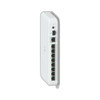
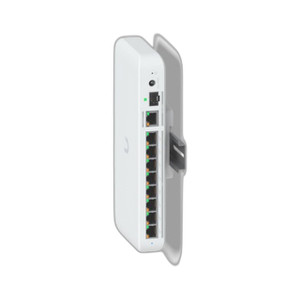
Ubiquiti UACC-SWITCH-FM Magnetic Wall Mount for Compact Switches
Overview
The Ubiquiti UACC-SWITCH-FM is a magnetic wall mount engineered specifically for UniFi compact switch models. This accessory delivers a clean, floating installation aesthetic — no visible brackets or fasteners — which matters when you're mounting network infrastructure in visible server rooms, network closets, or customer-facing equipment racks where cable management and visual cleanliness count. The magnetic coupling eliminates the need for traditional threaded mounts or adhesive backing, which means you can reposition or remove the switch without tool damage or residual marks on the wall surface.
Compatibility and Deployment Context
The UACC-SWITCH-FM is designed for UniFi compact switch models, making it an ideal fit for integrators and IT architects deploying network switches in space-constrained environments. Typical use cases include wall-mounted network closet installations, small-form-factor equipment deployments in branch offices, and retrofit scenarios where rack space is unavailable or inappropriate. The floating mount keeps the switch positioned away from the wall surface, allowing passive air circulation around the device — a practical consideration for deployments in warm environments or where thermal management is secondary to aesthetic presentation.
Key Installation Considerations
- Magnetic Coupling: Eliminates threaded fasteners or adhesive, meaning tool-free mounting and repositioning without wall damage — valuable in leased facilities or temporary installations.
- Wall Surface Compatibility: Magnetic mounts work on steel or ferrous surfaces; verify your wall backing or mounting surface includes ferrous material (steel studs, metal conduit, steel backing plates) before committing to this accessory. Drywall-only walls require a steel backing plate installation first.
- Cable Management: The floating position creates space behind the switch for cable runs and patch cord egress, reducing sharp cable bends and improving serviceability compared to direct wall mounting.
- Weight Support: Verify the magnetic coupling strength meets your specific UniFi switch model weight and deployment environment (temperature swings, vibration, or frequent repositioning may affect adhesion over time).
- Form Factor Match: Confirm your UniFi switch model is explicitly listed in the compatibility documentation; magnetic mounts are model-specific and may not fit all compact switch variants in the UniFi line.
Integration Notes
The UACC-SWITCH-FM is a standalone mounting accessory; it does not add functionality, processing, or network capability to your switch. Its role is purely mechanical — positioning and securing the device on a wall surface. Pair it with standard PoE power supplies and cabling appropriate to your UniFi switch model to complete the installation. No configuration or firmware updates are required for the mount itself.
When to Consider Alternatives
If your wall surface is non-ferrous (concrete, tile, or drywall without a ferrous backing), you'll need either a steel backing plate (additional installation step) or a traditional screw-mount accessory for your UniFi switch. If your deployment requires frequent relocation or temporary mounting, the magnetic approach is efficient; if the switch will be permanently installed and wall damage is acceptable, a compact rack mount or standard wall bracket may be more cost-effective. For outdoor or high-vibration installations, verify the magnetic coupling is rated for sustained dynamic loads — magnetic mounts excel in stable indoor environments.
Frequently Asked Questions
Q: Will the UACC-SWITCH-FM work on drywall walls?
A: Magnetic mounts require ferrous material (steel or iron). Standard drywall does not contain ferrous backing. You can install a steel backing plate or stud behind the drywall first, or choose a traditional screw-mount bracket for direct drywall installation.
Q: What UniFi switch models are compatible with the UACC-SWITCH-FM?
A: The UACC-SWITCH-FM is designed for UniFi compact switch models. Consult the product datasheet or contact Ubiquiti support to confirm compatibility with your specific switch model, as magnetic mounts are model-specific.
Q: Can I remove the switch without damaging the wall?
A: Yes. The magnetic coupling allows tool-free removal and repositioning without adhesive residue, fastener holes, or surface damage — a practical advantage in leased or customer facilities.
Q: Does the mount include all necessary hardware?
A: Refer to the package contents documentation. The magnetic mount itself requires no tools for installation, but verify whether your installation scenario (e.g., steel backing plate mounting) requires additional fasteners.
Q: What is the load rating of the UACC-SWITCH-FM magnetic coupling?
A: Confirm the weight specification for your UniFi switch model and verify it falls within the magnetic mount's rated capacity. Contact Ubiquiti or consult the datasheet for exact load limits.
Q: Will thermal expansion or temperature swings affect the magnetic coupling?
A: Magnetic strength can vary slightly with temperature extremes. For deployments in uncontrolled environments (outdoor-adjacent spaces, direct sunlight), test the coupling under your expected temperature range or consider a mechanical fastener-based mount for added security.
Ted PerryPerspective based on aggregated IP Security Depot and affiliated engineering team experience.
The UACC-SWITCH-FM solves a real problem for network integrators: how to mount UniFi compact switches on walls without visible fasteners or adhesive mess. The magnetic coupling is the key differentiator here — it's tool-free, repositionable, and leaves no wall damage when you remove the switch. That matters in customer deployments where aesthetics or leased-facility restrictions matter.
Technical Highlights:
- Magnetic Coupling Design: Eliminates traditional fasteners or adhesive backing, allowing immediate repositioning or removal without wall surface damage — a genuine advantage over screw-mount or adhesive alternatives in temporary or customer-facing installations.
- Ferrous Surface Requirement: Magnetic mounting demands steel or iron backing; verify your wall includes ferrous framing or install a steel backing plate beforehand. This is not a trivial consideration — drywall-only walls will require additional preparation.
- Floating Clearance: The magnetic mount positions the switch away from the wall surface, creating passive air circulation space around the device. In warm network closets or small enclosures, this clearance can meaningfully reduce thermal stress compared to direct wall mounting.
Deployment Considerations:
- Magnetic strength can degrade slightly under sustained temperature extremes. Test the coupling under your expected environment — particularly in uncontrolled or outdoor-adjacent spaces — before relying on it for permanent installation.
- The UACC-SWITCH-FM is model-specific. Confirm your UniFi switch variant is explicitly supported; magnetic mounts do not have the universal fit of traditional bracket systems. A mismatch in weight or form factor will compromise coupling reliability.
Deploy this accessory in branch office network closets or small-form-factor equipment installations where clean aesthetics and easy repositioning outweigh the need for a permanent, tool-secured installation. It's not the choice for mission-critical core switches or deployments where vibration or dynamic load changes are routine — but for light-duty compact switch mounting in stable indoor environments, the UACC-SWITCH-FM eliminates friction and mess.