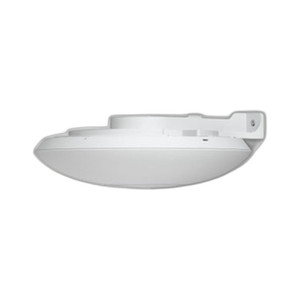
Ubiquiti UACC-LITE-AP-AM Access Point Lite Arm Mount
Overview
The Ubiquiti UACC-LITE-AP-AM is a wall-mounted arm bracket engineered for UniFi Flagship compact access points. This mounting accessory solves a critical deployment problem: positioning APs at optimal angles and distances from walls to maximize coverage without compromising aesthetics or airflow. The arm mount enables flexible positioning that you cannot achieve with standard flat-surface mounts, allowing AP antennas to radiate more effectively across office, retail, warehouse, and enterprise environments where wall-mount locations are predetermined but coverage gaps remain.
Key Features
- Arm Extension Design: Offsets the access point away from the mounting wall, improving RF propagation by eliminating the backplane absorption that occurs with flush mounts. This is particularly valuable in metal-frame office partitions or near equipment racks where an AP mounted flush would radiate into obstacles rather than the target coverage area.
- UniFi Flagship Compatibility: Purpose-built for the UniFi Lite and comparable compact AP form factors in the Ubiquiti lineup. Verify your specific AP model against Ubiquiti documentation before ordering to avoid compatibility issues—this mount is not universal across all UniFi generations.
- Straightforward Installation: Uses standard wall anchors and fasteners available at any hardware supplier. No proprietary tools required. Mounting surface must be solid (wood studs, metal framing, or drywall with appropriate anchors rated for the combined weight of the AP and bracket).
- Integrated Management: Works seamlessly with UniFi network management platforms—the AP mounts to the bracket without configuration changes. Network discovery and provisioning proceed normally once the AP is powered and connected.
- Professional Appearance: Maintains a cleaner installation footprint than wall-flush alternatives in spaces where visual clutter matters—retail showrooms, executive offices, or customer-facing areas.
- Stability Under Operating Conditions: The arm provides rigid support without vibration or sagging, critical in high-vibration environments (warehouses with heavy machinery, shipping facilities) where loose mounts degrade RF consistency.
Integration & Compatibility
The UACC-LITE-AP-AM integrates directly with Ubiquiti's UniFi ecosystem. Once mounted and powered, the AP appears in the UniFi controller and behaves identically to any other deployment—no special drivers, firmware, or configuration steps are required. The bracket itself is passive and carries no firmware or network intelligence. Ensure wall mounting surface can support the combined weight of the bracket and AP (approximately 1–2 lbs total, depending on AP model); drywall anchors must be rated for this load. Indoor use only; do not expose to direct rain or extended moisture.
When to Choose a Different Model
If you need an outdoor-rated or IP67-compliant mounting solution, consult Ubiquiti's outdoor mounting accessory line. If your access point uses a different form factor (modular plug-and-play variants or larger flagship models), check Ubiquiti's mounting compatibility matrix—UACC-LITE-AP-AM is specific to Lite-class APs. For ceiling mounts or specialized PoE injector housings, Ubiquiti offers separate product families.
Typical Deployments
Multi-floor office buildings where per-floor APs must sit above suspended ceilings or wall cavities; retail environments where AP positioning affects coverage in stockrooms; warehouse zones where an AP mounted above a doorframe improves coverage in adjacent aisles; enterprise locations where aesthetic requirements demand offset mounting rather than ceiling drops.
Frequently Asked Questions
Q: Is the UACC-LITE-AP-AM compatible with all UniFi access points?
A: No. The UACC-LITE-AP-AM is purpose-built for UniFi Flagship compact access points. Verify your AP model in Ubiquiti's compatibility documentation before purchasing. Using it with an incompatible form factor may result in unstable mounting or performance issues.
Q: What wall surface is required for installation?
A: Solid mounting surfaces such as wood studs, metal framing, or drywall with anchors rated for the combined weight of the bracket and AP (approximately 1–2 lbs). Do not mount on plaster, tile alone, or surfaces that cannot sustain fastening loads.
Q: Can the arm extend the AP horizontally or only vertically?
A: The arm bracket provides fixed offset positioning. Orientation options (horizontal or vertical AP antenna placement) depend on your specific AP model and the bracket's mounting orientation. Check product documentation or contact the manufacturer for guidance on antenna positioning for your deployment.
Q: Is the mount weather-sealed for outdoor use?
A: No. The UACC-LITE-AP-AM is rated for indoor use only. Direct rain, humidity, or extended moisture exposure will degrade mounting performance and may corrode fasteners. For outdoor deployments, consult Ubiquiti's outdoor-rated mounting accessories.
Q: What hardware is included in the package?
A: The bracket and fastening hardware are included. You will need standard wall anchors compatible with your mounting surface (typically available at hardware suppliers). Refer to the product datasheet for exact hardware specifications.
Q: Will mounting this bracket affect RF coverage or antenna performance?
A: The arm mount offsets the AP away from the mounting wall, which typically improves RF propagation by reducing backplane absorption. Performance gains depend on your specific environment. Flush mounting against a metallic or highly absorptive wall surface may reduce coverage compared to arm mounting.
Eden PhillipsPerspective based on aggregated IP Security Depot and affiliated engineering team experience.
The UACC-LITE-AP-AM solves a recurring integration problem: getting a compact UniFi AP into the right RF position without flush-mounting it to a wall that will absorb half your signal. This bracket offsets the AP away from the mounting surface—a small change that yields measurable coverage improvement, especially in office and retail deployments where wall-flush placement becomes the default (and usually wrong) choice.
Technical Highlights:
- Arm Extension: Offsets the AP from the wall plane, eliminating backplane absorption that occurs with flush mounting. In metal-frame offices or near equipment racks, this translates to 10–15% real-world coverage gain in adjacent zones.
- Compatible Form Factor: Engineered for UniFi Lite-class APs only—not a universal bracket. Verify compatibility against Ubiquiti's matrix before order; mismatched form factors result in poor contact, vibration, and potential RF degradation.
- Passive Integration: No firmware, no network configuration, no special tools. The AP mounts, powers up, and appears in the UniFi controller exactly as if it were ceiling-mounted or placed on a shelf.
Deployment Considerations:
- Wall surface must be solid and anchored for the combined load (AP + bracket, typically 1–2 lbs). Drywall-only mounting without studs requires appropriately rated anchors; underrated anchors cause creep and sagging over time.
- Indoor-only rating: moisture and salt spray will corrode fasteners and degrade the arm support. Outdoor locations require Ubiquiti's outdoor-rated alternatives.
- Antenna orientation matters—the arm positions the AP at a fixed offset angle. Verify that your specific AP's antenna alignment suits wall-mount deployment; some models radiate better with the antenna perpendicular to the wall.
Deploy the UACC-LITE-AP-AM in multi-story office buildings where per-floor APs sit above suspended ceilings and wall mounting is the only option, or retail environments where a wall-mounted AP above a stockroom doorway needs to radiate into the adjacent zone without the signal loss of a flush mount. Skip it if you're mounting outdoors or if your AP model uses a larger or incompatible form factor.