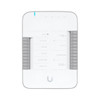
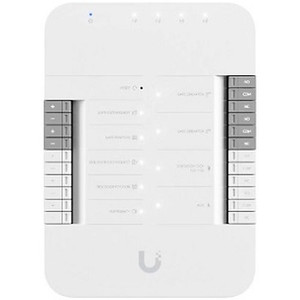
Ubiquiti UA-HUB-DOOR Single-Door Access Control Hub
Overview
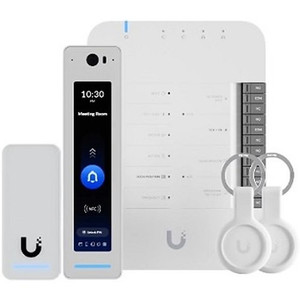
The Ubiquiti UA-HUB-DOOR is a dedicated access control hub designed to manage entry and exit for a single door within the UniFi Access ecosystem. It integrates with compatible Ubiquiti access readers—including the G2 Reader Pro—to enforce credential-based door operation across commercial offices, data centers, secure facilities, and warehouse environments. Unlike generic networked door controllers, the UA-HUB-DOOR is purpose-built to operate within the UniFi ecosystem, meaning configuration, monitoring, and audit logging happen through the same unified platform managing your IP cameras and network infrastructure. This eliminates the fragmentation that comes from bolting a standalone access control system onto your security stack.
Key Features
- PoE++ Power Input: Draws power exclusively via PoE++ (802.3bt), eliminating the need for a separate power supply or auxiliary wiring. This simplifies conduit runs during installation and centralizes power delivery through your switch, reducing the number of electrical circuits needed in access-control-dense deployments like multi-floor office buildings or warehouses with dozens of secured zones.
- Single-Door Architecture: Manages one door per hub unit. This modular approach means you scale by adding additional UA-HUB-DOOR units—each with its own PoE++ connection—rather than relying on a monolithic central controller. Useful for phased rollouts or deployments where doors are geographically dispersed.
- UniFi Access Integration: Works natively within the Ubiquiti UniFi Access platform, ensuring that door events (authorized entries, denials, forced-open alerts) appear in the same controller and audit log as your camera footage and network events. Cross-referencing a suspicious access attempt with video from nearby cameras happens in a single dashboard rather than jumping between systems.
- G2 Reader Pro Compatibility: Pairs with Ubiquiti's G2 Reader Pro and other compatible readers in the UniFi Access family. Reader selection determines your credential options—proximity cards, mobile tap-to-unlock via UniFi mobile app, or biometric enrollment—so verify your target reader's feature set before committing to a credential strategy.
- Wired Connectivity: Connects to your network via Ethernet (embedded in the PoE++ connection). No wireless fallback means door operation depends on network availability—a non-issue in most indoor deployments, but plan for an uninterruptible power supply (UPS) backing your PoE++ switch if uptime during power events is critical.
- Centralized Management: Configuration and firmware updates flow through the UniFi controller, reducing manual provisioning overhead compared to individual door-controller management. Audit trails and access reports integrate with your broader security event stream.
Integration & Compatibility
The UA-HUB-DOOR (often searched as UA HUB DOOR) operates exclusively within the Ubiquiti UniFi Access platform. Compatibility is limited to UniFi-certified readers and the UniFi controller—it does not support ONVIF, LDAP directory integration, or third-party access-control systems. If your facility already runs a separate ACS platform (like Salto, HID, or Genetec), the UA-HUB-DOOR will not integrate; you'll need to evaluate whether migrating to UniFi Access across the entire facility is feasible. For greenfield deployments or facilities already standardized on Ubiquiti IP cameras and networking, the UA-HUB-DOOR eliminates integration friction.
What's in the Box
- 1x UA-HUB-DOOR door access hub unit
Frequently Asked Questions
Q: Does the UA-HUB-DOOR work with non-Ubiquiti access readers?
A: No. The UA-HUB-DOOR is designed exclusively for the UniFi Access ecosystem and compatible readers such as the G2 Reader Pro. Third-party readers are not supported.
Q: What happens if network power is lost to the PoE++ switch?
A: Door operation will halt. The UA-HUB-DOOR has no battery backup or failsafe unlock mechanism built in. For critical access points, deploy the switch on an uninterruptible power supply (UPS) or configure a mechanical override per your facility's emergency egress requirements.
Q: Can I manage multiple doors from a single UA-HUB-DOOR?
A: No. Each UA-HUB-DOOR hub controls a single door. Add additional hubs for each additional door—each with its own PoE++ connection and UniFi controller registration.
Q: Does the UA-HUB-DOOR log access events?
A: Yes. All entry/exit events, denials, and forced-open alerts are logged in the UniFi Access controller. These logs integrate with your camera timeline and network audit trail for unified incident investigation.
Q: Is the UA-HUB-DOOR suitable for outdoor entry points?
A: Verify environmental specifications in the manufacturer datasheet. Typical access hubs are rated for indoor or protected environments. Outdoor deployments may require weatherproof enclosures or reader housings—confirm with the manufacturer before specifying.
Q: What credentials does the UA-HUB-DOOR support?
A: Credential type depends on your paired reader (e.g., G2 Reader Pro). Verify your reader's capabilities for proximity card, mobile app, biometric, or PIN support.
Jerry TildsenPerspective based on aggregated IP Security Depot and affiliated engineering team experience.
The UA-HUB-DOOR is a clean architectural choice if you're already committed to Ubiquiti's access-control ecosystem. The PoE++ power model eliminates a whole class of installation complexity—no separate 12V supplies, no relay wiring to third-party controllers—and the single-door, single-hub model scales predictably. That said, understand what you're trading: ecosystem lock-in and no failsafe unlock if the network goes down.
Technical Highlights:
- PoE++ (802.3bt) Power: Dedicated power channel over Ethernet means one cable per door and zero external power supply. Budget roughly 90W per PoE++ port on your switch if you're deploying many hubs; modern enterprise PoE++ switches handle this easily, but residential or budget-tier switches may hit power limits fast.
- Single-Door, Single-Hub Model: Scales linearly—add one hub per door. No oversizing for future growth or managing a central appliance. Useful in dispersed facilities but adds switching complexity if you have 50+ doors in close proximity.
- UniFi Controller Integration: Access logs appear in the same event stream as your camera triggers and network alerts. Cross-reference is immediate. However, this also means if your UniFi controller fails, access management halts unless you're running controller redundancy (clustering).
Deployment Considerations:
- No battery backup or failsafe unlock. If uptime during power loss is non-negotiable, mandate that the PoE++ switch sits on a UPS and verify your facility's emergency egress code permits remote-controlled door locks during outages.
- UniFi Access ecosystem only. Do not attempt to shoehorn this into a multi-vendor ACS environment. If your facility runs HID, Salto, or Genetec, the UA-HUB-DOOR will not play—evaluate a full UniFi Access migration first.
- G2 Reader Pro pairing is tight. Verify reader credential support (mobile, card, biometric, PIN) before specifying. A reader without your required credential method means rework.
The UA-HUB-DOOR makes sense for small-to-medium facilities standardizing on Ubiquiti IP cameras and networking, where unified logging and zero external power supplies outweigh the ecosystem lock-in cost. For large, multi-vendor security stacks or facilities requiring offline failsafe door operation, look elsewhere.