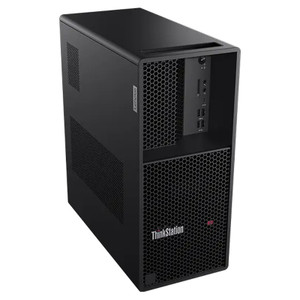
Lenovo 13DQ001RUS ThinkCentre Neo 50s Gen 6 Small Form Factor Desktop
Overview
The Lenovo ThinkCentre Neo 50s Gen 6 (13DQ001RUS) is a small form factor desktop built around Intel's Core Ultra 5 Series 2 architecture — a platform shift that moves AI acceleration onto the die itself, freeing the CPU to spend cycles on actual workloads rather than inference overhead. At 16 GB of RAM and a 512 GB PCIe NVMe 4.0 x4 SSD, this unit is provisioned to handle concurrent desktop computing tasks without hitting memory walls mid-session. The compact Raven Black chassis fits environments where rack space and desk footprint both matter — think security operations centers, back-office server closets, or edge deployments where a tower simply won't land.
Key Features
- Intel Core Ultra 5 225 (Series 2), up to 4.40 GHz E-core boost: The Series 2 architecture introduces the Neural Processing Unit (NPU) on-die, offloading AI inferencing from the CPU. For operators running video analytics software or AI-assisted monitoring dashboards, that means the CPU isn't starved when the NPU handles model inference in parallel. The 20 MB cache keeps frequently accessed instruction sets resident — relevant when switching rapidly between multiple application contexts.
- 16 GB RAM: Enough headroom to run a VMS client, a browser-based management console, and background system processes simultaneously without paging to disk. If your workflow adds video decoding or simultaneous stream monitoring, confirm with your VMS vendor whether 16 GB meets their recommended footprint for the channel count you're targeting.
- 512 GB PCIe NVMe 4.0 x4 SSD: NVMe 4.0 delivers sequential read speeds roughly double what NVMe 3.0 offered. In practice, that means fast OS boot, near-instant application launch, and no perceptible lag when loading large configuration files or forensic footage exports. The 512 GB capacity is appropriate for an OS-plus-applications drive; bulk video storage belongs on a dedicated NVR or NAS.
- Small Form Factor chassis, Raven Black: The SFF enclosure keeps the footprint tight — deployable on a desktop, mounted behind a monitor with a VESA adapter kit, or slid into a shallow equipment shelf. The Raven Black finish is neutral enough for most commercial and operations environments without drawing attention.
- Intel Core Ultra Series 2 platform: The Series 2 die integrates the NPU alongside the CPU and GPU tiles, which positions this machine for AI-PC workflows — Windows Copilot+ features, on-device model inference, and AI-assisted productivity tools — without requiring a discrete GPU. For purely transactional workloads, the integrated graphics handle dual-display output adequately.
Integration & Compatibility
The 13DQ001RUS ships with Windows-compatible hardware throughout — the Intel Core Ultra 5 225 is fully supported under current Windows 11 Pro and Windows 11 Enterprise licensing. For network video recorder and VMS client deployments, the platform is compatible with major x86-64 Windows VMS clients including Milestone XProtect, Genetec Security Center, and Hanwha Wisenet WAVE client — verify minimum CPU and RAM requirements with each vendor for your specific channel count. The PCIe NVMe slot configuration may support an additional M.2 drive depending on motherboard layout; consult the ThinkCentre Neo 50s Gen 6 hardware maintenance manual for confirmed slot availability before speccing a secondary drive. For PoE switch and network integration, this unit connects via standard GbE — confirm whether your deployment requires 2.5GbE or 10GbE before finalizing the build. Lenovo's Vantage management software provides BIOS updates, hardware diagnostics, and warranty status in a single interface, which reduces IT overhead in multi-unit deployments.
Frequently Asked Questions
Q: What operating system does the 13DQ001RUS ship with?
A: The product listing does not specify a pre-installed OS. Lenovo ThinkCentre Neo 50s Gen 6 units are commonly available with Windows 11 Pro or as a no-OS (DOS) configuration for volume deployments. Confirm the OS included with the specific SKU at the time of purchase.
Q: Can the 13DQ001RUS run VMS software like Milestone XProtect or Genetec Security Center?
A: Yes — the Intel Core Ultra 5 225 and 16 GB RAM meet or exceed the minimum system requirements for most VMS client applications. For deployments handling high channel counts or live AI analytics, review each vendor's recommended (not just minimum) specs, as requirements scale with stream count and resolution.
Q: What storage expansion options does the 13DQ001RUS support?
A: The unit ships with a 512 GB PCIe NVMe 4.0 x4 SSD as the primary drive. Whether additional M.2 or 2.5-inch SATA slots are available depends on the specific motherboard configuration. Consult the ThinkCentre Neo 50s Gen 6 hardware maintenance manual for confirmed expansion options before ordering additional drives.
Q: Is the 13DQ001RUS suitable for use as a dedicated NVR or recording server?
A: The 512 GB SSD provides OS and application storage only — it is not sized for long-term video retention. For recording server roles, pair this unit with a dedicated NAS or direct-attached storage array. The CPU and RAM are adequate for running recording software, but bulk storage must be planned separately.
Q: Does the 13DQ001RUS support dual-monitor output?
A: Intel Core Ultra 5 Series 2 integrated graphics support multiple display outputs. The specific port configuration (DisplayPort, HDMI, USB-C with DP Alt Mode) depends on the ThinkCentre Neo 50s Gen 6 rear I/O panel. Confirm display output count and connector types in the hardware specification sheet before finalizing your monitor setup.
The 13DQ001RUS lands in an interesting spot for security operations deployments. The Intel Core Ultra 5 225's E-cores boost to 4.40 GHz, and the integrated NPU is the real differentiator here — if you're running on-device AI workloads alongside a VMS client, the NPU handles inferencing without competing directly with the CPU scheduler. That's meaningful in a compact SFF unit where you can't drop in a discrete GPU.
Technical Highlights:
- Intel Core Ultra 5 225, 20 MB cache: The large cache reduces memory round-trips when the processor is context-switching between a VMS client, OS services, and background processes — noticeably smoother than prior-gen ThinkCentre platforms under mixed workloads.
- 512 GB PCIe NVMe 4.0 x4 SSD: Gen 4 bandwidth means the OS and application layer loads fast and stays responsive. This is not a storage drive — plan your video retention on an external NAS or NVR appliance and treat this SSD purely as the system volume.
- 16 GB RAM, Small Form Factor: 16 GB is adequate for a VMS client or security dashboard workstation. If your deployment adds simultaneous video decoding of more than a handful of high-res streams, check your VMS vendor's RAM guidance — some recommend 32 GB for 32-channel-plus configurations.
Deployment Considerations:
- The SFF chassis is VESA-mountable with the appropriate Lenovo bracket, which keeps the unit off the desk and out of the way in cramped SOC environments — confirm bracket compatibility with the Neo 50s Gen 6 specifically before ordering.
- The Core Ultra 5 225 does not include a discrete GPU. For deployments requiring hardware-accelerated video decode across many simultaneous streams, validate that the integrated GPU's decode engine (Intel Quick Sync) meets your VMS's hardware acceleration requirements.
Best fit: a security operations workstation or VMS thin-client deployment where the goal is a compact, manageable, AI-ready endpoint — not a standalone recording appliance. Pair it with a dedicated NVR and a Lenovo enterprise peripherals stack for a consistent, supportable environment.