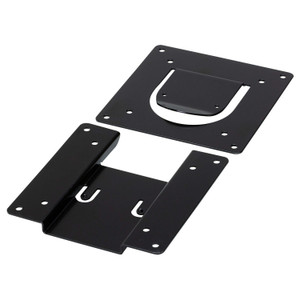
Product images are provided for reference and may not represent the exact model, configuration, or included components.

Overview

SKU: VK101
UPC: 672792016363
Condition: New
Write a Review 0% OFF

ATEN Tabletop KIT FOR VK320 Touch Panel (us - VK101

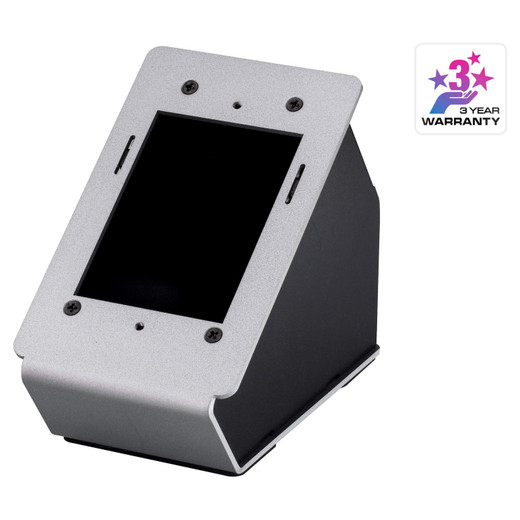
ATEN VK101 Tabletop Kit for VK320 Touch PanelOverviewThe ATEN VK101 is a tabletop installation kit designed to deploy the VK320 touch panel in surface…

$214.00 $213.99 SAVE $0
Ships same business day
In stock

Quantity:

Adding to cart… The item has been added
Compatibility guidance available for your deployment
Senior specialists for pre and post-sales support
Authorized sourcing and documentation support
Shipping and lead-time confirmation before install

Laura Bennett, IPSD Senior Specialist

Talk to Laura

200+ hrs training • U.S - based

Senior Specialist • 877-277-7147

ATEN Tabletop KIT FOR VK320 Touch Panel (us - VK101

$214.00
$213.99

Overview

SKU: VK101
UPC: 672792016363
Condition: New

No Bots, Just Experts

Questions about this product? Free pre-sales support from a senior specialist — product questions, compatibility checks, BOM quotes, price confirmation — typically answered within one business day. Need camera placement or system design work? Engineering time is $175 per hour (qty 1 = 1 hour). Hardware buyers get up to one hour ($175) credited back on their order.

Description

ATEN VK101 Tabletop Kit for VK320 Touch Panel

Overview

The ATEN VK101 is a tabletop installation kit designed to deploy the VK320 touch panel in surface-mount configurations — the right choice when a recessed or rack installation isn't viable and you need the panel accessible on a desk, podium, or AV credenza. The VK101 supports up to 10 licenses within the ATEN ATEN control system environment and ships with firmware v4.2.413 (released 2026-05-18), so the controller logic is current out of the box. A 16-segment controller ID switch and semi-recessed reset pushbutton are onboard for commissioning and field resets without disassembly.

Compatibility

The VK101 is purpose-built for the ATEN VK320 touch panel. It integrates within the broader ATEN ATEN control system lineup, supporting environments where the VK320 is the primary operator interface. If your installation calls for a recessed in-wall or rack-mount deployment of the VK320, a different mounting solution within the VK-series accessory family is required — the VK101 addresses tabletop scenarios only. For ATEN control system accessories that pair with this kit, verify VK-series compatibility before ordering.

Installation Notes

Operating humidity is rated 0–80% RH non-condensing — keep the panel away from open-air loading docks, server rooms with condensation risk, or high-moisture AV environments. The 16-segment ID switch must be set before deployment; duplicate controller IDs on the same network segment will cause addressing conflicts that are difficult to diagnose after commissioning. The semi-recessed reset button prevents accidental field resets during normal operation. Firmware upgrades are delivered via the ATEN software package vk0100-v4.2.413.zip — confirm the firmware version matches your VK320 and broader control system before going live. For control system planning, note the 10-license ceiling when sizing multi-panel deployments.

Specifications
Mount Type: Recessed; Rack
Controller Id: 1 x 16-segment Switch
Reset Button: 1 x Semi-recessed Pushbutton
Humidity: 0 - 80% RH, Non-Condensing
Max. No. Allowed: 10 licenses
Firmware Upgrade: v4.2.413
s: Description
Q&A
Reviews
Have Questions?

RELATED PRODUCTS

System Design, Deployment & Technical Support

Support services and planning resources for commercial surveillance, access control, and infrastructure deployments.

Fixed scope • Fixed price

System Design Assistance

  • Get help validating product compatibility
  • Coverage requirements
  • Storage planning and deployment architecture before you buy.
Request Design Help

Deployment & Configuration Support

  • Access fixed-scope support for rollout planning
  • User setup guidance
  • Migration and system standardization across single-site or multi-site deployments
View Support Services

Guides, Tools & Calculators

  • PoE requirements
  • Storage retention
  • Camera selection and deployment methodology
Open Technical Resources