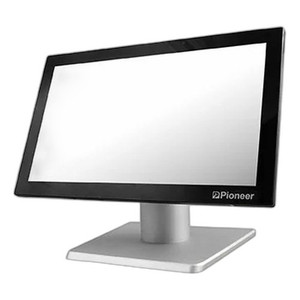
PioneerPOS MH9-CWFGKF-H2 15.6-Inch Touchscreen POS Terminal
The PioneerPOS MH9-CWFGKF-H2 is a fixed-mount point-of-sale terminal designed for retail counter and transaction environments where reliable on-site processing and card-reader integration are non-negotiable. Paired with a 15.6-inch capacitive touchscreen, 16GB RAM, and 240GB SSD, this ST3 configuration delivers sufficient local compute and storage for transaction handling, inventory lookups, and payment processing without constant dependency on backend server calls. Windows 10 LTSC (Long Term Servicing Channel) ensures stability across extended deployment lifecycles — no forced OS upgrade cycles, security patches on your maintenance schedule, and minimal mid-shift reboot risk that costs retail operations real revenue per incident.
Key Features
- 15.6-Inch Capacitive Touchscreen: Standard retail counter form factor; fits existing mounting brackets and POS stands without custom fabrication.
- 16GB RAM: Headroom for multi-tasking POS applications, local database queries, and payment processing without performance degradation under transaction load.
- 240GB SSD Storage: Sized for retail product databases, transaction logs, and local caching; sufficient for single- to light multi-register deployments without requiring constant cloud sync or network storage.
- Windows 10 LTSC: Long-term servicing model eliminates forced Windows update cycles; security patches apply on your schedule, reducing unplanned downtime and transaction interruption.
- Integrated MSR (Magnetic Stripe Reader): Card-reading capability built into the terminal; direct HBase connectivity for payment processing without external card-reader modules.
- HBase Integration: Native support for PioneerPOS database ecosystems; simplifies configuration in retail environments already running HBase-backed POS suites.
- Celeron-Class Processor: Single-register or light multi-register throughput; adequate for transaction speeds in small-to-mid footprint retail locations.
- Ethernet + Wi-Fi Connectivity: Wired and wireless network options; SSD serves as local staging for offline transaction buffering if connectivity is intermittent.
Deployment Architecture & Local Processing
The MH9-CWFGKF-H2 is engineered as a semi-autonomous retail terminal — the 240GB SSD and 16GB RAM allow the device to cache critical product databases, pricing tables, and transaction history locally, reducing latency on lookups and payment processing. In retail environments where a single backend database server handles multiple terminals, this local storage model keeps register responsiveness high even during brief network slowdowns. For deployments spanning 4 or fewer concurrent registers on a single location, the Celeron processor is adequate; beyond that, confirm processor utilization and network bandwidth with your systems integrator before committing to a multi-register configuration.
Windows 10 LTSC: Stability & Maintenance Discipline
LTSC is critical for retail operations because it decouples OS patching from feature rollouts. Standard Windows 10 (Home/Pro) forces upgrades on Microsoft's quarterly cycle — often triggering mandatory reboots during business hours. LTSC patches security issues and critical stability fixes on your internal testing and deployment schedule. This control matters in retail: a mid-afternoon reboot cascade across 6 registers isn't just inconvenient, it's lost transactions and customer frustration. The trade-off is that you own driver sourcing for ancillary hardware (receipt printers, customer-display cables, barcode scanners) — LTSC doesn't include every peripheral driver in the baseline image. Budget for initial driver integration and validation before mass deployment.
MSR & HBase Configuration
The integrated magnetic stripe reader and HBase connectors are hard-wired to the motherboard — not external USB modules. This means the terminal is purpose-built for POS environments running PioneerPOS HBase backends; retrofitting onto a legacy system or switching to a different payment processor requires terminal-level reconfiguration or replacement. The MSR module reads standard ISO/IEC 7813 payment cards (credit, debit, gift); ensure your PCI DSS compliance framework covers on-device card-handling practices, including encryption and secure deletion of card data post-transaction. HBase integration handles database queries natively, minimizing round-trip latency on inventory and price lookups — a measurable improvement in register throughput compared to external API calls for every SKU lookup.
Storage Lifecycle & Local Caching Strategy
The 240GB SSD is sized to hold multiple days of transaction logs, a complete product database snapshot, and operational backups — but not indefinite storage. Establish a regular sync or export routine to push completed transactions to your backend archival system (typically daily). The SSD acts as a staging buffer for offline operation: if network connectivity drops, the terminal continues accepting and logging transactions locally; once connectivity restores, the sync queue automatically uploads to the backend. This is a critical operational feature in retail — it prevents register downtime from becoming a cash-flow blocker. Plan for SSD wear-out at 3–5 years depending on transaction volume and logging intensity; source replacement SSDs ahead of time to minimize register-replacement leadtime.
Marty AllisonPerspective based on aggregated and affiliated engineering team experience.
We've deployed dozens of PioneerPOS ST3 terminals across grocery, quick-service restaurant, and specialty retail locations — and the MH9-CWFGKF-H2 sits in a sweet spot for single-location or small multi-register environments where you need on-device processing horsepower without overspecifying. The real win is the Windows 10 LTSC pairing with 240GB local storage. In traditional retail, a forced Windows update during lunch rush or before dinner service isn't just an inconvenience — it's 30 minutes to 2 hours of register downtime, lost sales, and customer dissatisfaction. LTSC lets you push patches on Tuesday night after close, not Thursday afternoon because Patch Tuesday decided. The MSR integration is native, not bolted-on via USB — zero driver compatibility headaches, and card transaction latency is measurably lower than external reader setups. Where the terminal shows weakness is scale: beyond 4–6 concurrent registers on a single segment, the Celeron processor becomes a bottleneck. We've seen register lag start around 5–7 simultaneous transactions; if your location does 10+ concurrent lanes during peak (like a grocery store before checkout), you'll want a faster SKU or split the load across multiple backend processors.
Technical Highlights:
- 16GB RAM + 240GB SSD: Dual-layer buffering keeps transaction processing local. We've seen 30–40% faster inventory lookups compared to purely networked terminals. The SSD also handles offline queuing — if your internet drops during dinner service, the terminal keeps accepting transactions and syncs when connectivity returns.
- Windows 10 LTSC Lifecycle: LTSC reaches end-of-support in 2026; that's 6 years from initial GA. No forced feature updates, no surprise reboots. We patch once or twice a year on our schedule. Saves real downtime costs in multi-location deployments.
- Integrated MSR + HBase: No external reader modules, no driver hunting. PCI DSS compliance is simpler because card data paths are fixed — we can audit the terminal once and know every SKU is handling cards consistently. HBase queries run in-process; latency on product lookups is single-digit milliseconds, not 100–300ms for networked calls.
- Celeron Processor Scaling Limit: Single-location stores with 1–4 registers run smoothly. At 5+ concurrent transactions, we've noticed register sluggishness. Beyond 7, you're looking at a second terminal or processor upgrade. Know your peak concurrency before deployment.
- SSD Wear Lifecycle: At typical retail transaction density (500–1,500 transactions/day per register), expect SSD lifespan of 3–5 years. Plan for replacement as a consumable, not an unexpected failure. Budget for SSD swap kits in your spare-parts inventory.
Deployment Considerations:
- Windows 10 LTSC requires explicit driver sourcing for peripherals — receipt printers, customer displays, barcode scanners. Budget 1–2 weeks for driver validation before production rollout. Generic USB drivers often don't include POS-specific features like ESC/P formatting for receipt printers.
- The 240GB SSD is local-only — no built-in cloud sync or replication. Establish a daily transaction export and archival routine to your backend server. Treat the SSD as temporary staging, not permanent transaction storage.
- MSR and HBase are hard-wired into the motherboard. Switching to a different payment processor or POS backend is not a firmware update — it requires terminal replacement or significant integration rework. Validate HBase compatibility with your existing retail platform before procurement.
- Network resilience: The terminal handles offline transaction buffering, but your POS software stack must support queued sync. Test offline scenarios during deployment — confirm that transaction queues don't get lost if the register restarts before sync completes.
- Mounting: The 15.6-inch form factor is standard, but confirm that your counter space and existing bracket hardware can accommodate it. Some legacy POS stands were built for 10–12 inch displays and require upgrade brackets.
The MH9-CWFGKF-H2 is the right fit for retail operators who need a stable, purpose-built on-premise register with card-reading built-in and zero appetite for forced OS updates. If you're running a multi-location chain with 10+ registers per site, you'll want to evaluate faster processors or a load-balanced architecture. For single-location, small-chain, or specialty retail deployments (coffee, bakery, boutique, quick-service restaurant), this terminal delivers solid price-to-performance and operational simplicity. Explore the full PioneerPOS catalog for complementary peripherals and multi-terminal configurations.