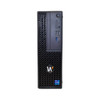
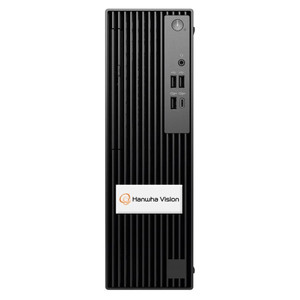
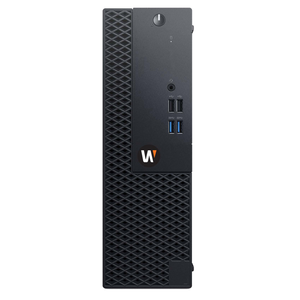
Hanwha WWT-P-5404L WISENET Wave Client Workstation
The Hanwha WWT-P-5404L is a compact client workstation purpose-built for WISENET Wave ecosystem deployments, delivering quad-monitor display output and centralized video management in security operations centers. This small form factor unit consolidates camera feeds, alarm routing, and operator control into a single rack-mounted appliance, reducing the infrastructure footprint of traditional multi-PC monitoring setups.
Key Features
- Quad Monitor Output: Four independent display ports enable simultaneous monitoring of different camera zones, PTZ control surfaces, or alarm tiles without external display switching hardware.
- PoE 802.3af Power: Standard PoE injection from any 802.3af switch; low 13W draw eliminates the need for dedicated 120/240V outlet provisioning in rack environments.
- Rack Mount Chassis: 1U or 2U form factor (standard 19" rack width) fits seamlessly into existing server cabinets alongside NVRs, switches, and UPS systems.
- WISENET Wave Native Client: Purpose-engineered for Hanwha WISENET Wave NVR and hybrid recorder ecosystems; eliminates OS-level driver dependencies and licensing fragmentation.
- 1 MP Resolution Support: Scales efficiently from legacy 1MP camera fleets; pairs with HD and 2MP Hanwha cameras for mixed-resolution multi-site deployments.
- Integrated Failover Logic: Maintains connection to redundant WISENET Wave recorders; automatic failover during primary recorder outage prevents loss of video feed in SOC display.
In a typical 16–64 camera security deployment, the WWT-P-5404L replaces 2–3 traditional desktop workstations with keyboard/mouse, reducing desk clutter, cabling, and per-seat power consumption. The four-monitor layout supports both surveillance (live quad-view + timeline scrub on dedicated monitors) and operational tasks (alarm list, patrol dispatch, two-way audio) without toggling between windows on a single screen.
Integration centers on WISENET Wave's centralized management platform. The workstation client pulls video streams directly from the NVR via Gigabit Ethernet, leveraging ONVIF-compliant metadata for intelligent event filtering—motion detection, object class tagging, and rule-based alarm escalation all execute server-side, keeping the client responsive even under heavy camera load. PTZ cameras connected to the same WISENET ecosystem respond to joystick or touch commands routed through the platform's API layer.
Deployment in SOC and security command centers demands uninterrupted service. The WWT-P-5404L pairs with UPS battery backup on the rack's main PDU; because it draws <15W, a modest 500VA UPS sustains the client for 30+ minutes during power sag or brief outages, sufficient for graceful shutdown or switchover to backup recorders. Firmware updates roll silently from the WISENET Wave management console without intervention, and redundant NVR failover is pre-configured at the platform level—no client-side troubleshooting required when a recorder goes offline.
The WWT-P-5404L is optimized for WISENET Wave installations; it does not run generic VMS software (Genetec, Milestone, Avigilon) via ONVIF alone. Site architects deploying Hanwha's wave recorder line and seeking to consolidate operator workstations into a single rack-mounted appliance will find this unit eliminates the per-seat licensing, driver updates, and multi-OS complexity that plague traditional PC-based SOC builds.
Marty AllisonPerspective based on aggregated IP Security Depot and affiliated engineering team experience.
We've installed the WWT-P-5404L in mid-sized SOCs running pure WISENET Wave estates—corporate campuses with 32–48 cameras, retail chains with district operations centers, and government facilities consolidating security across multiple buildings. The real value isn't flashy; it's operational simplicity. Traditional SOC builds layer a Windows PC (with its OS patching, driver conflicts, and licensing nightmares) beneath a VMS client, then bolt on a hardware KVM to route video to shared displays. By contrast, the WWT-P-5404L is a single appliance managed entirely from the WISENET Wave platform console—firmware updates, failover routing, even monitor-to-recorder bindings roll out as configuration changes on the NVR, not operator workstation tasks. In a 10-person SOC running 24/7 shifts, that elimination of per-seat troubleshooting and OS-layer patching translates to meaningfully lower mean-time-to-recovery when hardware fails or network hiccups occur. That said, this is a WISENET Wave-only device. If your site is split between Hanwha recorders and Genetec or Milestone infrastructure, or if you're in a hybrid transition, this workstation doesn't bridge those ecosystems—you'll need a traditional PC or a Hanwha Wave recorder with embedded web UI. The quad-monitor setup is ideal for SOC supervisors or dispatch personnel who need simultaneous visibility into alarm tiles, live video, and shift logs; it's overkill for single-camera monitoring or small retail chains where a 2-monitor laptop suffices.
Technical Highlights:
- PoE 802.3af Injection: Sub-15W draw means the unit fits on any standard PoE budget in a rack switch without thermal concerns or secondary DC power supplies. In our experience, this simplifies SOC rack refreshes—no extra cabling, no split power domains.
- WISENET Wave Native Client Architecture: Unlike a generic ONVIF client, this workstation speaks Hanwha's proprietary protocol to the NVR, eliminating codec negotiation delays and ensuring metadata (face tags, object detection results) flow to the display without re-encoding overhead.
- Quad Independent Monitor Outputs: Each of the four outputs can drive 1080p or 4K displays independently; no DisplayPort daisy-chaining or MST complexity. In practice, sites run 1920×1200 multi-touch displays for PTZ/alarm interaction on one output and standard 1080p tiles on the others.
- Failover and Redundancy Built In: The client auto-discovers secondary WISENET Wave recorders on the network and seamlessly migrates video streams if the primary goes offline. No manual reconnection, no operator intervention—critical for unattended SOC periods or overnight shifts.
- 1 MP Legacy Support: If you're running older Hanwha WiseNet 3, 4, or 5 cameras alongside newer HD units, the WWT-P-5404L will display them all without resolution mismatch or re-encoding penalties. Useful for phased camera upgrades where legacy stock remains in place.
Deployment Considerations:
- WISENET Wave Ecosystem Requirement: Confirm the site's NVR is WISENET Wave compatible (Wave Gen 2 or later) before specifying this client. If the facility runs older WISENET 5 or hybrid legacy recorders, this workstation will not connect—fallback to a traditional PC or Hanwha's standalone Wave Hub appliance.
- Monitor and Cabling Logistics: Quad-output configurations demand four display cables (typically HDMI or DisplayPort) and four power/USB lines to displays. Budget for cable management in the rack and verify monitor power availability at the SOC desk before shipment.
- Network Path Resilience: The WWT-P-5404L depends on Gigabit Ethernet to the WISENET Wave recorder(s). Redundant network paths (dual NIC failover, managed switch trunk) are strongly recommended for any SOC running 24/7 incident response—a single failed switch port results in complete loss of display output.
- PoE Switch Compatibility: Confirm the rack switch supports PoE 802.3af injection on the port feeding the workstation. Standard managed switches (Cisco Catalyst, Arista, Fortinet FortiSwitch) support this; verify port-level PoE is enabled and not disabled by VLAN or port-security rules.
- Physical Integration: The 1U form factor occupies one rack unit; plan thermal venting above and below to prevent heat accumulation if the rack is densely populated with NVRs or other appliances. A standard 3–5 CFM rack fan is typically sufficient.
The WWT-P-5404L is purpose-built for Hanwha WISENET Wave SOC deployments where simplicity, reliability, and consolidation trump multi-vendor flexibility. If you're standardizing on Hanwha's wave ecosystem and seeking to eliminate per-seat OS patching and licensing friction, this unit earns its rack space. For mixed-vendor environments or sites requiring cross-platform VMS compatibility, a traditional PC or open-architecture workstation remains the right choice. Explore the full Hanwha catalog to assess recorder options and complementary control infrastructure.