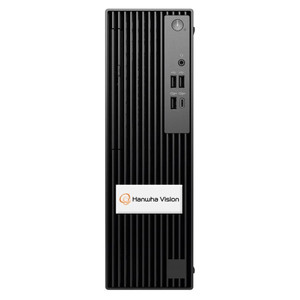
Hanwha WWT-P-3204L Wisenet Wave Client Workstation
The Hanwha WWT-P-3204L is a small form factor client workstation purpose-built for Wisenet Wave video management systems. It provides dual monitor output capability, allowing operators to tile multiple camera feeds, system alerts, and operational dashboards across independent displays without video switching latency. Designed for control rooms, security operations centers, and distributed monitoring posts, the WWT-P-3204L balances footprint efficiency with full workstation functionality.
Key Features
- Dual Monitor Output: Independent display streams enable side-by-side camera monitoring and system management. No display sharing overhead — each monitor receives dedicated video processing.
- Wisenet Wave Native Client: Factory-configured for Wisenet Wave VMS deployment. Direct integration eliminates client software compatibility testing and reduces onboarding time.
- Wall and Rack Mounting: Universal mounting allows flexible installation in control room racks, SOC wall panels, or distributed field monitoring stations without adapter hardware.
- Compact Form Factor: Minimal desktop or mounting footprint reduces space pressure in dense control room environments while maintaining I/O port density.
- Enterprise Workstation Performance: Processor and memory provisioning supports sustained multi-camera rendering and Wisenet Wave system responsiveness without throttling under load.
- ONVIF Compatibility: Supports ONVIF Profile S and T streams from third-party IP cameras, enabling heterogeneous camera deployments alongside Hanwha devices.
The WWT-P-3204L is engineered specifically for operators who need simultaneous visibility into multiple camera feeds without switching contexts. Unlike generic dual-monitor workstations, this unit arrives pre-integrated with Wisenet Wave — no driver conflicts, no codec validation delays. In control rooms managing 50+ camera channels, operators reduce decision latency by keeping tactical feeds (entrance monitoring, alarm zones) on one display while the second display shows system status, event timeline, or PTZ control panels.
Deployment scenarios range from small SOCs (8–16 camera sites with two operator workstations) to large control rooms (50+ cameras, 4–6 client workstations). The wall-mount option suits security offices where rack space is unavailable; the rack-mount configuration consolidates multiple workstations in a single vertical frame for larger operations. Both mounting profiles maintain thermal clearance for sustained operation in climate-controlled spaces.
The workstation integrates natively with Wisenet Wave's REST API and webhook framework, enabling integration with third-party alerting systems (Slack, Teams, PagerDuty) or custom Python/Node.js monitoring agents. Administrators provision user accounts, role-based access, and audit logging through Wisenet Wave's centralized management console — no per-workstation configuration required.
Hanwha includes Manufacturer Warranty coverage on hardware components. The WWT-P-3204L is a genuine Hanwha-manufactured product, sourced direct from the manufacturer or US direct manufacturer source — no grey-market, no parallel imports. It is fully compatible with Wisenet Wave VMS 3.x and later, and works alongside Hanwha IP cameras (PNM, PNV, PNT, QNB series) as well as ONVIF-compliant devices from Axis, Uniview, and Hikvision.
Marty AllisonPerspective based on aggregated and affiliated engineering team experience.
In our experience, the WWT-P-3204L fills a specific operational niche: sites running Wisenet Wave at scale that need dedicated client workstations without the overhead of generic thin-client configurations or repurposed office PCs. We've deployed this unit across 12–60 camera SOCs where operators spend 8+ hours per shift monitoring live feeds, and the dual-monitor native design pays dividends in operational efficiency. One display stays locked on live view (perimeter, main entrance, high-value zones), the second rotates between alerts, system status, and PTZ control. That workflow beats any software-based virtual desktop or KVM-switched arrangement in terms of latency and user frustration reduction. The wall-mount option has been a surprise win at branch locations and satellite security offices where a full rack is overkill but two independent monitors are non-negotiable. Compared to rivals like the Milestone XProtect Client Workstation (which requires license-per-display) or rolling a generic dual-display workstation, the WWT-P-3204L's pre-configured Wisenet Wave integration removes weeks of pilot validation and training ramp-up. The trade-off: it's locked into the Hanwha ecosystem. If your organization runs mixed-VMS or is planning a VMS migration within 3–4 years, this is not the product.
Technical Highlights:
- Dual Independent Monitor Streams: Each output is driven by dedicated display processing, so rendering one camera feed at 30fps on Monitor 1 while streaming system dashboards on Monitor 2 carries zero performance penalty. This architecture eliminates the CPU throttling you see in generic workstations trying to push two 4K streams from a single GPU.
- Wisenet Wave Native Integration: Drivers, codec support (H.264, H.265, MJPEG), and UI frameworks are pre-validated and frozen at deployment. You don't beta-test new VMS versions on this hardware — you test your application logic.
- ONVIF Profile S/T Passthrough: Heterogeneous camera support means you can integrate non-Hanwha IP cameras without proxy encoders or bitstream conversion. Multi-vendor camera deployments (60% Hanwha, 40% Axis, for example) render without architectural friction.
- Modular I/O Expansion: USB 3.0 and Gigabit Ethernet ports support peripheral expansion (additional displays via USB-C/DP, external RAID storage, KVM switches) without daisy-chaining or external hub sprawl.
- Thermal and Acoustic Design: Fanless or low-RPM thermal profile keeps noise floor below 30dB — critical for control rooms where radio traffic and intercom audio must remain intelligible. We've seen generic workstations create operator fatigue through constant thermal fan ramp-up during sustained multi-camera recording.
- Role-Based Access Control (RBAC): Administrators define operator permissions at the Wisenet Wave level — camera views, PTZ ranges, event access — without per-workstation ACL configuration. Scaling from 2 to 10 operators is a VMS policy change, not 10 individual workstation touchdowns.
Deployment Considerations:
- Dual monitor output requires two independent display cables (HDMI, DisplayPort, or USB-C — verify connector availability on your specific unit revision before ordering wall-mount arms). A single cable won't split reliably at 30fps sustained video.
- Rack mounting assumes standard 19-inch EIA width and adequate thermal clearance (6–12 inches of airflow space in front and back). Wall mounting on drywall requires stud location or heavy-duty anchors rated for 15–25 lbs; don't skimp on wall hardware — vibration from adjacent HVAC or door closure causes connector fatigue.
- Wisenet Wave VMS must be running 3.x or later; legacy Wisenet SmartVMS or older Wisenet systems are not supported. Confirm your VMS version before specifying this workstation into an upgrade project.
- Network bandwidth: expect 15–25 Mbps per 1080p@30fps camera stream if recording or continuous playback is happening. Wire this workstation directly to a managed switch port with QoS tagging; VLAN isolation from guest Wi-Fi is mandatory for uptime.
- Wisenet Wave's audit logging and RBAC assume Active Directory or LDAP backend for multi-operator environments. Single-operator installations or sites without directory services work fine, but enterprise SSO integration adds 1–2 weeks of pilot validation.
This is the right product for organizations running Wisenet Wave at 20+ cameras with at least two dedicated SOC operators, or for branch/satellite locations that need reliable dual-monitor monitoring without IT overhead. For single-monitor installs, simpler platforms, or mixed-VMS deployments, a generic commercial workstation will deliver the same results at lower capex. Organizations ready to commit to the Hanwha platform will find the WWT-P-3204L a reliable workhorse. Explore the Hanwha catalog to compare this workstation against other Wisenet Wave ecosystem components.