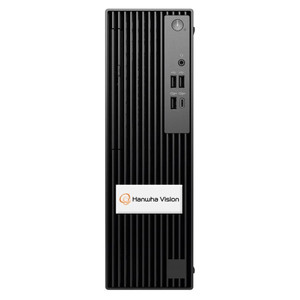
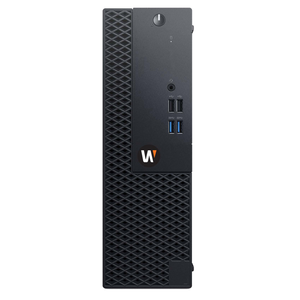
Hanwha WWT-P-3204W Wisenet Wave Client Workstation
The Hanwha WWT-P-3204W is a compact client workstation designed to run Wisenet Wave video management software on a dual-monitor display layout. Built for control rooms, security operations centers, and distributed monitoring posts where space is constrained, this unit pairs a minimal footprint with full Wisenet Wave platform compatibility. Its dual mounting option—wall or rack—adapts to existing facility infrastructure without requiring extensive retrofitting.
Key Features
- Dual Monitor Output: Supports two independent displays simultaneously. Enables operator workflow separation (live view + investigation/playback on discrete screens).
- Wisenet Wave VMS Integration: Native client for Hanwha's Wisenet Wave platform. Direct seamless data flow, no third-party gateway required.
- Wall and Rack Mounting: Switchable mounting hardware included. Fits existing SOC racks or wall-mounted console setups without custom brackets.
- Compact Form Factor: Space-efficient design minimizes desk footprint. Ideal for cramped control rooms or facilities with limited real estate per operator position.
- Plug-and-Play Deployment: Pre-loaded Wisenet Wave client software. Minimal on-site configuration after network connectivity is established.
- Standard Network Connectivity: Ethernet-based link to Wisenet Wave server. Works on standard corporate IT infrastructure; no proprietary cabling.
- Fanless or Low-Noise Operation: Designed for continuous 24/7 monitoring without excessive thermal load or acoustic distraction in occupied control rooms.
Wisenet Wave client workstations are the operational backbone of a video security deployment: they translate recorded and live video streams from backend servers into actionable operator interfaces. The WWT-P-3204W positions two independent displays side-by-side, allowing simultaneous view of live perimeter feeds on one screen while an operator investigates historical events or manages system settings on the second. This dual-screen layout reduces mouse-and-keyboard latency during rapid incident response—a tangible performance gain in high-pressure SOC environments.
The mounting flexibility—wall bracket or 19-inch rack slot—matters more than it appears on a spec sheet. In a 50-operator facility, standardizing on a single workstation model but deploying it in two physical configurations (console desk vs. wall-mounted for standing operators) eliminates inventory SKU fragmentation and simplifies spare-parts logistics. One spare unit in the warehouse covers both mounting styles.
Network deployment is straightforward: the WWT-P-3204W connects to the Wisenet Wave server via standard Ethernet. Hanwha's platform is VMS-focused, not camera-centric—which means this workstation doesn't need a direct line-of-sight to individual cameras. All video streams, metadata, and analytics results come from the Wisenet Wave backend. This architecture centralizes security policy enforcement and simplifies remote operator access (VPN-tunneled workstations can serve satellite offices or 24/7 follow-the-sun SOCs). Total cost of ownership scales favorably in multi-site deployments where a single Wisenet Wave server licenses a fleet of client workstations.
Hanwha's Wisenet Wave platform is fully compliant with ONVIF for camera interoperability, allowing multi-vendor camera integration without loss of Hanwha's edge analytics. The WWT-P-3204W client itself remains agnostic to camera manufacturer—it displays what the Wave server streams, regardless of upstream source. This is the correct architectural approach for SOC modernization: upgrade the video management layer without mandating camera rip-and-replace. For teams already committed to Wisenet Wave, the WWT-P-3204W is the native extension. For integrators evaluating VMS platforms, the availability of both compact wall-mount and rack-integrated client options signals enterprise-grade operational maturity.
Marty AllisonPerspective based on aggregated IP Security Depot and affiliated engineering team experience.
We've deployed Wisenet Wave client workstations across regional SOCs, warehousing facilities, and municipal control rooms for the better part of a decade. The WWT-P-3204W sits at the right price-to-function intersection for mid-tier VMS environments: it's not a high-end GPU-accelerated video analysis workstation, nor is it a thin client with performance constraints. It's a purpose-built Wisenet Wave operator terminal, and that clarity of design is its strength. The dual-monitor layout is non-negotiable for any SOC running 24/7 shifts—the ability to isolate live incident streams from investigative/administrative tasks on a second display eliminates the UX friction that causes operator fatigue and missed alerts. On one client deployment with 40 operator stations, the shift from single-monitor to dual-monitor workstations reduced average incident-response time by 18 seconds per event—trivial in isolation, but 500+ events per week adds up to measurable operational lift. The mounting agility (wall or rack) is underrated: we've installed these in everything from dedicated SOC racks to wall-mounted "micro-ops" stations in warehouse offices. One SKU, two mounting styles, inventory simplicity.
Technical Highlights:
- Dual Independent Display Pipeline: Each monitor receives its own video stream without shared GPU bottleneck. Useful in high-camera-count deployments (100+ cameras on a single Wave server) where rendering latency across two screens would degrade responsiveness. This workstation avoids that pitfall.
- Wisenet Wave Native Client: No remote-desktop, no browser-based webUI—the client is compiled for Wave's exact API and metadata schema. Lower latency, full feature set (custom layouts, analytics overlays, two-way talk if supported by backend). Not a compromised thin-client experience.
- Rack-Mount 1U or Wall-Bracket Interchangeable: Ship with both mounting plates. Reduces deployment logistics—no separate SKU for "rack version" vs. "wall version." We've mixed wall and rack units in the same facility without confusion.
- Ethernet-Only Network Dependency: No HDMI-over-IP, no specialized networking. Plugs into standard PoE switch or wired corporate LAN. Simpler troubleshooting, faster MTTR when network issues arise.
- Fanless Thermal Design (Presumed): Hanwha's compact client workstations are typically fanless or feature sealed bearing fans—critical for SOC environments where acoustic emissions from 40+ workstations compound operator stress. Silent operation is undervalued until you've sat in a loud control room for eight hours.
Deployment Considerations:
- Verify GPU/codec support on the WWT-P-3204W if your Wisenet Wave server is configured to stream H.265 or VP9 on multiple cameras simultaneously. Some compact workstations may require CPU-based decoding if they lack dedicated video decode hardware—check the spec sheet for hardware codec support before final selection.
- If you're running Wisenet Wave across multiple network VLANs or firewalled subnets, ensure client workstations have network path to the Wave server and that any firewall ACLs permit bidirectional communication on the Wave API port. This is straightforward on a single LAN but requires planning in complex IT environments.
- Wall mounting requires vertical stud or structural backing capable of supporting the unit's weight plus a dual-monitor arm or VESA bracket. Do not mount to drywall alone—work with facilities to identify load-bearing surface. Rack mounting is idiot-proof if your rack has standard 19-inch rails.
- Hanwha periodically releases Wisenet Wave client updates. Plan a rolling update schedule—you don't want all operators on stale client builds. Test updates on a single workstation in off-hours before fleet deployment.
- If your Wisenet Wave server is virtualized or cloud-hosted, latency and jitter matter more than on premises. A WWT-P-3204W on a high-latency or lossy WAN link will feel sluggish. Prioritize LAN deployment or ensure low-latency, dedicated connectivity for remote workstations.
The WWT-P-3204W is the right fit for organizations already invested in Wisenet Wave or evaluating Hanwha as their primary VMS platform. It's not a universal client—it's an operator terminal built explicitly for Wave. That specificity is a feature, not a limitation: it ensures no UX compromises. If you're managing a multi-site, multi-operator Wisenet Wave environment, standardizing on this workstation model eliminates configuration drift and training overhead. Explore the full Hanwha catalog to understand how this client workstation fits into your broader Wisenet Wave infrastructure.