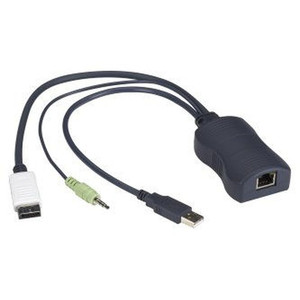
Black Box KV1400A PS/2 Server Access Module
Overview
The Black Box KV1400A is a PS/2 Server Access Module (SAM) designed to extend and expand KVM switch infrastructure in enterprise and data center environments. As an expansion module with PS/2 connectivity, the KV1400A slots into compatible Black Box KVM systems, providing the physical and signal bridge between legacy PS/2-interface servers and a centralized KVM switching fabric. If your server room includes older rack-mounted hardware with PS/2 keyboard and mouse ports — common in long-lifecycle data centers, industrial control environments, and government facilities — the KV1400A is the module that keeps those servers under centralized KVM management without requiring a server refresh.
The KV1400A ships in black, consistent with Black Box's enterprise rack equipment line, and is classified as an expansion module — meaning it adds server access points to an existing KVM deployment rather than functioning as a standalone switch. Buyers evaluating this module should confirm compatibility with their specific Black Box KVM chassis before ordering.
Key Features
- PS/2 Server Connectivity: The KV1400A uses PS/2 interface connections, which means it integrates directly with servers that expose PS/2 keyboard and mouse ports — no USB adapter required on the server side, eliminating a potential failure point in the signal chain.
- Expansion Module Architecture: Designed as a modular add-on to a compatible KVM switch platform, the KV1400A lets you scale server access port count incrementally. Add ports as your rack density grows rather than over-provisioning at initial deployment.
- Commercial-Grade Form Factor: The black chassis finish aligns with standard 19-inch rack equipment aesthetics and signals rack-mount compatibility consistent with enterprise data center deployments.
Integration and Compatibility
The KV1400A is a PS/2 expansion module within the Black Box KVM product family. Deployment requires a compatible Black Box KVM chassis that accepts this module form factor. Verify your chassis model's expansion slot specification against the KV1400A before purchasing — module-to-chassis compatibility is non-negotiable in modular KVM architectures. For environments standardized on USB server interfaces, consider a USB-interface SAM variant within the Black Box KVM line instead. This module is appropriate for KVM switch deployments where the target servers present legacy PS/2 ports and a chassis upgrade is not on the roadmap.
Frequently Asked Questions
Q: What type of server interface does the KV1400A support?
A: The KV1400A supports PS/2 connectivity, making it the correct module for servers with PS/2 keyboard and mouse ports. It is not a USB SAM variant.
Q: Is the KV1400A a standalone KVM switch?
A: No. The KV1400A is an expansion module — it adds server access ports to a compatible Black Box KVM chassis. It does not operate independently.
Q: How do I confirm the KV1400A is compatible with my existing Black Box KVM chassis?
A: Cross-reference your KVM chassis model's expansion slot specifications with the KV1400A module type. Black Box publishes compatibility matrices for their KVM product lines — consult the chassis documentation or contact pre-sales engineering for verification before ordering.
Q: Can the KV1400A be used with USB-only servers?
A: No. The KV1400A uses PS/2 interface connections. For servers with only USB keyboard/mouse ports, a USB SAM variant within the Black Box KVM family is the appropriate choice.
Q: What color is the KV1400A?
A: The KV1400A is black, consistent with standard enterprise rack equipment.
The KV1400A is the PS/2 SAM you reach for when your KVM chassis needs to pick up older servers that haven't moved to USB — a situation that comes up more often than people expect in long-lifecycle data centers and government facilities. The PS/2 interface on this module is the defining spec: it's not a universal SAM, it's purpose-built for that specific legacy port type.
Technical Highlights:
- PS/2 Interface: Direct PS/2 keyboard and mouse connectivity means no adapter stack between the module and the server — cleaner signal path, one fewer thing to fail during a 2 a.m. outage.
- Modular Expansion Design: Slots into a compatible Black Box KVM chassis to add server access capacity incrementally — you're not buying a whole new switch to add a handful of ports.
- Black Chassis Finish: Matches standard enterprise rack equipment; no cosmetic mismatch in a mixed-vendor rack environment.
Deployment Considerations:
- Chassis compatibility must be confirmed before ordering — the KV1400A is a module, not a universal accessory. Plug it into the wrong chassis and it simply won't seat or function.
- If even one target server in the group has moved to USB-only, you'll need a separate USB SAM for that server — this module does not bridge both interface types.
The KV1400A makes the most sense in a data center or server room where PS/2-interface servers are staying in service for another hardware cycle and the KVM chassis is already in place — adding access ports to what you have rather than replacing infrastructure that's still doing its job.