
StarTech Secure 4-PORT Quad-monitor KVM Switch - CK4-HPD404C
Usually Ships in 2-3 Weeks
Free shipping over $499
$2,898.99

Manufacturer-verified compatible cameras, recorders, mounts, accessories, and licenses for this product. Adjust quantities and add the entire bundle to your cart in one click.
Questions about this product? Free pre-sales support from a senior specialist — product questions, compatibility checks, BOM quotes, price confirmation — typically answered within one business day. Need camera placement or system design work? Engineering time is $175 per hour (qty 1 = 1 hour). Hardware buyers get up to one hour ($175) credited back on their order.
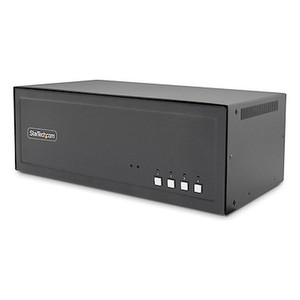
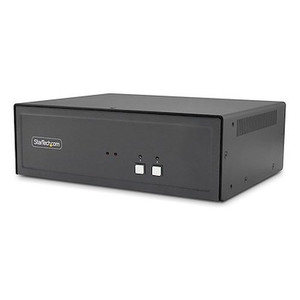
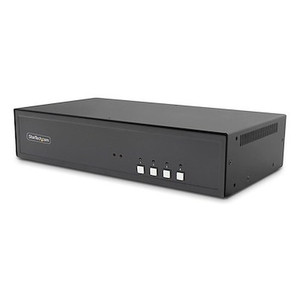
The StarTech CK4-P404C is a NIAP Protection Profile for Peripheral Sharing Devices (PSD) 4.0-certified, 4-port quad-monitor KVM switch built for environments where physical data separation between classified and unclassified networks is a hard requirement. If you're deploying workstations in government facilities, defense contractor offices, intelligence community environments, or any high-security data center where multi-level security (MLS) operations are standard, this is the device class you need — not a conventional KVM that passes USB data transparently between hosts. Each of the four DisplayPort video channels supports up to 4K 30Hz per display, giving analysts and operators full-resolution visibility across four hosts and four monitors from a single console. The all-metal enclosure weighs 4.2 lb and measures 12.6 × 6.7 × 4.9 in — a compact desktop form factor for a device handling this level of port isolation.
The CK4-P404C (often searched as CK4 P404C) is designed for multi-host secure desktop environments running DisplayPort video output. The 16 host-side DisplayPort female connectors support standard DP cables to each workstation or server. The three USB 2.0 Type-A console ports handle HID peripherals (keyboard and mouse), and the isolation architecture means USB mass storage and non-HID devices are blocked by design — this is a feature, not a limitation, in NIAP-compliant deployments.
For environments running mixed classification levels — for example, a workstation simultaneously accessing a Secret-level network and an unclassified network — this switch provides the hardware-enforced separation required by security policy. It does not replace network-level controls, but it eliminates the KVM switch as a data exfiltration or cross-contamination vector, which is the key audit concern for secure desktop infrastructure.
Check your facility's approved products list (APL) on the NIAP website to confirm the CK4-P404C listing is current for your program's accreditation cycle before procurement.
Q: What does NIAP PSD 4.0 certification mean for this KVM switch?
A: NIAP Protection Profile for Peripheral Sharing Devices (PSD) version 4.0 is an independent government security evaluation that verifies the switch enforces strict data isolation between connected hosts. It is required for use in many U.S. federal and DoD classified environments and confirms the device has been tested against current secure KVM standards.
Q: Can the CK4-P404C support 4K 60Hz across all four displays?
A: No. The maximum supported resolution is 4K 30Hz per display. If your workflow requires 4K at 60Hz — such as high-frame-rate video analysis — this switch is not the correct model. For most analytical, document-review, and dashboard monitoring workflows, 4K 30Hz is sufficient.
Q: How many computers can the CK4-P404C connect at once?
A: The CK4-P404C supports four host computers simultaneously, each with up to four DisplayPort video outputs (16 host-side DP connectors total). Switching between hosts routes all four displays, keyboard, and mouse to the selected system.
Q: What USB peripherals are supported on the console side?
A: The console provides three USB 2.0 Type-A ports. These are designed for HID peripherals (keyboard and mouse). The NIAP PSD 4.0 architecture blocks non-HID USB traffic — USB mass storage and other data-class devices will not pass through, by design, to prevent data exfiltration between host domains.
Q: What is the warranty on the CK4-P404C?
A: StarTech provides a 3-year manufacturer warranty on the CK4-P404C.
Q: Is the CK4-P404C suitable for outdoor or industrial environments?
A: No. The operating temperature range is 0°C to 40°C (32°F to 104°F), which is appropriate for climate-controlled office or data center environments only. It is not rated for outdoor, industrial, or extreme-temperature deployments.

The CK4-P404C is one of the few desktop KVM switches I'd confidently specify into a classified or multi-domain workstation environment without hesitation — and that's almost entirely because of the NIAP PSD 4.0 certification. That evaluation isn't marketing language; it's an independent third-party security validation that the device enforces host isolation at the hardware level. When an auditor asks what prevents data from crossing between a classified and an unclassified host on the same desk, the NIAP APL listing for the CK4-P404C is the answer.
Technical Highlights:
Deployment Considerations:
For a four-operator command-and-control facility running simultaneous access to Secret and unclassified networks on quad-display workstations, the CK4-P404C is the right hardware anchor for the desktop security architecture.

Manufacturer-verified compatible cameras, recorders, mounts, accessories, and licenses for this product. Adjust quantities and add the entire bundle to your cart in one click.
Looking for more StarTech products? Shop the full StarTech catalog →
Support services and planning resources for commercial surveillance, access control, and infrastructure deployments.
Fixed scope • Fixed price