
StarTech Secure 4-PORT Quad-monitor KVM Switch 2X - CK4-PM204C
Usually Ships in 2-3 Weeks
Free shipping over $499
$1,500.99

Manufacturer-verified compatible cameras, recorders, mounts, accessories, and licenses for this product. Adjust quantities and add the entire bundle to your cart in one click.
Questions about this product? Free pre-sales support from a senior specialist — product questions, compatibility checks, BOM quotes, price confirmation — typically answered within one business day. Need camera placement or system design work? Engineering time is $175 per hour (qty 1 = 1 hour). Hardware buyers get up to one hour ($175) credited back on their order.
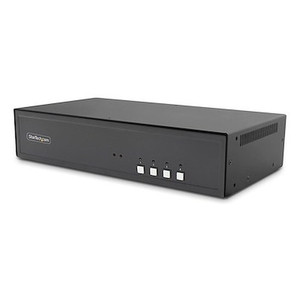
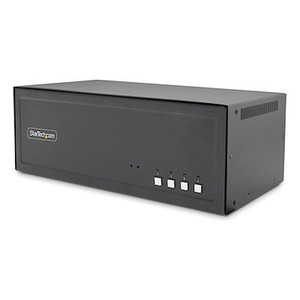
The StarTech CK4-PM202C is a NIAP PP 4.0-certified secure KVM switch built for classified and sensitive compartmented information environments where signal isolation between hosts is non-negotiable. It connects two DisplayPort-equipped computers to a four-monitor HDMI console — giving operators full quad-display visibility while switching hosts — at up to 4K 30Hz. If you're deploying in a DoD, IC, or regulated government facility where peripheral sharing must meet Protection Profile 4.0 requirements, this is the switch to specify. Integrators sourcing for commercial high-security environments such as SOCs, trading floors, or defense contractor workstations will find the CK4-PM202C (often searched as CK4 PM202C) purpose-built for exactly this use case.
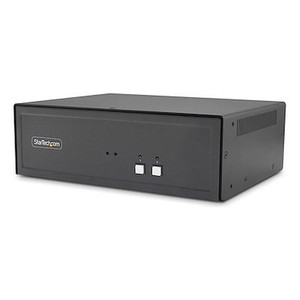
The switch ships in a solid metal chassis measuring 8.8 x 6.7 x 2.6 inches and weighing 3.9 lb — compact enough for a desk or shallow shelf, sturdy enough to stay put in a busy operator station. The all-black finish fits standard government and enterprise rack-adjacent deployments without drawing attention.
The CK4-PM202C is designed for workstations with discrete DisplayPort outputs — verify that both source computers provide at least two DP outputs each to populate all four console monitors. The four HDMI console outputs connect to any HDMI-capable display, including the large-format 4K monitors common in government and SOC deployments. USB 2.0 is the console peripheral interface; USB 3.x devices will operate at 2.0 speeds through the switch, which is standard for keyboards, mice, and smart card readers. Audio connectivity uses standard 3.5mm analog — compatible with most operator headsets and desktop speakers. For broader context on KVM switches and how secure models compare to standard desktop KVMs, review the available selection by category. StarTech's full product line includes cabling and accessories that complement this switch in secure workstation builds. Buyers procuring for multi-operator environments should also review KVM accessories including compatible cable sets. For environments combining video surveillance with analyst workstations, pairing this switch with a well-planned NVR infrastructure ensures operator displays receive the full resolution feeds the switch can handle.
Q: What NIAP certification level does the CK4-PM202C carry?
A: The CK4-PM202C is certified to NIAP Common Criteria Protection Profile for Peripheral Sharing Devices version 4.0, the current highest-tier PP for KVM switches used in classified and sensitive government environments.
Q: How many monitors and computers does the CK4-PM202C support?
A: It supports 2 host computers (each connected via DisplayPort) and drives 4 HDMI monitors simultaneously on the console side, maintaining all four displays regardless of which host is active.
Q: What is the maximum resolution the CK4-PM202C supports?
A: The CK4-PM202C supports up to 4K (3840x2160) at 30Hz across all four HDMI console outputs. If your application requires 4K at 60Hz, confirm this switch meets your frame rate requirement before specifying.
Q: What USB peripherals can I connect to the console side?
A: The console side provides 3x USB 2.0 Type-A ports — sufficient for keyboard, mouse, and a third device such as a CAC/smart card reader. USB 3.x devices will function at USB 2.0 speeds.
Q: What is the warranty on the CK4-PM202C?
A: StarTech provides a 3-year manufacturer warranty on the CK4-PM202C.
Q: Does the CK4-PM202C support audio switching?
A: Yes. The switch includes one 3.5mm stereo female jack on the console side and two 3.5mm stereo female jacks on the host side, enabling analog audio to switch with the active host selection.

The spec that defines whether the CK4-PM202C belongs in your deployment is the NIAP PP 4.0 certification — not the quad-display layout, not the 4K resolution. PP 4.0 is the benchmark that procurement officers look for when a KVM is destined for a classified or SCI-adjacent workstation. If your facility security officer's approved products list requires PP 4.0, this switch qualifies. If your deployment is commercial with no classified network requirement, you're paying a certification premium you don't need, and a standard secure KVM would be a better fit on cost.
Technical Highlights:
Deployment Considerations:
The CK4-PM202C is the right call for a two-workstation classified analyst station in an IC or DoD environment where NIAP PP 4.0 is a hard procurement requirement and the operator needs uninterrupted quad-display visibility across both hosts — a common layout in 24/7 watch floor configurations.

Manufacturer-verified compatible cameras, recorders, mounts, accessories, and licenses for this product. Adjust quantities and add the entire bundle to your cart in one click.
Looking for more StarTech products? Shop the full StarTech catalog →
Support services and planning resources for commercial surveillance, access control, and infrastructure deployments.
Fixed scope • Fixed price